
How to Build Your AI Tool Stack: Step-by-Step Guide

How to Build Your AI Tool Stack: Step-by-Step Guide
Building an AI tool stack can save time, reduce repetitive tasks, and improve productivity - if done right. With over 10,000 AI tools launched last year, the challenge isn't just picking tools but creating a system that solves specific problems without adding complexity. Here’s a quick breakdown:
- Start with your needs: Identify tasks draining time (e.g., emails, data analysis) and set measurable goals like cutting email time by 40%.
- Understand tool categories: Focus on automation (e.g., Zapier, Otter.ai), data analysis (e.g., Perplexity Pro), and content creation (e.g., ChatGPT Plus, Midjourney).
- Evaluate tools wisely: Use a checklist for security, cost, and integration. Test tools with free trials before committing.
- Connect tools effectively: Map workflows, automate data flow, and test for efficiency with real-world tasks.
- Review regularly: Audit tools quarterly to eliminate redundancies and ensure ROI.
The key is to keep your stack simple and focused. Choose tools that align with your actual workflow, and regularly refine your system to stay efficient.
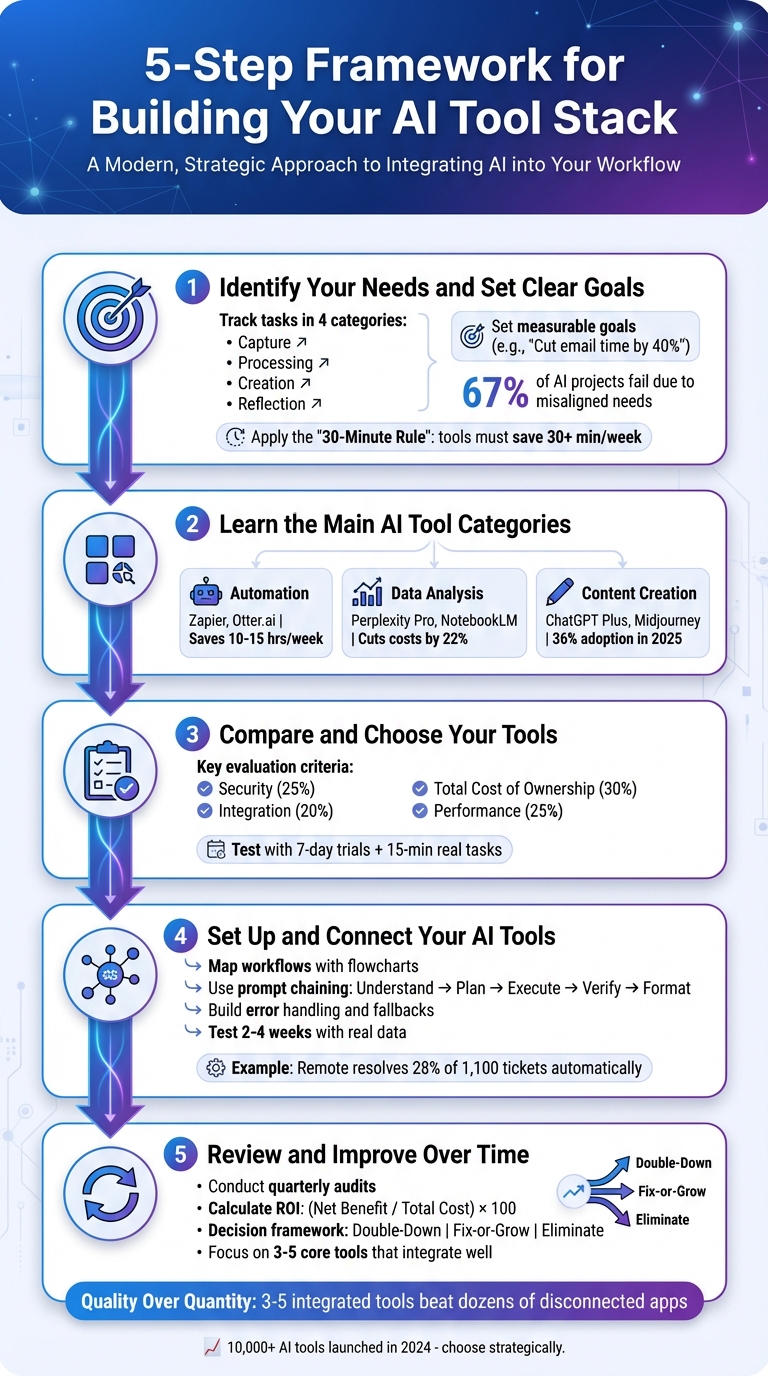
5-Step Framework for Building an Effective AI Tool Stack
Step 1: Identify Your Needs and Set Clear Goals
Getting started with AI tools requires a clear understanding of what you need and why. This step is all about focusing on your actual challenges instead of being distracted by flashy features. Research shows that 67% of AI projects fail to deliver ROI because companies pick tools that don’t align with their real needs. To avoid this, focus on solving your biggest pain points first.
Define Your Primary Use Cases
Take a week to track your tasks, breaking them into four categories:
- Capture: Collecting information, like meeting notes.
- Processing: Analyzing and solving problems.
- Creation: Writing emails, reports, or presentations.
- Reflection: Reviewing and making sense of your work.
This will give you a clear picture of where time and energy are being drained. Pay special attention to tasks that feel repetitive, mentally exhausting, or time-consuming. For instance, if your team spends 20 hours a week responding to customer support emails, that’s a clear opportunity for AI to step in. Quantify the cost of these inefficiencies - if email management takes up 250 hours weekly across your team, calculate the financial impact based on your labor costs to set a realistic budget.
"The best AI tool is the one you'll actually use. Not the one with the most features, the flashiest demo, or the loudest marketing." – Kiramat Ullah
Before moving forward, set clear and measurable goals. Instead of vague aims like “boost productivity,” go for specific targets like “cut email processing time by 40%” or “reduce document creation time from 3 hours to 45 minutes”. These benchmarks will help you judge whether the tools you choose are delivering real value.
With your priorities and costs mapped out, you’ll be ready to explore the different AI tool options.
Review Your Budget and Technical Requirements
After identifying your needs, it’s time to figure out what you can afford and what technical requirements you’ll need to meet. Factor in all costs, including licensing, setup, training, and maintenance. As of 2026, basic users typically spend around $100 per month on essential tools, while power users with advanced needs might budget $500–$700 monthly. Engineers using autonomous coding tools may need $1,000–$2,500 or more.
Match your tools to your team’s technical expertise. If coding isn’t a strength, opt for no-code platforms. Also, ensure the tools integrate seamlessly with your existing systems, whether it’s Microsoft 365, Google Workspace, your CRM, or project management software.
Security is another key consideration. Look for vendors with SOC 2 or ISO 27001 certifications, especially if your team handles sensitive data. Make sure you understand how the tool uses your data - will your inputs train public models? Set clear internal policies, like banning the use of confidential client information in free tools. For global teams, confirm that tools comply with regional data laws, such as using EU data centers for European operations.
To keep things simple and effective, apply the “30-Minute Rule”: only include tools that save at least 30 minutes per week or significantly reduce errors. This keeps your workflow streamlined and ensures every tool you adopt adds real value.
Explore AI Tools on Flaex.ai
Discover the best AI tools for your workflow, curated, reviewed, and ranked.
Browse Directory →Step 2: Learn the Main AI Tool Categories
To navigate the world of AI tools effectively, it's important to understand how they fit into your workflow. Think of your AI stack as layers that handle Capture, Processing, Creation, and Reflection. Each category - automation, data analysis, and content creation - plays a unique role in streamlining tasks. Most workflows need tools from all three categories to function efficiently. Let’s break down these categories to find the best solutions for your needs.
Automation Tools
Automation tools handle repetitive tasks that eat up your time - like transcribing meetings, managing emails, scheduling, or coordinating multi-step workflows across apps. These tools have evolved far beyond basic "if-this-then-that" setups. Today’s automation solutions use advanced AI to manage complex goals autonomously, from streamlining procurement to simplifying HR operations.
On average, AI productivity tools can save 10–15 hours per week. For instance, Zapier connects over 7,000 apps to automate tasks like data entry and workflow handoffs. Meanwhile, platforms like Otter.ai transcribe meetings and sync action items directly to your task manager. By 2029, AI agents are expected to resolve 80% of common customer service issues.
"The future of work is not human versus machine, it's human amplified by machine." – Sergey Nuzhnyy, Head of Product Analytics, AIMLAPI
When choosing automation tools, look for ones that integrate seamlessly with your existing systems - like your CRM, project management software, or communication platforms. This avoids the inefficiency of constantly switching between tools. Once automation takes care of repetitive tasks, the next step is using data analysis tools to extract meaningful insights from raw data.
Data Analysis Tools
Data analysis tools take efficiency to the next level by turning raw data into actionable insights. They process large datasets, identify patterns, and provide predictive insights. These tools simplify complex metrics, helping you spot trends, forecast demand, or detect anomalies in areas like finance or operations. They also reduce the stress of decision-making by organizing overwhelming amounts of data.
Adopting AI for customer operations can slash operational costs by 22%. Similarly, predictive maintenance powered by AI can help industries like railways cut maintenance expenses by 20%. Modern tools use techniques like "grounding" to ensure the AI stays aligned with your specific data and facts, minimizing the risk of errors or hallucinations.
Platforms like Perplexity Pro (around $20/month) are great for research that requires cited sources and real-time data. Tools such as Google NotebookLM can summarize large volumes of documents into clear, actionable insights. If your team spends hours wrestling with spreadsheets or generating reports manually, these tools can save you both time and effort.
Content Creation Tools
Once automation and analysis are in place, content creation tools step in to tackle creative tasks. These tools use generative AI to create text, images, audio, video, and even software code. They help overcome creative bottlenecks and cut down production costs. In fact, the use of generative AI tools grew from 20% in 2024 to 36% in 2025, making this the fastest-growing category.
Popular tools include ChatGPT Plus and Claude Pro (both around $20/month) for drafting and brainstorming, as well as Midjourney (approximately $10–$60/month) for generating images and Descript for video editing. Emerging platforms like Lovable and Bolt allow non-technical users to build functional apps using natural language prompts.
By 2025, 65% of organizations reported using generative AI in at least one area of their business. The most common applications are in IT (28%), operations (11%), marketing (10%), customer service (8%), and cybersecurity (8%). If your team spends a lot of time creating emails, presentations, or marketing materials, these tools can make a noticeable difference.
To get started, identify your biggest time sink. If repetitive tasks are overwhelming, focus on automation tools. If interpreting data is a challenge, prioritize data analysis tools. And if creative work is slowing you down, invest in content creation tools. The best AI stacks combine tools from all three categories, working together to create a smooth and efficient workflow.
Step 3: Compare and Choose Your Tools
Now that you've identified the essential tool categories, it's time to evaluate and select the best options for your tech stack. The goal here is to ensure that the tools you choose align with your actual needs. Misaligned tools can lead to wasted resources and poor ROI, so a methodical evaluation process is essential. Go beyond flashy features and marketing claims to make informed decisions.
Create Your Evaluation Checklist
A weighted scoring matrix can help you objectively compare tools. For instance, you might assign weights like Security (25%), Integration (20%), Total Cost of Ownership (30%), and Performance (25%).
Here are five critical areas your checklist should cover:
- Integration Capabilities: Check if the tool integrates seamlessly with your current software (e.g., Google Docs, Salesforce, Slack). Look for bi-directional integrations that allow data to flow both ways, rather than just one-way exports.
- Security and Compliance: Determine if your data is being used to train the vendor's models and whether you can opt out. Verify compliance with regulations like GDPR or HIPAA.
- Scalability: Consider how pricing and performance will change as your usage grows. For example, assess API limits, throughput, and data capacity to avoid bottlenecks.
- Output Quality: Test all tools using the same real-world prompts to objectively measure their performance.
- Vendor Viability: Investigate the vendor's financial stability, product roadmap, and the quality of their technical support.
When calculating the Total Cost of Ownership (TCO), think beyond the monthly subscription fee. Include costs like implementation, data preparation, staff training, integration, and ongoing maintenance. Also, compare pricing models - flat subscriptions work well for consistent daily use, while usage-based pricing may suit irregular workflows. Hybrid models, blending a base fee with usage limits, are another option to explore.
"The objectively best standalone tool often isn't the best tool for your stack. If you're all-in on Microsoft 365, Copilot beats superior standalone alternatives because adoption is higher when AI lives where people already work." – Kiramat Ullah, AI Implementation Expert
By carefully evaluating tools against these criteria, you can ensure that every addition to your stack directly tackles inefficiencies in your workflow.
Try Tools Before You Commit
Before making a final decision, test each tool in a real-world context. Use free trials or pilot programs to see how well a tool performs. A simple 7-day trial combined with a 15-minute test on a real task can reveal whether the tool saves time and improves clarity. Spend the initial days setting up and creating a prompt library, then use the rest of the trial to complete core tasks, noting any friction points or quality issues.
Free trials often give you full access for a limited time, making them ideal for professional evaluations. Free plans, however, may come with restrictions. Ensure that data retrieval and migration are straightforward to avoid vendor lock-in.
Be mindful of hidden costs like API limits, per-seat fees, or advanced features locked behind higher pricing tiers. These can quickly add up as your team grows. For example, email management alone can consume an average of 5 hours per week per knowledge worker - a key metric to consider when evaluating whether a tool delivers measurable ROI. If a tool doesn’t clearly save time or money during the trial, it’s worth exploring other options.
Step 4: Set Up and Connect Your AI Tools
Once you've chosen your AI tools, it's important to start with the basics. Proper installation, configuration, and integration can transform a scattered collection of apps into a streamlined productivity system.
Install and Configure Each Tool
Start by installing each tool using official SDKs or integrations. For example, if you're working with OpenAI or Google's Gemini, rely on their official libraries (like openai or google-genai) to get a solid understanding of their APIs before introducing additional layers.
Prioritize security from the beginning. Avoid hardcoding API keys directly into your applications. Instead, store them in environment variables or use a credential management system. Apply the "least privilege" principle - only grant the minimum permissions necessary. For instance, if a tool only needs text generation access, don’t give it billing permissions.
Customize the tools to fit your workflows. Set up team workspaces, save commonly used prompts as templates, and create specialized AI personas for different tasks. For example, if you're using an AI writing tool, you could design personas for writing social media posts, technical documents, or customer emails. This approach can save significant time and reduce repetitive tasks.
Before connecting tools, clean up your data sources. Remove duplicates, ensure file formats are UTF-8 encoded, and check that file sizes meet API limits. A healthcare provider that prepared their data properly before launching an AI workflow reported cutting insurance claim processing times by 75%. Clean data leads to better, more reliable AI outputs.
Once your tools are configured, it's time to connect them for a seamless workflow.
Connect Tools for Smooth Data Flow
The real power of an AI system lies in how well your tools work together. Instead of manually moving data between tools, aim to automate the process for smooth, uninterrupted data flow.
Start by mapping your workflow. Use a simple flowchart to visualize where each tool fits and how data moves between them. For example, in July 2025, Popl’s sales team used Zapier to connect HubSpot, Salesforce, and OpenAI. This setup automatically filtered spam from inbound emails, categorized sales inquiries, and enriched lead data using email domain analysis. By replacing a more expensive solution, the team saved $20,000 annually.
Break complex workflows into smaller, modular tasks. One effective method is prompt chaining, which involves steps like Understand → Plan → Execute → Verify → Format. Remote, a company with 1,800 employees and only three IT staff, used this strategy to integrate Okta, ChatGPT, and Notion. ChatGPT classified and prioritized support tickets submitted through Slack, while automated agents suggested resolutions based on historical data. This system now resolves 28% of their 1,100 monthly tickets automatically, saving over 600 hours each month.
"It's not just about doing more. It's about doing it better, faster, and with fewer resources."
– Jason Alvarez-Cohen, CEO, Popl
To maintain productivity, build error handling into your integrations. Use automated retries with exponential backoff for failed API requests, set up fallback options for tool outages, and create alerts for critical issues like usage limit breaches. For sensitive outputs - such as legal documents or customer-facing content - add a human review step to catch potential errors or inaccuracies.
Finally, test your system with real-world data for 2–4 weeks before fully implementing it. Track key metrics like API response times (aim for under 2 seconds), output accuracy (target over 95%), and system uptime (aim for 99.9% or higher). ActiveCampaign followed this approach when building their AI-powered onboarding system. New users were automatically registered for webinars in their preferred language via Demio, leading to a 440% increase in webinar attendance and a 15% reduction in 90-day churn.
Step 5: Review and Improve Your Tool Stack Over Time
To keep your AI tools efficient and aligned with your goals, regular reviews are essential. As your needs shift and new tools emerge, periodic evaluations ensure your stack stays streamlined and impactful. This step reinforces the importance of maintaining a focused and effective AI tool stack.
Track Tool Performance and Value
Once you’ve integrated your tools into your workflow, it’s crucial to monitor how well they perform over time. Conduct quarterly audits to evaluate each tool's contribution to measurable KPIs. Classify their performance into categories - expand, adjust, or eliminate - and calculate the return on investment (ROI) while factoring in hidden costs like training or maintenance.
Here’s a straightforward system to guide your decisions:
- Double-Down: Increase usage of tools that show strong ROI and high adoption rates.
- Fix-or-Grow: Investigate underperforming tools with potential. Issues like poor data quality or lack of training might be holding them back.
- Eliminate: Remove tools that offer low ROI or duplicate existing functionalities.
To calculate ROI, use this formula: (Net Benefit / Total Cost) x 100. For example, if a tool saves 20 hours per month at $50 per hour (a $1,000 benefit) but costs $500 monthly, its ROI would be 100%. Don’t forget hidden costs, such as the time spent on setup, data cleanup, or maintaining integrations.
Also, keep an eye out for "Shadow AI", which refers to tools adopted by individuals or teams without centralized oversight. These can lead to redundant capabilities and unnecessary expenses.
"An AI stack audit is not a one-time cleanup. It is a recurring discipline that improves how your teams plan, execute, and measure."
– Nathan Thompson, Fullcast
Add New Tools as Your Needs Change
The AI landscape evolves rapidly, with new tools and features constantly emerging to address shifting challenges. To stay ahead, schedule monthly or quarterly reviews of specific stack components - like language models or image generators - to keep your tools relevant.
When testing new tools, pilot them with a small group of 15–25 users over 60–90 days. Instead of relying solely on survey feedback, track real usage metrics. For instance, if you’re trying a transcription tool, measure how many meetings are transcribed weekly and whether team members actively use the transcripts.
Set clear "sunset triggers" to know when it’s time to replace a tool. To stay informed about new releases, subscribe to one or two trusted sources for AI updates. A resource like AI Tools Directory offers curated weekly updates, helping you discover useful tools without overwhelming your workflow.
Conclusion
The steps outlined above provide a clear framework for assembling an AI tool stack that genuinely enhances productivity. The key isn't in chasing every new tool but in solving specific workflow challenges - whether it’s automating repetitive tasks, streamlining data analysis, or overcoming creative bottlenecks.
A well-designed AI tool stack emphasizes quality over quantity. Instead of juggling dozens of disconnected apps, focus on a streamlined set of 3–5 tools that work together seamlessly. Organizing these tools into functional layers - like Capture, Processing, Creation, and Reflection - ensures every tool serves a distinct purpose and integrates smoothly with the rest. Many AI projects stumble because companies choose tools based on hype rather than addressing actual business needs.
"A mediocre tool in a great workflow beats a great tool used in isolation." – Life Note
Regularly reviewing your tools is essential to maintaining an efficient system. With over 10,000 AI tools released in the past year alone, the landscape evolves quickly. Periodic evaluations help you keep tools that genuinely save time and remain open to adopting better options as your needs change.
Ultimately, the best AI tool stack is the one you’ll actually use. Flashy features and aggressive marketing don’t matter if the tools don’t fit your workflow. Focus on mastering one tool at a time and building workflows that simplify processes. By prioritizing integration, ease of use, and continuous improvement, your AI tools can amplify productivity without adding unnecessary complexity. Keep refining your stack as your goals and challenges evolve.
Featured on Flaex