
How to Choose the Right AI Tool for Your Business in 2026

How to Choose the Right AI Tool for Your Business in 2026
AI tools are transforming businesses in 2026, with 88% of organizations using them to save time, boost revenue, and improve decision-making. But choosing the right tool is challenging - 10,000 AI tools launched last year alone, and up to 85% of AI projects fail due to poor selection. To avoid costly mistakes, focus on these steps:
- Define clear goals: Identify specific problems, inefficiencies, or opportunities in your business.
- Match tools to needs: Categorize tasks (automation, insights, creativity, foresight) and choose tools that align with your objectives.
- Evaluate carefully: Assess scalability, integration, cost, security, and ease of use with pilots and stress tests.
- Decide build vs. buy: Build custom solutions for high control, buy ready-made tools for speed, or partner for a hybrid approach.
- Test and refine: Start small with a 30-day trial, monitor performance, and review quarterly.
The right AI tool can save time, reduce costs, and improve outcomes - if chosen with a structured approach.
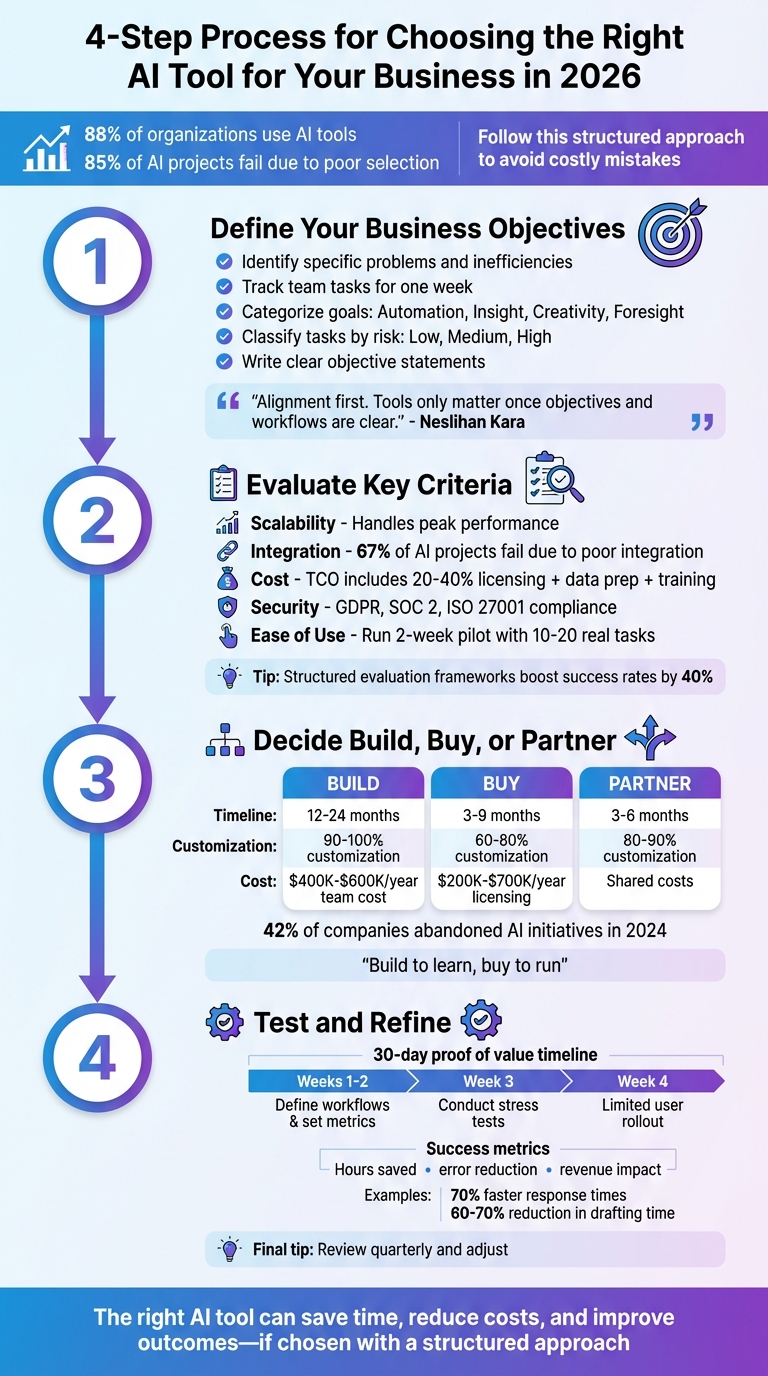
4-Step Process for Choosing the Right AI Tool for Your Business in 2026
Step 1: Define Your Business Objectives and Use Cases
Identify Your Key Business Goals
Before diving into AI tools, it's essential to define a clear, testable problem statement. Start by examining your operations for inefficiencies, revenue leaks, or gaps in customer experience. To get a better sense of where AI might help, have your team track their tasks for an entire week. This will help pinpoint repetitive, high-volume activities that could be automated.
Once you’ve identified the pain points, categorize your goals into one of these four areas: automation (handling repetitive tasks), insight (analyzing data), creativity (generating content), or foresight (predicting trends and outcomes). Each category demands specific AI capabilities and unique metrics for success.
"Alignment first. Tools only matter once objectives and workflows are clear." - Neslihan Kara, AI Strategist
Next, classify tasks based on risk levels: low (like internal drafts), medium (such as customer-facing emails), and high (compliance, finance, legal, or medical work). This helps determine the level of oversight required and the appropriate AI model tier.
Write a concise statement for each objective, such as: "I need this tool to help me with ___". Then, create a one-page hypothesis that outlines who will be affected, the current metrics (e.g., cycle time, cost per task), the improvements you’re aiming for, and any limitations related to data. This document will guide you throughout the evaluation process.
With your objectives clearly defined, you can focus on finding AI tools that align with your specific needs.
Match AI Tools to Your Use Cases
After setting your goals, the next step is matching them with AI capabilities. For example, in July 2025, Noventiq saved 989 hours of work in just four weeks by using Microsoft AI tools for document processing and meeting summaries. Similarly, NTT DATA automated up to 65% of IT service desk tasks with AI agents, allowing their team to focus on higher-value work.
Precision is key here. If your primary challenge is speeding up content creation, look for generative AI tools that specialize in writing and editing. For handling customer support, you’ll need conversational AI capable of ticket routing. If data analysis is your focus, you’ll want AI that excels at synthesizing information and spotting patterns.
Start by calculating the annual cost of the problem you want to solve, including time lost, errors, and missed opportunities. For instance, if a problem costs your business $750,000 a year, the AI solution you choose should cost significantly less to make financial sense. In 2024, Deriv reduced recruiter review time by 50% and delivered 45% faster onboarding answers by integrating Amazon Q Business into their HR processes.
To prioritize effectively, use a tiered approach. S-Tier tools are essential - they automate critical workflows or improve decision-making across the organization. A-Tier tools have a big impact on specific departments, like marketing or sales. B-Tier tools handle niche tasks, such as design or video editing. Focus your resources on S-Tier and A-Tier tools first.
Keep in mind that 80% of business AI needs can often be met with a single foundational platform if you leverage custom assistants for repetitive workflows. Don’t overcomplicate your AI stack before mastering the basics. Aligning your goals with the right AI capabilities sets the stage for building a strong and effective AI tool strategy by 2026.
Explore AI Tools on Flaex.ai
Discover the best AI tools for your workflow, curated, reviewed, and ranked.
Browse Directory →Step 2: Evaluate Key Criteria for AI Tools
Key Factors to Consider
After identifying AI tools that align with your use cases, it’s time to evaluate them against five essential dimensions: scalability, integration capabilities, cost-effectiveness, security, and ease of use.
Scalability is about whether the tool can handle growth without faltering. For instance, if you're processing thousands of documents per hour, the tool should maintain quality and performance under peak load. Ask vendors how they handle sudden usage spikes - like processing 3,000 documents in an hour. If their answers are vague or unconvincing, that’s a red flag.
Integration capabilities can make or break your AI initiative. A staggering 67% of AI projects fail to deliver ROI because tools don’t integrate well with existing systems. Look for features like robust REST or GraphQL APIs, real-time webhook support, and authentication standards such as SSO and OAuth2. Request architecture diagrams to understand how the tool manages data flow, error tracking, and model operations.
Cost-effectiveness isn’t just about the price tag. Licensing fees typically account for only 20–40% of the total cost. You also need to consider data preparation, integration, training, and ongoing optimization. Create a total cost of ownership (TCO) model for 12 and 36 months, factoring in compute resources, token usage, and middleware dependencies under different usage scenarios.
Security and compliance are critical, especially in regulated industries. Verify that the tool complies with standards like GDPR, SOC 2, or ISO 27001, and offers role-based access control (RBAC) and data residency options. For workflows involving sensitive data, multi-region deployment and clear rollback mechanisms are key.
Ease of use directly influences adoption rates. Employees unfamiliar with the tool are six times more likely to find AI counterproductive. Run a two-week pilot to see if the tool simplifies processes or adds unnecessary complexity. Measure the "rewrite time" - how much effort is needed to refine the AI’s output - to gauge its usability in real-world scenarios.
| Evaluation Criteria | What to Verify | How to Test |
|---|---|---|
| Scalability | Handles peak performance | Test with realistic data loads |
| Integration | API and connector quality | Use vendor diagrams; test with inconsistent data |
| Cost | TCO over time | Model 12- and 36-month scenarios |
| Security | Compliance with standards | Conduct audits and checks |
| Ease of Use | Workflow fit and training needs | Pilot with real tasks |
Using these benchmarks, create a weighted scoring matrix to compare tools effectively.
How to Score and Compare AI Tools
To objectively assess your options, build a scoring matrix based on the criteria above. Assign weights to each factor depending on your needs. For example, if you’re focused on high-volume automation, scalability should get a higher weight. On the other hand, creative tasks might require prioritizing ease of use. In one enterprise framework, weights might look like this: 20% governance, 20% security, 15% scalability, 15% cost, and 30% other factors.
Run a two-week pilot using 10–20 tasks from your actual workflow. Track metrics like accuracy, latency, and error rates, and document any patterns during stress tests. Understanding where a tool fails can be as important as knowing where it excels. Run identical prompts 3–5 times and record how much post-processing time each output requires.
"Scalability and stability matter because real workloads rarely stay small."
– Neslihan Kara, AI Strategist
Follow the 80/20 rule: if a tool effectively meets 80% of your key use case needs and aligns with your team’s skills, it’s worth considering instead of endlessly searching for perfection. Confirm that the vendor has in-house engineers to address edge cases like messy data or API glitches rather than relying solely on outsourced support. Structured evaluation frameworks can boost AI project success rates by 40%. Lastly, revisit performance quarterly, as model updates or shifts in data can impact quality over time.
Enhance Business Efficiency: Selecting the Right AI Tools for Your Needs
Step 3: Decide Between Build, Buy, or Partner Strategies
Now that you've evaluated your tools, it's time to decide how to acquire them. This choice goes beyond just budget - it’s about control, ownership, and how well the solution aligns with your long-term goals. Whether you decide to build custom tools, buy pre-made solutions, or partner with providers, this decision will shape your AI capabilities for years to come.
To guide your decision, use the AIM Matrix, which evaluates your AI initiative across three key dimensions: Advantage (is it a core differentiator for your business?), Integration (how deeply it needs to fit into your existing workflows), and Model Risk (the cost of errors or inaccuracies). For example, if your project scores 5/5 on Advantage, building might make sense. If it’s closer to 1/5, buying is likely the smarter move.
"The AI buy vs build decision is a choice between renting model behavior and owning model outcomes." – The Art of CTO
42% of companies abandoned AI initiatives in 2024, up from 17% in 2023, with project delays being the main culprit. Understanding the trade-offs now can help ensure your project doesn’t meet the same fate.
Building Custom AI Solutions
Building your own AI tools gives you complete control over intellectual property, data privacy, and feature development. You’re not just renting behavior - you own the outcomes. This level of customization (90–100%) can create a competitive edge.
But the challenges are significant. For starters, assembling even a small AI team - one ML engineer, one data engineer, half an MLOps specialist, and half a product manager - can cost between $400,000 and $600,000 annually. Development timelines stretch over 12 to 24 months, and it could take at least six engineers a full year to deliver a production-ready system.
Maintenance is another hurdle, requiring 30–35% of your initial investment each year. AI systems need constant updates to stay accurate, and many teams underestimate this, leading to performance issues within six months.
For instance, in 2024, a legal tech startup began using a frontier LLM API for contract analysis, achieving 74% accuracy at a cost of $2,000 per month. By 2025, after gathering 3,000 annotated examples, they transitioned to a fine-tuned open-source model, reaching 89% accuracy. Although hosting costs rose to $3,500 per month, they avoided $18,000 in monthly API fees at a 500-user scale.
"Building a custom model for a product nobody wants is the most expensive way to fail. Validate with an API first." – Tim Adair, Product Manager, IdeaPlan
Before committing to building, validate your idea with APIs. Identify your "crossover point" - the scale where hosting your own solution becomes cheaper than paying per API call. For many, this happens between 100,000 and 1,000,000 monthly predictions. Even a tiny difference of $0.002 per query can add up to $240,000 annually at 10 million queries per month.
Buying Ready-Made AI Tools: Pros and Cons
Buying pre-made AI tools offers speed and simplicity. Deployment can take as little as 3–9 months, with lower upfront costs. Vendors handle infrastructure, updates, and retraining, so you don’t need a large in-house team. All you need are basic API integration and vendor management skills.
The downside? Customization is limited (60–80%), and you’ll depend on the vendor for updates and changes. Essentially, you’re renting the model’s behavior, not owning its outcomes. Licensing for enterprise AI platforms typically costs $200,000 to $700,000 per year, with integration adding another $200,000 to $400,000.
For example, a 900-person company needed a support agent. Since many vendors offered the capability (a low "Advantage" score), but it required deep billing integration (a high "Integration" score), the CTO chose a "buy plus deep integration" strategy.
Before committing, test a 30-day proof of concept with a single workflow and integration. This can help uncover any hidden technical debt. If neither building nor buying feels like the right fit, a hybrid approach may be the answer.
| Factor | Build (In-House) | Buy (Ready-Made) | Partner/Hybrid |
|---|---|---|---|
| Timeline | 12–24 months | 3–9 months | 3–6 months |
| Customization | 90–100% | 60–80% | 80–90% |
| IP Ownership | Full control | Vendor owned | Shared/Partial |
| Expertise Needed | High (ML experts) | Minimal (API/Admin) | Moderate (Integrations) |
| Annual Maintenance | 35% of initial cost | 15–20% of total cost | Shared with vendor |
Partnering with AI Providers
The hybrid model, often called the "orchestrator" approach, has become increasingly popular. Here, companies purchase APIs for foundational capabilities while developing custom layers for their specific needs. This strategy balances speed, control, and cost.
Partnering allows you to use vendor infrastructure for standard functions while focusing your resources on building unique features. Timelines for implementation typically fall between those for building and buying - around 3 to 6 months - with customization levels of 80–90% for critical components.
However, managing vendor relationships and integrations is critical to avoid delays. This approach doesn’t require deep ML expertise but does need a team skilled in system integration.
As AI models improve and costs drop, the competitive edge is shifting from owning the model to owning the workflow. Many organizations now "build to learn" (prototype to refine requirements) but "buy to run" (use stable, production-ready platforms). This lets you experiment quickly without sacrificing reliability.
Before moving forward, audit your organization's shadow AI usage. Identify unauthorized tools or plugins employees are already using. This can highlight unmet needs and inform your strategy. In some industries, shadow AI usage has increased 250% year-over-year as employees seek faster solutions.
Finally, if you choose to build, establish "kill criteria" - clear benchmarks that would trigger a switch to buying if the project fails. With only 31% of AI use cases expected to reach full production by 2026, having an exit plan is essential to protecting your investment.
Step 4: Build and Test Your AI Tool Stack
Now it’s time to bring everything together. With your strategy in place and tools carefully chosen, this step focuses on integrating those tools and testing how well they work together. A well-designed AI stack isn’t just about flashy features - it’s about solving real problems efficiently. The difference between a smooth-running system and a chaotic mess lies in thoughtful planning and thorough testing. Once your tools are integrated, the focus shifts to continuous improvement.
Combine Tools
Think of your AI stack as having four key layers:
- Foundation Layer: This includes core intelligence tools like ChatGPT or Claude.
- Automation Layer: Tools like Zapier or Make.com that connect processes.
- Function-Specific Layer: Specialized tools for tasks like design, customer support, or analytics.
- Data Layer: Your CRM and other business systems that store and manage critical data.
Each layer has a specific role, and the tools within them must work together seamlessly. Smooth integration ensures your stack aligns with your goals and keeps everything running efficiently.
"The best AI stack isn't the most expensive tools: it's the tools that work well together." – Kiramat Ullah, AI Specialist
Many modern AI systems use multi-model routing: lightweight models handle simpler tasks, while more advanced models step in for complex problems. This approach reduces costs and improves speed. For example, shifting high-volume workflows from basic automation to advanced platforms like Make.com can lower operational costs by as much as 60%. Keeping AI execution close to your data - whether in a lakehouse or warehouse - also minimizes data movement, simplifies retrieval, and ensures better compliance.
Costs for AI stacks vary depending on your team size:
- Solopreneurs: $35–$55 per month
- Small teams: $250–$400 per month
- Mid-size companies: $2,500–$4,000 per month
Test and Refine Your AI Stack
Before rolling out your AI stack across the company, it’s smart to start with a 30-day proof of value (POV). This trial period lets you identify what works and what doesn’t. Here’s how you can structure it:
- Weeks 1–2: Define high-value workflows and set specific success metrics. Make sure security and access protocols are in place.
- Week 3: Conduct targeted stress tests. Use evaluation sets to uncover potential weaknesses or edge-case failures.
- Week 4: Roll out the tools to a limited group of users. Track accuracy, consistency, and how often human intervention is needed.
Skip the flashy demos and focus on real-world performance. Use the 20-Task Consistency Test: run 20 actual tasks through the system and measure the quality and reliability of the output. Tools that require constant human oversight or fail to deliver results within 15 minutes should be eliminated. Teams that use structured evaluation frameworks report a 40% higher success rate when transitioning from pilot testing to full implementation.
Keep your focus on measurable outcomes like hours saved, error reduction, and revenue impact. For example, AI-powered lead routing can improve response times by up to 70%, and research drafting time can drop by 60–70% with long-context reasoning models. Automate one workflow at a time, assess the time saved, and only then move on to the next tool. Always include human-in-the-loop validation for critical outputs.
Regular testing is key. Reassess your AI stack quarterly or after major updates to ensure performance remains strong and costs stay manageable. Use a decision impact tracker to log AI recommendations versus actions taken, and review the results after 30 days to calculate the actual return on investment (ROI). This process of constant review and refinement helps your AI stack grow with your business, preventing it from becoming a source of inefficiency or technical debt.
AI Tool Recommendations by Industry
Using the evaluation criteria outlined earlier, this section highlights AI tools tailored to specific industries, addressing their unique challenges while focusing on scalability, integration, and cost control.
AI Tools for E-commerce and Retail
By 2026, e-commerce businesses are shifting from managing multiple standalone tools to relying on fewer unified platforms that integrate inventory, pricing, and fulfillment data seamlessly. With the global AI e-commerce market projected to hit $8.65 billion, nearly 89% of retailers are already using or testing AI solutions.
For managing inventory and supply chains, tools like Inventory Planner, RELEX, and Prediko help reduce stockouts by up to 65% and cut forecast errors by 20–50%. They analyze factors like sales trends, seasonal patterns, and external demand signals, offering measurable cost savings for overstock or missed sales scenarios.
Dynamic pricing tools, such as Prisync (starting at $99/month), Omnia Retail, and Intelligence Node, adjust prices in real time based on market demand and competitor activity, often updating every 10 minutes. Even a modest 1% improvement in price realization through these tools can boost operating profit by 8–12%. However, it’s crucial to set minimum margin thresholds to avoid a damaging price war.
For enhancing customer experience, platforms like Nosto, Dynamic Yield, and Recombee provide real-time product recommendations, while Algolia and Klevu improve product discovery through semantic search. E-commerce businesses using AI for personalization report 15–30% higher conversion rates and up to 40% more revenue.
On the customer support side, tools like Gorgias (starting at $77/month) and Tidio ($24.17/month) automate routine inquiries, cutting support costs while improving conversion rates. By 2026, around 80% of e-commerce interactions are expected to be handled by AI-based chat tools.
For content creation, tools such as Photoroom and Nano Banana (Google Gemini-based) streamline tasks like product photography and background editing. Meanwhile, platforms like Jasper ($49/month) and Copy.ai assist in crafting product descriptions and marketing copy. On the logistics front, services like ShipBob and ShipHero use AI to optimize order routing, reducing shipping costs by 15–25%.
Similar tailored solutions are available in healthcare, where compliance and precision are critical.
AI Tools for Healthcare and Life Sciences
In healthcare, AI tools must adhere to strict compliance standards while addressing scalability and integration needs. Tools should meet HIPAA requirements, including AES-256 encryption, six-year audit logs, and business associate agreements (BAAs). With HIPAA violations carrying penalties of up to $2.1 million annually, verifying vendor compliance is essential.
For clinical documentation, tools like DeepCura ($129/month per provider), Nuance DAX Copilot, and Freed AI ($99/month per clinician) automate SOAP notes and EHR data entry, significantly reducing administrative workloads. For example, Banner Health implemented "BannerWise" (powered by Claude) in 2025, cutting pre-visit chart review time from 8 hours to just minutes. Similarly, Elation Health saw a 61% drop in documentation time using Claude for summary generation.
In life sciences, Claude for Life Sciences integrates with platforms like Benchling and 10x Genomics to automate genomic analysis and lab protocols. A major pharmaceutical company reduced clinical study report drafting from 12 weeks to just 10 minutes with this AI. By 2025, 85% of leading pharmaceutical firms prioritized adopting AI.
For clinical decision-making, platforms like OpenEvidence (ranked the top AI medical research assistant), Vera Health, and UpToDate (starting at $559/year) provide real-time, evidence-based treatment recommendations. Medical imaging tools such as Aidoc and PathAI use deep learning to identify abnormalities in scans, helping radiologists prioritize urgent cases.
"HIPAA compliance is not a product attribute - it's an operational state that depends on how AI is deployed, configured, documented, and monitored."
– Joe Braidwood, CEO, GLACIS
Avoid using consumer-grade tools like ChatGPT Plus or Gemini Advanced for handling protected health information (PHI), as they lack HIPAA compliance and could misuse sensitive data.
In contrast, creative industries take a different approach, leveraging AI to enhance productivity while maintaining artistic quality.
AI Tools for Creative Industries
By 2026, nearly all creative professionals - 97% - are incorporating generative AI into their workflows, spanning everything from ideation (60%) to production (72%). These tools are helping creators triple their output in half the time, with 87% of creators surveyed in 2025 reporting AI integration in their processes.
For video production, platforms like Runway ($12+/month), Luma AI ($9.99+/month), and HeyGen ($24+/month) enable multilingual content creation using AI avatars that mimic voice and appearance. Descript simplifies video editing by allowing users to edit transcripts directly. Tools like Opus Clip and Vizard can repurpose a single 60-minute podcast into 20+ short-form clips for platforms like TikTok in minutes.
In design and image generation, Midjourney V7 ($10–$60/month) produces cinematic visuals, while Adobe Firefly ensures intellectual property safety by using licensed or public-domain content. Krea AI enables designers to turn rough sketches into polished designs instantly.
For writing and content strategy, tools like Jasper ($39+/month) and Claude Pro ($20/month) assist with marketing copy and long-form content. The focus has shifted toward Answer Engine Optimization (AEO), with tools like Nano Banana structuring content for AI-driven search engines like Perplexity and ChatGPT Search.
In audio and music, platforms like Suno AI ($10+/month) and Eleven Labs offer high-quality voice cloning and text-based audio editing. AI-powered scheduling tools like Buffer and Hootsuite now predict the best posting times with 95% accuracy.
"Content creators who use AI tools produce 3x more content in half the time."
– PostEverywhere
Instead of relying on dozens of tools, focus on building a core stack of 3–5 specialized tools - for writing, video editing, and scheduling. Use AI to handle repetitive tasks and boost volume, but keep human editors involved to ensure quality and maintain strategic direction.
Conclusion
Key Takeaways for Choosing AI Tools
Choosing the right AI tools in 2026 is all about focusing on alignment with your business needs rather than just chasing the latest technology. Start by identifying your specific challenges - whether it's reducing time spent on repetitive tasks, addressing revenue losses from slow processes, or improving customer experiences. A practical way to approach this is by using a risk ladder to categorize tasks into low, medium, or high stakes, then pairing them with the right model tier and level of human oversight.
Test your chosen solution over a 30–60 day pilot period, using real-world tasks to ensure its performance remains consistent. Don’t forget to evaluate the 12-month Total Cost of Ownership - this includes everything from training and integration to unexpected costs like token usage spikes. While businesses often see a return of $3.70 for every $1.00 spent on AI, this only happens when tools are tightly aligned with business goals.
A critical step? Clean your data first, as the quality of AI output heavily depends on the input. Set up a quarterly review process to assess tool performance, ROI, and alignment with your evolving objectives. Define clear triggers for replacing tools to avoid technical debt and vendor lock-in. Interestingly, teams that follow structured AI evaluation frameworks report a 40% higher success rate in their implementations.
The Future of AI in Business
Looking ahead, the AI landscape in 2026 is evolving rapidly. AI is moving beyond standalone tools to autonomous agents capable of managing entire workflows with minimal human intervention. New orchestration layers are emerging to coordinate multiple specialized models, while industry-specific AI solutions - like those tailored for healthcare or legal - are outperforming general-purpose platforms in niche areas.
The growing emphasis on on-device and private AI setups reflects concerns around data sovereignty and cost predictability. Instead of relying on one "smartest" general model, businesses are adopting tiered strategies: using Fast models for brainstorming, Strong models for complex tasks, and Specialist tools for industry-specific needs. AI is also becoming deeply integrated into productivity platforms like Microsoft 365 and Google Workspace, reducing the need for separate tools.
To succeed, businesses need to manage their AI tools as if they were part of the team. This means monitoring API stability monthly, reviewing costs quarterly, and regularly training staff on optimizing AI prompts and safety measures. The companies that thrive will be those that continually adapt their AI stack, staying flexible with new technologies while staying laser-focused on measurable outcomes.
Featured on Flaex