
Small Business AI Stacks vs Enterprise AI Stacks

Small Business AI Stacks vs Enterprise AI Stacks
In 2026, small businesses and enterprises approach AI stacks differently due to their unique goals, budgets, and operational needs. Here's the core difference: small businesses focus on saving time and simplifying workflows, while enterprises prioritize scalability, governance, and managing large-scale operations.
- Small Business AI Stacks: Designed for quick, cost-effective solutions. Typical tools include SaaS platforms like ChatGPT, Zapier, or HubSpot, with budgets ranging from $250–$600/month. These setups are easy to deploy (days to weeks) and require minimal technical expertise.
- Enterprise AI Stacks: Built for large-scale, complex tasks with strict compliance. They use advanced tools like Snowflake, Azure Synapse, and custom AI frameworks, costing $100,000+ annually. Deployment takes months, often involving engineering teams and detailed governance protocols.
Key Takeaways:
- Small Business Goals: Automate repetitive tasks, reduce friction, and save time (e.g., lead triage, email management).
- Enterprise Goals: Optimize processes, manage risk, and scale operations (e.g., multi-agent workflows, compliance-heavy tasks).
- Budget: Small businesses spend less upfront but focus on ROI within weeks; enterprises invest heavily for long-term gains.
- Tools: Small businesses rely on plug-and-play SaaS, while enterprises require custom APIs, hybrid clouds, and fine-tuned models.
Quick Comparison
| Feature | Small Business AI Stack | Enterprise AI Stack |
|---|---|---|
| Primary Goal | Save time, simplify tasks | Scale, manage complexity |
| Cost | $250–$600/month | $100,000+/year |
| Deployment Time | Days to weeks | Months to years |
| Customization | Low (off-the-shelf tools) | High (custom APIs/models) |
| Data | CRM, spreadsheets | Data lakes, hybrid systems |
| Governance | Basic SaaS security | Advanced (SSO, RBAC, audits) |
Choosing the right stack depends on your business size, budget, and priorities. For small teams, start small and build an AI stack with affordable tools. For enterprises, invest in scalable, secure systems that handle complex workflows.
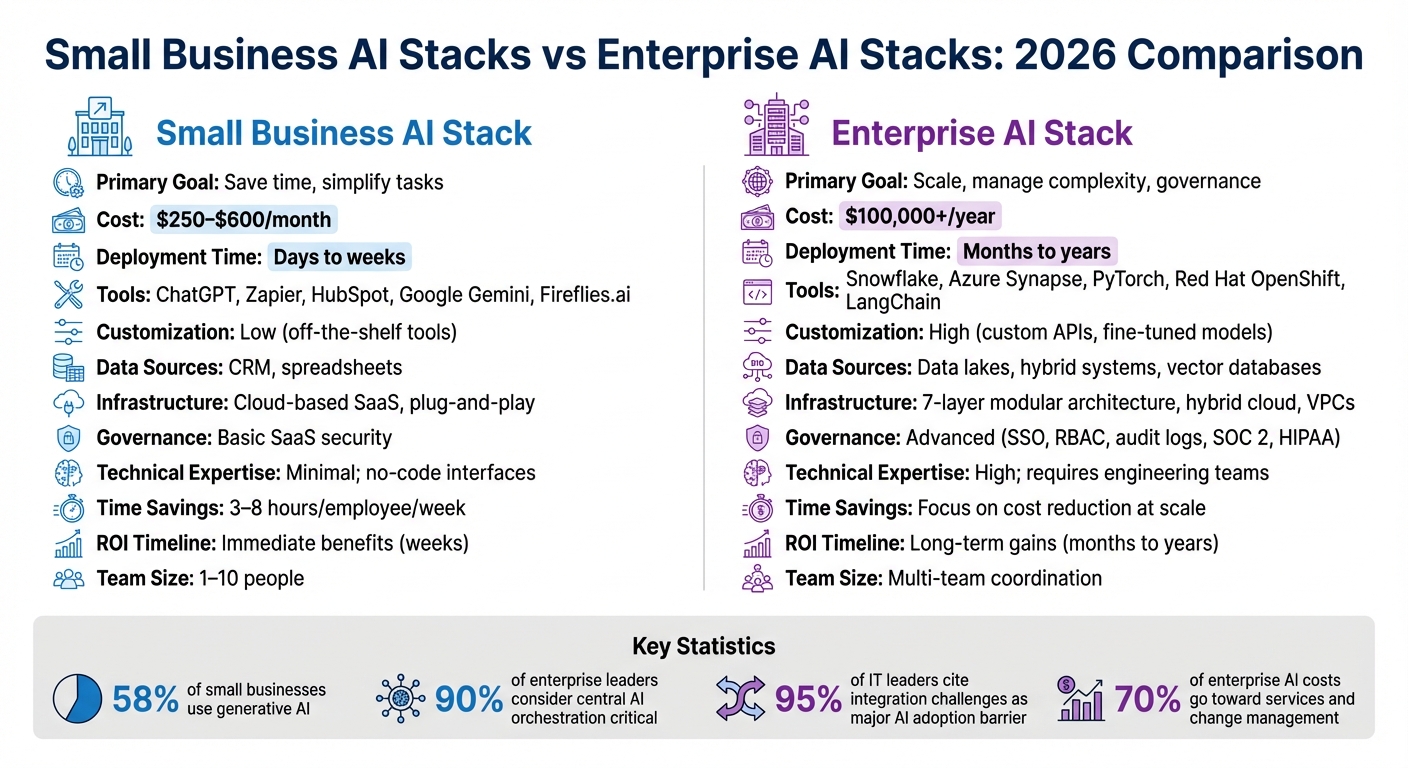
Small Business vs Enterprise AI Stacks: Key Differences in Cost, Tools, and Deployment
Top 6 AI Apps Every Small Business Needs in 2026 🚀
Explore AI Tools on Flaex.ai
Discover the best AI tools for your workflow, curated, reviewed, and ranked.
Browse Directory →Main Differences Between Small Business and Enterprise AI Stacks
The differences between small business and enterprise AI stacks go beyond mere size - they stem from their distinct goals. Small businesses rely on AI as a force multiplier, aiming to address immediate, pressing challenges. Enterprises, on the other hand, use AI as an optimization engine, focusing on reducing costs and increasing accuracy across extensive operations. These differing priorities influence every decision, from the AI tools they choose to their deployment timelines. Let’s break it down further by looking at budgets and infrastructure strategies.
Budget realities highlight these contrasting priorities. Small businesses typically operate within tight, short-term budgets, while enterprises invest heavily in services and change management. For enterprises, annual AI contracts can range from $100,000 to over $1 million, with about 70% of those costs going toward services, internal efforts, and managing organizational change, rather than the software itself. As an AI Enablement Practice Lead at Pertama Partners puts it:
"The biggest pricing shift from small business to enterprise AI training isn't the list price - it's that you start paying for behavior change, not just access".
These budgetary differences naturally lead to distinct approaches to infrastructure.
Infrastructure strategies also vary significantly. Small businesses adopt a "software-defined" approach, relying on SaaS platforms and treating computing power as virtually limitless, enabling quick and easy integration. Enterprises, however, construct 7-layer modular architectures that often involve private clouds, hybrid deployments, and strict governance protocols. These enterprise systems can take 12 months or more to implement due to the need for security, compliance, and coordination across multiple departments.
Comparison Table: Key Differences
Here’s a side-by-side look at the major distinctions between small business and enterprise AI stacks:
| Feature | Small Business AI Stack | Enterprise AI Stack |
|---|---|---|
| Primary Objective | Immediate time savings & revenue | Scale, governance, & risk management |
| Data Requirements | Existing structured data (CRM, spreadsheets) | Massive data lakes with full lineage |
| Infrastructure | SaaS-heavy; API-based | 7-layer modular architecture; hybrid cloud |
| Cost to Build | $0 (DIY) to $40,000 (custom) | $100,000 to $1,000,000+ (contract value) |
| Time to Deploy | Days to weeks | Months to years (security/compliance) |
| Customization Level | Low (off-the-shelf) to moderate | High (fine-tuned models & custom APIs) |
| Governance | Basic; human-led | Rigorous (SSO, RBAC, audit logs) |
Small Business AI Stacks: Tools and Workflows
For small businesses, AI needs to deliver quick, cost-effective solutions. The focus isn’t on overhauling operations but on weaving AI into everyday tasks like email management, scheduling, and customer interactions. According to the U.S. Chamber, 58% of small businesses are already using generative AI. Their priority? Automating time-consuming processes for smoother daily operations.
By 2026, the core AI stack will follow a simple principle: one tool for each task. Start with an AI-powered office suite, such as Google Gemini or Microsoft Copilot, to streamline drafting and summarizing. Add a general-purpose assistant like ChatGPT or Claude for brainstorming and problem-solving. Next, use automation platforms like Zapier or Make to connect apps and eliminate repetitive data entry. Finally, integrate AI-enabled CRMs like HubSpot or Mailchimp for tasks like lead scoring and personalized email campaigns. This approach avoids unnecessary subscription costs, which currently average $164 per month for business owners.
Simple Tools for Automation and Productivity
The tools in this AI stack aim to free up time by automating repetitive tasks. For instance, AI meeting tools like Fireflies.ai can save consultants 3–5 hours per week by automatically summarizing and organizing meeting notes. Similarly, lead triage tasks that used to take 25–30 minutes per inquiry can now be completed in under a minute with platforms like Zapier Central. On average, small businesses can reclaim 3–8 hours per employee each week by automating tasks such as email filtering, lead routing, and document preparation.
These tools are budget-friendly for most small teams. A solo entrepreneur’s setup might cost $40–$80 per month, while small teams spend around $200–$400, and larger, growth-focused teams may invest $1,000+ monthly. Individual tools like ChatGPT Plus or Claude Pro are priced at $20 per month, Fireflies starts at $19 per month, and Notion AI costs roughly $10 per user per month.
The guiding principle behind these workflows is human-in-the-loop design. While automation speeds things up, human oversight ensures quality and maintains brand consistency. For example, Custom AI chatbots can independently handle 20–40% of repetitive customer queries, but more critical decisions still require human judgment. As Steven Jones puts it:
"AI will not magically fix a broken process, but in 2026 it can absolutely help a small business move faster with fewer mistakes".
This mix of automation and human oversight creates an efficient, streamlined system tailored for the immediate needs of small businesses.
Comparison Table: Benefits and Limitations
| Feature | Small Business AI Tools | Enterprise AI Tools |
|---|---|---|
| Cost | $40–$400/month for most teams | $1,000+/month; often $100K+ contracts |
| Deployment Speed | Days to weeks | Months to quarters |
| Ease of Use | Low learning curve; no-code interfaces | High; often requires engineering teams |
| Customization | Limited (templated prompts/workflows) | Extensive (fine-tuned models, custom APIs) |
| Infrastructure | Minimal; cloud-based SaaS | Complex; hybrid clouds, VPCs, SOC 2 |
| Support | Self-service or community forums | Dedicated account managers and SLAs |
| Scalability | Limited; designed for small teams | Unlimited; built for multi-team coordination |
| Security & Governance | Standardized SaaS security | Advanced (SSO, RBAC, audit logs) |
| Time Savings | 3–8 hours/employee/week | Varies; focus on cost reduction at scale |
Enterprise AI Stacks: Tools and Workflows
When it comes to enterprise AI stacks, the focus shifts dramatically compared to small business setups. Instead of prioritizing quick, cost-effective solutions, enterprises need systems that can handle massive scale and complexity. These stacks are built to support thousands of users, manage enormous datasets, and enable seamless collaboration across multiple teams. To achieve this, enterprise AI stacks are designed with layers that cover everything from model selection to governance, ensuring operations are compliant and fully auditable.
One major evolution in enterprise AI is the move from simple chatbots to sophisticated, coordinated workflows. Platforms like LangChain, CrewAI, and Microsoft's Agent Framework are leading the way by managing multi-step processes. These tools can handle tasks like updating CRM records, triggering workflows, and interacting with external APIs. Thanks to a wide range of pre-built connectors, they can also integrate smoothly with internal systems.
Another critical piece of the puzzle is the data infrastructure. Enterprises rely on tools like vector databases - examples include Weaviate, Pinecone, and Qdrant - paired with lakehouse architectures such as Apache Iceberg and Delta Lake. This combination ensures that AI models are grounded in relevant business data while staying under strict governance protocols. A popular approach, known as Retrieval-Augmented Generation (RAG) enhances the accuracy and traceability of AI-generated responses. Antoni Rosinol, CEO of StackAI, sums it up well:
"A single LLM API is not an enterprise AI platform. A platform is what turns that text generation into a reliable system that your business can trust, operate, and audit."
The risks of neglecting such robust systems are significant. For example, Zillow experienced a staggering $1 billion loss during the pandemic due to unchecked drift in its real estate pricing models. This highlights the need for a strong observability layer, supported by tools like Prometheus, Grafana, and LangSmith, to monitor and maintain production-grade AI systems.
This foundational architecture sets the stage for the advanced orchestration and customization capabilities discussed next. You can explore a wide range of these enterprise-grade AI tools in our directory.
Advanced Tools and Customization
Building on a solid data foundation, enterprise AI tools are engineered for precision and scalability. Unlike small business tools that rely on templated workflows, enterprise platforms offer extensive customization. This includes fine-tuning models, creating custom APIs, and deploying AI in highly secure environments. Frameworks like Ray facilitate distributed computing, allowing enterprises to scale workloads from single instances to large clusters that can handle complex training and inference tasks. For high-performance needs, setups like NVIDIA DGX clusters enable ultra-fast GPU-to-GPU communication.
Model customization is another area where enterprises excel. Many organizations are adopting multi-model routing strategies to optimize both performance and cost. Routine tasks are assigned to lightweight models, while more complex challenges are escalated to advanced models like GPT-4 or Claude 3. Open-source models, such as LLaMA 3 and Mistral, are also gaining popularity. These allow companies to maintain full control over their data while managing hosting costs independently.
Governance is a cornerstone of enterprise AI operations. Tools like Unity Catalog and Guardrails AI provide essential features such as runtime controls, audit trails, and filters to protect sensitive data. These capabilities are crucial for meeting compliance standards, including regulations like the EU AI Act. Role-Based Access Control (RBAC), Single Sign-On (SSO), and automated approval workflows further ensure that AI systems remain secure and auditable across departments. As InitializeAI puts it:
"Governance is no longer a blocker - it's your competitive edge."
Given the technical complexity of these systems, enterprises need dedicated engineering teams to manage deployment and maintenance. While small businesses can implement tools in a matter of days, enterprise-level setups often take months to roll out. However, the payoff is a scalable, deeply integrated system capable of supporting long-term growth.
Comparison Table: Deployment and ROI
| Factor | Small Business AI Stack | Enterprise AI Stack |
|---|---|---|
| Deployment Time | Days to weeks | Months to quarters |
| ROI Timeline | Immediate benefits | Long-term cost reduction |
| Scalability | Limited; small team focus | Unlimited; multi-team coordination |
| Infrastructure | Cloud-based SaaS | Hybrid clouds, VPCs, high-performance clusters |
| Customization | Templated workflows | Fine-tuned models, custom APIs, multi-model routing |
| Integration Complexity | Low; plug-and-play | High; extensive connectors, custom code |
| Governance | Standard SaaS security | Advanced (SSO, RBAC, audit logs) |
| Technical Expertise | Minimal; no-code interfaces | High; requires engineering teams |
| Risk Management | Basic monitoring | Continuous drift monitoring, observability layers |
Tool and Integration Comparison
When it comes to building an effective AI stack, the way tools and workflows come together plays a huge role. Small businesses and enterprises often take very different paths in their choices. For small businesses, the focus is on off-the-shelf, no-code AI tools like ChatGPT, Zapier, or GoHighLevel. These tools are designed to solve specific problems and can be integrated with popular SaaS ecosystems like Google Workspace, Microsoft 365, and Slack in just a few days. On the other hand, enterprises lean toward custom-built models using frameworks like TensorFlow or PyTorch, managed through platforms such as Red Hat OpenShift. This approach helps them achieve the precision and scalability needed for their larger, more complex operations. Naturally, these differences in tools also shape how integrations are handled.
Small businesses typically rely on pre-built connectors that make integration straightforward. In contrast, enterprises often face more complex challenges, requiring custom APIs to link systems together. This isn’t a minor issue - 95% of IT leaders cite integration challenges as a major barrier to AI adoption. For small businesses, simple trigger-action workflows are usually enough, but enterprises need to navigate intricate ERP and CRM integrations that demand custom-built solutions.
The way data is managed also highlights the divide. Small businesses deal with structured data generated by SaaS tools, while enterprises work with massive datasets stored in advanced systems like Snowflake, Amazon Redshift, and AWS S3. These setups enable enterprises to handle vector databases and lakehouse architectures essential for cutting-edge AI applications. As AI expert Andrew Ng aptly puts it:
"Without good data, even the best AI models will struggle."
- Andrew Ng, AI Influencer
Compliance is another area where the two diverge significantly. Small business tools usually cover basic requirements like GDPR and CCPA, often handled through the provider's built-in terms. Enterprises, however, must meet much stricter standards, such as SOC 2, HIPAA, ISO 27001, and the EU AI Act. This involves implementing features like full audit trails, role-based access control (RBAC), and PII masking. In industries like healthcare and finance, where compliance is non-negotiable, failing to meet these standards can result in multimillion-dollar penalties.
Comparison Table: Small Business vs. Enterprise Tools
Here’s a quick look at how small business and enterprise AI stacks differ:
| Feature | Small Business AI Stack | Enterprise AI Stack |
|---|---|---|
| Primary Tools | ChatGPT, Claude, Zapier, HubSpot, Wix | Snowflake, Azure Synapse, PyTorch, Red Hat OpenShift |
| Latency | High variance (2–8 seconds) | Low variance (1–4 seconds) |
| Compliance | Basic (GDPR, CCPA) via provider | Strict (SOC 2, HIPAA, ISO 27001, EU AI Act) with audit trails |
| Dataset Handling | Small, structured data from SaaS tools | Massive, hybrid structured/unstructured data via vector databases |
| Integration Ease | High; pre-built connectors for fast setup | Low; requires custom APIs and deep ERP/CRM integration |
| Pricing Model | Monthly subscriptions ($250–$600/mo) | Annual contracts ($50,000–$100,000+) |
| Connector Breadth | Zapier offers over 6,000 connectors | Workato offers about 1,000 connectors with deeper logic |
| Technical Expertise | Minimal; no-code interfaces | High; requires dedicated engineering teams and MLOps |
This breakdown emphasizes how the needs and capabilities of small businesses and enterprises shape their AI strategies, from tool selection to integration and compliance. Each approach has its strengths, tailored to the scale and complexity of the operations they support.
Building Workflows: Small Business vs Enterprise Approaches
When it comes to designing AI workflows, small businesses and enterprises have distinct priorities. Small businesses focus on quick decision-making to drive immediate revenue or improve efficiency. On the other hand, enterprises aim to fine-tune their large-scale operations, whether by shaving milliseconds off transactions or achieving small but impactful cost reductions.
These differences shape everything from team structures to the AI tool stacks they choose. Small businesses typically rely on generalists who treat AI as a "junior teammate", while enterprises deploy specialized teams like MLOps, AIOps, and Data Engineering to manage intricate workflows, such as RAG pipelines or multi-agent systems. The results speak for themselves: 91% of small-to-medium-sized businesses (SMBs) using AI report revenue growth. This proves that streamlined workflows can deliver big wins without the complexity enterprises often face.
Human-in-the-Loop Approaches for Small Businesses
For small businesses, human-in-the-loop (HITL) workflows act as a productivity booster, not a bottleneck. The idea is simple: automate repetitive tasks (like data entry or summarizing meetings) while keeping humans involved in critical or customer-facing decisions. This approach allows small teams to maintain quality without the need for extensive infrastructure. For example, businesses using local Small Language Models (SLMs) on dedicated NPU hardware can completely sidestep per-token cloud costs, achieving a 40% return on investment (ROI) on automation in just six months.
In 2026, the "Local-First" strategy is becoming more popular. Small businesses are running local LLMs with tools like Ollama on dedicated "AI NUCs" or servers, keeping inference costs near zero after the initial hardware purchase. Human reviewers then validate outputs locally before they’re sent to customers. This model works well for tasks like drafting emails, creating reports, or routing leads - where speed matters more than getting it perfect on the first try. The key to success? Start small. Focus on automating one time-consuming task before scaling up.
While small businesses thrive on agility and lean processes, enterprises require more structured systems to manage their larger, more complex operations.
Enterprise Approaches for Multi-Team Coordination
Enterprises face a different challenge: how to deploy AI across multiple departments while maintaining governance and accountability. To tackle this, they generally adopt one of three operating models: Centralized (a single team manages all AI agents), Federated (individual teams operate under central guidelines), or Hybrid (a mix of central infrastructure and decentralized ownership by business units). These models often rely on "forward-deployed engineers" who embed AI solutions directly into multi-team workflows to ensure smooth scaling.
Enterprise workflows are typically built on a 7-layer architecture that includes Foundation, Knowledge (RAG), Orchestration, Execution, Guardrails, Deployment, and Governance. This structured approach helps prevent coordination issues, which are common - 76% of enterprises report experiencing negative outcomes from disconnected AI systems, and 31% discover unapproved or "rogue" AI tools in their organizations each month. For enterprises, HITL processes are not optional; they’re a critical safety measure for systems that impact finances or customer interactions. These workflows include mandatory approvals and audit trails, ensuring that automation is not just efficient but also reliable and compliant under regulatory and financial scrutiny.
Using AI Tools Directory to Build Your Stack
When putting together your AI stack, it’s essential to choose tools that not only fit seamlessly into your workflow but also align with your budget and integration needs. Whether you’re managing a small business or a large enterprise, finding tools that deliver real value can be a challenge. That’s where the AI Tools Directory (Flaex AI) comes in. It offers a searchable database of over 1,500 AI tools, organized by function - think writing assistants, customer support platforms, marketing automation tools, and development frameworks. Instead of getting lost in flashy feature lists, you can focus on finding tools that directly support your business goals.
Finding Tools with Filters and AI Agents
The platform’s advanced search and filtering system makes it simple to narrow down options. You can filter by category, pricing model (free, freemium, or paid), and user ratings. For example, a small business owner looking to automate lead routing could filter for automation tools and compare starting prices, integration options, and potential time savings side by side. Enterprises with strict compliance requirements can use filters to identify tools that meet standards like SOC 2, GDPR, or Data Processing Agreements - helping them shortlist options even before scheduling demos.
AI-powered agents within the directory take it a step further by recommending workflows tailored to your specific challenges. Let’s say your team is overwhelmed by customer support emails. Simply describe the bottleneck, and the platform will suggest tools with clear ROI metrics. Additionally, expert-curated tool stacks are available for different business stages - from startup essentials to scaling operations - so you can avoid unnecessary subscriptions and focus on tools that have proven value.
This streamlined process naturally sets the stage for evaluating costs and understanding potential integration risks.
Assessing Costs and Integration Risks
Once you’ve identified promising tools, the next step is evaluating their costs and integration compatibility. Integration challenges are a common hurdle, but the AI Tools Directory helps by assessing tools for integration stability and API reliability. This ensures they’ll work smoothly with popular systems like Google Workspace, Microsoft 365, or your CRM. The platform also provides a detailed cost analysis, factoring in expenses like implementation, training, and switching fees.
For small businesses, a well-rounded AI stack typically costs between $250 and $600 per month. On the other hand, enterprise stacks can exceed $10,000 monthly, depending on factors like custom needs and security requirements. Comparison tables break down costs by tier, showing what’s included at different pricing levels. For instance, a "Pro" plan might cost around $20/month, while "Team" plans often range from $25–$30 per user/month. These insights help you budget confidently before making any commitments.
Security is another key consideration. The platform highlights tools that meet enterprise-grade standards, reducing risks tied to tool sprawl - a growing concern for organizations. In fact, 36% of enterprise leaders report increasing security and privacy issues as their AI tool usage expands.
Once costs and risks are clear, community insights can provide additional guidance for building an optimized AI stack.
Using Shared Stacks and Community Insights
The AI Tools Directory also taps into its user community, offering shared "starter playbooks" and "ready-to-use workflows" tailored to specific roles, such as agencies, real estate professionals, or coaches. These shared stacks include metrics like time saved and revenue impact, helping users skip the trial-and-error phase.
For instance, one agency using Zapier Central cut lead triage time from 30 minutes to under 1 minute, boosting response speed by 70%. Another sales team using Clay for LinkedIn prospecting saw their email open rates jump from 18% to 54%, while also doubling reply rates with AI-driven personalization.
"The problem isn't access to AI tools. It's knowing which ones actually solve your business problems without wasting thousands of dollars on subscriptions you'll never use."
- Kiramat Ullah, Ideal Inspiration
For larger organizations, the community offers strategies for managing "tool sprawl." Currently, 28% of organizations use more than 10 different AI applications, and 31% discover unapproved tools each month. Shared governance strategies help standardize approval processes and centralize orchestration. In fact, 90% of enterprise leaders agree that having a central AI orchestration platform is essential for success.
Conclusion: Selecting the Right AI Stack for Your Business
Picking the right AI stack isn't about chasing the latest shiny tool or building overly complex systems. It’s about matching your choices to your business goals, budget, and growth plans. For small businesses, this often means sticking to lean, cost-effective solutions - typically in the range of $250–$600 per month for a team of 5–10 people. Larger enterprises, however, need scalable, modular systems, often spending $10,000+ monthly to handle the complexities of coordinating across multiple departments.
Here’s a simple strategy that works: buy 80% of your stack for standard needs (like chatbots or document processing) and build the 20% that sets you apart. This approach can help businesses implement AI three times faster while cutting infrastructure costs by 40%. For smaller teams, starting with a 30-day trial of a few high-impact tools - like automating meeting notes or FAQ responses - can be a game-changer. Larger companies, on the other hand, may face longer development cycles (4–12 months), with delays potentially costing over $50,000 per month in lost opportunities.
To make the selection process easier, platforms like AI Tools Directory (Flaex AI) can simplify the overwhelming task of evaluating the 10,000+ AI tools launched in the past year. With AI agents and community-curated stacks, businesses can quickly identify workflows tailored to their specific needs, boosting efficiency and cutting through the noise.
The stats back this up: 58% of small businesses are already using generative AI, while 90% of enterprise leaders consider a central orchestration platform critical. Whether it’s automating lead triage or building multi-agent workflows, the key is to start small - tackle one bottleneck, track the hours saved, and expand from there. A focused evaluation process helps avoid wasted subscriptions and ensures tools deliver measurable ROI - like the 998% return one small business achieved by improving pipeline visibility.
At the end of the day, it’s about practicality.
"The best AI tool is the one you'll actually use. Not the one with the most features, the flashiest demo, or the loudest marketing."
- Kiramat Ullah, Ideal Inspiration
Featured on Flaex