
AI Tool Search: Tips for Faster Workflow Optimization

AI Tool Search: Tips for Faster Workflow Optimization
Finding the right AI tool can save your team 20–40 hours per month, but with over 41,000 tools available, the search can feel overwhelming. Poor tool selection is a leading cause of AI project failures, yet targeted searches and smarter strategies can make all the difference. Here’s how to simplify the process:
- Search Smart: Use task-specific queries like "contract review automation" instead of generic lists.
- Leverage Directories: Platforms like Flaex AI offer advanced filters (pricing, complexity, platform) and AI-driven recommendations to match tools to your needs.
- Check Community Insights: Look at user reviews, trending tools, and "Most Saved" metrics for reliable options.
- Use AI Agents: Describe your workflow goals to AI agents, which can recommend and evaluate tools for you.
- Subscribe to Updates: Weekly newsletters from trusted directories keep you informed about the latest tools.
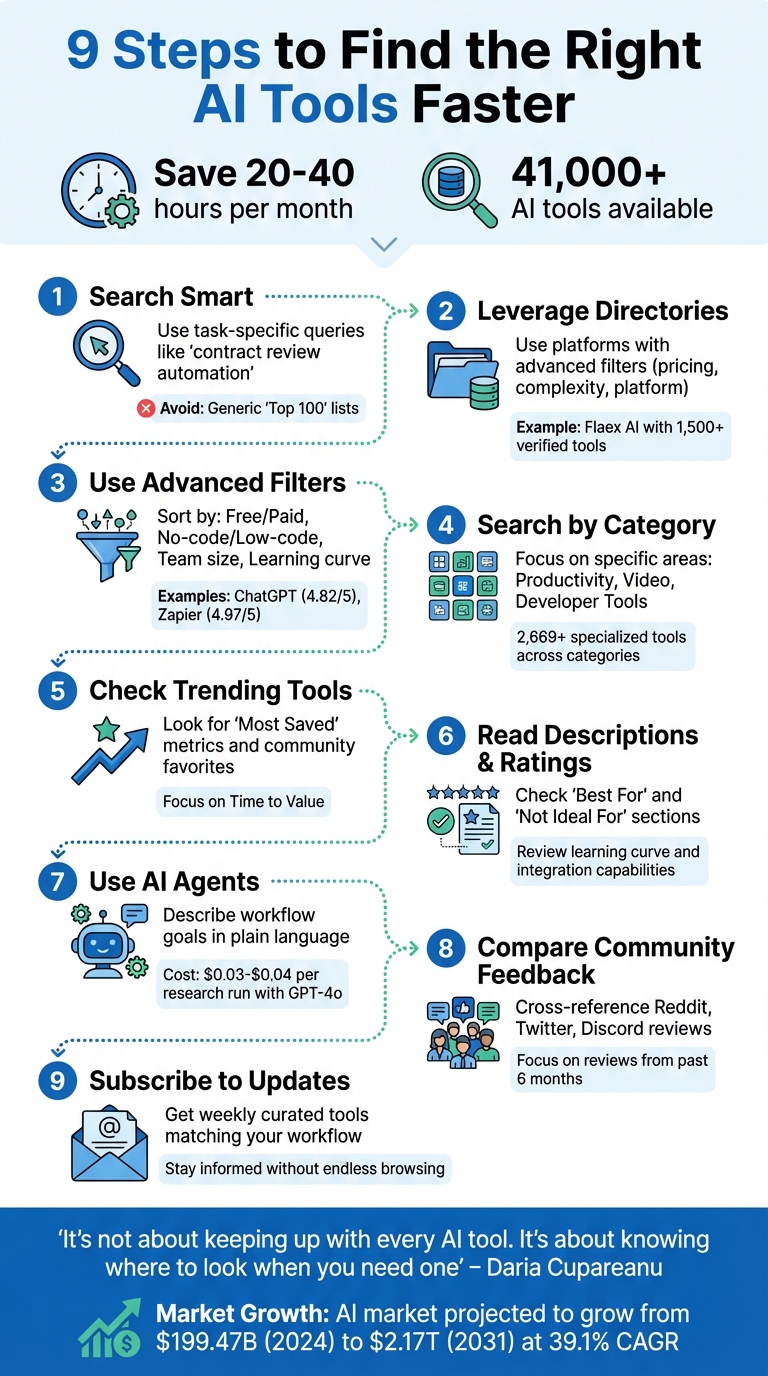
9-Step Guide to Finding the Right AI Tools for Your Workflow
3 AI Tools That Will Transform Your Workflow
Explore AI Tools on Flaex.ai
Discover the best AI tools for your workflow, curated, reviewed, and ranked.
Browse Directory →How to Search for AI Tools More Efficiently
Forget those massive "Top 100" lists - they're often too broad to be helpful. Instead, focus your search with task-specific queries like "contract review automation" or "video repurposing for social media." This approach helps you zero in on tools that fit your workflow perfectly. Once you refine your search, you can take advantage of modern directories that go beyond basic lists.
Today’s directories often use AI to recommend tools based on your specific needs. For example, Flaex AI's AI tool stacks can generate curated tool suggestions when you type in goals like "automate customer support emails." This feature saves you hours of manual research, delivering tailored results quickly.
Filtering options make the process even smoother. Advanced filters let you sort tools by pricing, technical requirements, or platform compatibility, narrowing down thousands of options in just a few clicks. Some directories even go a step further by providing data like traffic stats and monthly visits, giving you a sense of a tool’s popularity and reliability before you commit.
"Directories solve the discovery problem. Instead of hoping you stumble across the right tool... you can browse categorized libraries of thousands of options." - Daria Cupareanu, Author, AI blew my mind
Community feedback is another powerful feature. Trending sections, leaderboards, and "Most Saved" filters highlight tools that other professionals are already using and trusting. For instance, between June and August 2025, the AI directory "There's An AI For That" saw a staggering 13.93 million visits. This level of engagement shows how centralized directories have become an essential resource for anyone navigating the AI landscape.
1. Flaex AI: AI Tools Directory
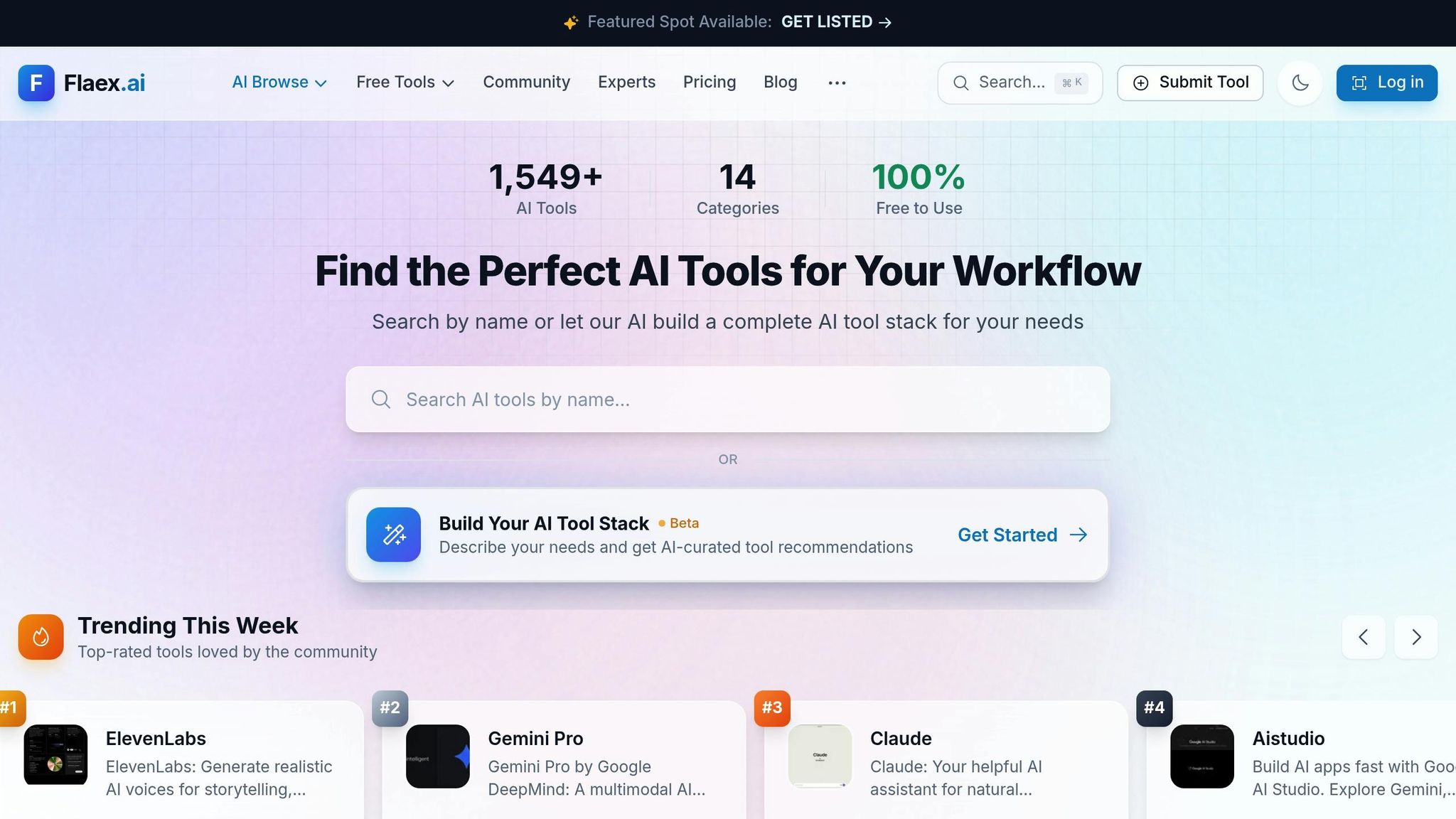
Flaex AI offers a massive database of over 1,500 verified AI tools spread across 65 pages. These tools cover categories like writing, development, productivity, and automation, making it a go-to resource for finding AI solutions that fit your workflow needs. What sets Flaex AI apart is its ability to go beyond a simple list. The platform uses AI-driven recommendations to help you build complete tool stacks tailored to your specific challenges. With the beta feature "Build Your AI Tool Stack", you can describe your bottlenecks in plain language and get a customized set of tools designed to address them.
Search Filters (Free, Top-Rated, New Tools)
Flaex AI simplifies the search process with filters that let you sort tools by pricing: Free (e.g., AI Studio, OpenClaw), Freemium (e.g., ElevenLabs, Claude), Paid (e.g., Midjourney), or Contact for Pricing. The "Trending This Week" section showcases top-rated tools, scored on a scale from 0.0 to 5.0. For instance, ElevenLabs earns a perfect 5.0 for its lifelike AI voice generation, while Claude holds a 4.4 rating for managing complex conversational tasks. Additionally, tools are tagged by their "Discovered" date, helping you stay updated on the latest options.
Tool Descriptions and Ratings
Each tool listing includes a detailed technical profile that covers its learning curve, technical requirements (no-code/low-code), and data privacy settings. The platform also provides a Fit Analysis, which identifies who the tool is best suited for and outlines practical use cases. For example, the "Use Cases & Problems Solved" section translates technical features into real-world benefits, such as reducing manual research or decluttering your workspace. This makes it easier to decide if a tool aligns with your needs.
Community Insights and Collaboration
Flaex AI also emphasizes community engagement. The "Saved By" metrics show how many users have bookmarked a tool, while the "Witness Reports" section offers user reviews. Additionally, the Discussion area provides valuable insights into a tool's reliability and performance in practical scenarios. These features give you a clearer picture of how a tool might work for you before committing to it.
2. Use Advanced Filters in AI Directories
Advanced filters are a game-changer when it comes to finding the right AI tools quickly. They help you zero in on options that align with your budget, skill level, and specific needs - saving you time and effort.
Most AI directories allow filtering by pricing models like Free, Freemium, Paid, Free Trial, or Contact for Pricing. You can also sort tools based on technical complexity, such as no-code or low-code, and platform compatibility, like Web or Mobile. For solo entrepreneurs, applying filters like "no-code" and "Free" can help avoid tools that are too complex or costly.
Performance-based filters, such as Top-rated or Trending This Week, highlight tools that consistently deliver results. Community metrics, like the number of reviews or how often a tool has been saved, can also signal reliability. For instance, ChatGPT boasts a rating of 4.82/5 from 334 reviews, while Zapier scores an impressive 4.97/5 from 229 reviews. These ratings reflect strong performance across various use cases.
You can refine your search further by filtering for team size (solo, small team, enterprise), learning curve (instant, moderate, steep), or data privacy needs (cloud-based, on-device). For example, tools labeled "instant" and "cloud-based" are ideal for small teams needing quick implementation. On the other hand, enterprises handling sensitive data might lean toward tools with on-device processing.
"AI productivity is not about having more features. It's about removing friction from real work." - Arti-Trends
3. Use AI-Curated Recommendations
AI-Curated Recommendations
AI-curated recommendations take the guesswork out of finding the right tools by analyzing your workflow and offering personalized suggestions. Instead of wading through endless options, you simply describe your needs, and the AI provides a tailored list of tools that align with your requirements.
Today’s AI directories, powered by databases of over 3,000 verified tools, use semantic search to grasp the intent behind your query - not just the keywords. For instance, instead of typing "video editor", you could say, "I need a tool to turn long webinars into short, captioned clips for social media." The AI then identifies tools that fit your workflow and goals, offering a more precise and relevant match. Flaex AI takes this approach further, embedding these capabilities into its platform to enhance your tool discovery experience.
With Flaex AI's "Build Your AI Tool Stack", you can outline your business needs, and it will generate a custom stack from a selection of over 1,500 tools. It focuses on tools designed to save time, simplify processes, and integrate seamlessly with your existing software.
For even more confidence in your choices, explore curated lists that highlight tools with detailed profiles covering factors like ease of use, budget compatibility, and data privacy. Highly rated tools such as ElevenLabs (5.0/5) and Perplexity.ai (5.0/5) often stand out for their dependability and strong performance.
4. Search by Category and Name
Search Filters (Free, Top-Rated, New Tools)
Finding the right AI tool can feel overwhelming, but category-based searching through an AI tool directory makes it much easier. Instead of endlessly scrolling, you can focus on specific areas like Productivity, Video Creation, or Developer Tools - a smart move when some directories list over 2,669 specialized tools across various categories [26, 27].
Pairing category selection with pricing filters can refine your search even further. For example, if you're exploring "AI Content Writing" tools, applying filters like "Free" or "Freemium" helps you avoid enterprise-only options that might not fit your budget [26, 19]. Tools such as Bard, Pika.Art, and Stable Diffusion often appear as completely free choices, while others like ChatGPT and Perplexity.ai offer freemium models, allowing you to try them out before committing [26, 19].
Using top-rated filters can also highlight tools that have proven their worth. However, don’t just look at the scores - pay attention to the number of reviews. A 5.0 rating from 266 reviews is far more telling than a perfect score based on just a handful of ratings. Once you've filtered your options, dive into detailed tool profiles to ensure the tool aligns with your specific needs.
Detailed Tool Descriptions and Ratings
After narrowing your options through categories and filters, the next step is to review detailed tool profiles. Searching by name gives you access to technical descriptions that help you decide if a tool is the right fit. Look for sections like Best For and Not Ideal For in the descriptions - they can quickly tell you if the tool lacks critical features, like browser extensions or team collaboration capabilities. Other technical details, such as the learning curve, team size compatibility, and data privacy standards, are also important to avoid choosing something that doesn’t meet your requirements.
Ratings become even more insightful when tied to specific use cases. For example, tools like Stable Diffusion (4.99/5 from 229 reviews) and Zapier (4.97/5 from 229 reviews) consistently receive high marks because they address well-defined problems effectively. By aligning these technical details with your workflow, you can confidently select tools that offer practical, reliable solutions [17, 29].
5. Check Trending Tools Sections
AI-Curated Recommendations
Finding the right tools quickly is key to streamlining your workflow. Trending sections showcase tools that are not only easy to find but also deliver immediate, practical results. These sections group tools based on professional needs in the Flaex AI Directory - whether it's AI SDR for inbound conversions or tools for data visualization - making it easier to match them to your specific requirements.
One standout benefit is the Time to Value factor. Tools featured in trending lists are chosen for their ability to provide value almost instantly while maintaining consistent performance. They’re also assessed for how seamlessly they integrate into your existing productivity setup. As Daria Cupareanu, author of AI Blew My Mind, aptly notes:
"It's not about keeping up with every AI tool. It's about knowing where to look when you need one".
This curated approach serves as a solid starting point before diving into community feedback.
Community Insights and Collaboration
Trending sections driven by community input offer a glimpse into real-world usage. These insights reflect shifting user priorities and reveal how tools actually perform in everyday workflows, beyond just their marketing claims.
Look for filters like "Most Saved" to identify tools that professionals rely on for the long haul. This metric goes beyond short-term trials, indicating a deeper level of trust and utility. When assessing trending tools, focus on those designed to simplify your daily tasks rather than those with an overwhelming array of features. Additionally, explore the "Use Cases & Problems Solved" section in each tool's profile. This helps you confirm whether the tool effectively addresses specific challenges in your workflow, such as automating manual data entry or tackling complex research tasks.
6. Read Tool Descriptions and Ratings
Detailed Tool Descriptions and Ratings
Once you've narrowed down your options, take the time to carefully examine tool descriptions and community ratings. These descriptions often highlight the technical details you need to make quick, informed decisions. Look for information about the tool's technical complexity, learning curve, and specific use cases. Revisit the previously mentioned "Best For" indicators to confirm if a particular tool aligns with your needs.
A key factor to consider is the learning curve - effective tools should start delivering value almost immediately. Cost matters too. Compare subscription fees with usage limits to evaluate whether you're getting a good deal. For instance, a $20/month tool with a 10,000-token limit might end up costing more per 1,000 words than a $50/month tool with unlimited usage. Also, double-check whether the tool integrates seamlessly with your existing software. Native integrations are crucial for maintaining a smooth workflow.
Paying attention to these details will help you make a more informed decision and prepare you to evaluate user feedback effectively.
Community Insights and Collaboration
Technical specs only tell part of the story - real user feedback can reveal how a tool performs in everyday use. Start by looking at low ratings (1-star and 2-star reviews) to uncover recurring issues, such as technical glitches or unexpected costs. Focus on recent reviews, as AI tools and their pricing models often change rapidly.
If you notice consistent low ratings, it could be a red flag for reliability problems. For a broader perspective, check platforms like Reddit or Hacker News, where users often share candid opinions. Community ratings can also give you a sense of how well the tool performs in practice. Additionally, look at metrics like "Most Saved" to identify tools that professionals rely on for long-term projects rather than just quick tests.
These community insights can help you fine-tune your choices and pick a tool that truly meets your needs.
7. Use AI Agents for Workflow Setup
AI Agents in Action
AI agents can save you countless hours by streamlining the process of finding and comparing tools. Instead of sifting through endless options, you simply describe your workflow goal - like "automate my weekly financial reporting" - in plain language, and the AI takes it from there.
These agents go beyond basic keyword matching by interpreting your intent. For instance, a "Reviewer Tool Agent" can use web crawlers to gather details, pricing, and reviews for multiple tools at once. Running such a research workflow with GPT-4o is surprisingly affordable, costing around $0.03 to $0.04 per run. This method not only automates discovery but also handles initial evaluations, making it a valuable addition to targeted, task-specific searches. Plus, they integrate effortlessly with platforms like Flaex AI to provide accurate and actionable tool assessments.
Detailed Tool Descriptions and Ratings
AI agents don’t just locate tools - they analyze them based on the specific needs of your workflow. A "Manager" agent oversees specialized sub-agents, each tasked with evaluating tools for factors like functionality and security. This structured approach eliminates the need for you to manually verify whether a tool aligns with your tech stack.
Take Flaex AI (https://flaex.ai) as an example. It uses built-in AI agents to help users compare tools, recommend workflows, and transform goals into optimized tool configurations. These agents consider key factors like reliability, cost, and data security, filtering out subpar options before they even make it to your shortlist.
"AI tool selection isn't about finding the most advanced technology or the best demo. It's about matching tools to problems, ensuring they'll work in your environment, and confirming people will actually use them." - Tara Minh, Operation Enthusiast
For beginners, it’s smart to start with single-purpose agents instead of trying to automate an entire department. You can also configure agents to pause for human approval on sensitive actions, such as sending payments or deleting data. This "human-in-the-loop" strategy allows you to retain control while still reaping the benefits of automation.
8. Compare Tools with Community Feedback
Taking a closer look at community feedback can give you a much clearer picture of a tool's reliability beyond what marketing claims might suggest.
Community Insights and Collaboration
Community feedback serves as a reality check, often exposing gaps between a tool's promises and its actual performance. For instance, if a tool advertises "production-ready code" but over 50 users report needing an extra 20 minutes to debug, that’s a red flag for recurring issues. Expert reviewers dedicate around 15% of their testing time (roughly 1–2 hours per tool) to digging through community discussions on platforms like Reddit, Twitter, and Discord.
"The most trustworthy reviews usually come from nowhere: Reddit threads, Twitter discussions, or private Slack communities where people have no incentive to exaggerate." – Aleksey Smyrnov, Developer
Cross-referencing feedback from multiple sources is key. When several independent users report the same problem, it’s a strong indicator of an actual limitation. Negative feedback is particularly valuable - disgruntled users often detail technical flaws and hidden costs that slick marketing materials gloss over. To keep your evaluation relevant, focus on reviews from the past six months. By analyzing this feedback across various platforms, you can create a more accurate picture of a tool’s real-world performance.
Detailed Tool Descriptions and Ratings
Platforms like Flaex AI make it easier to combine structured evaluations with community insights. Flaex AI hosts over 1,527 AI tools, providing detailed descriptions, ratings, and a space for users to share workflows and feedback. This collaborative environment helps you assess more than just pricing; it highlights real performance metrics based on user experiences.
Professional tool evaluation frameworks assign 10% of their weight to user feedback, factoring in satisfaction surveys and how companies address reported issues. For example, community votes give ChatGPT a rating of 5.0/5, while Grok scores 3.5/5 - clear evidence of differing performance levels based on collective user experience. Such ratings offer a quick way to spot standout tools and identify potential pitfalls.
9. Subscribe to Weekly Tool Updates
After refining your search techniques, subscribing to weekly updates can make your workflow even smoother. Manually sorting through thousands of AI tools wastes valuable time, but weekly newsletters from trusted directories cut through the noise. These updates deliver curated recommendations straight to your inbox, focusing on tools that match your specific workflow needs. This way, you stay informed about efficient, task-specific AI solutions without the hassle of endless browsing.
AI-Curated Recommendations
The most useful newsletters don’t just list new tools - they categorize them by function and use case. For example, you might find collections like "7 Game-Changing AI SDR Tools" or curated lists for marketing, coding, or data visualization. Flaex AI is one such resource, offering weekly updates on over 1,527 tools across various categories. Their updates include filters for free tools, top-rated options, and newly added resources.
Filters for Better Searches
Filters like "free", "top-rated", and "new" make weekly updates even more effective. These options let you focus on tools that fit your budget and meet reliability standards. For instance, top-rated filters highlight community favorites like Perplexity.ai (5/5 from 266 users) and Zapier (4.97/5 from 229 users). Meanwhile, filters for new tools ensure you’re always aware of the latest launches. This combination of filters and community validation helps you quickly identify tools that are worth your time.
Community Insights and Professional Trends
Beyond technical filters, these newsletters often include insights from the AI community. They highlight trending tools based on real usage rather than flashy marketing campaigns. Flaex AI’s newsletter captures this well:
"Join a growing community of AI enthusiasts. Weekly curated tools, tips, and insights."
Additionally, these updates often reveal which tools are being adopted by professionals at companies like Microsoft, OpenAI, and Google Cloud. This insider perspective helps you identify tools with long-term potential, avoiding those that might fade out and disrupt your workflows later. Flaex AI's curated updates align perfectly with the goal of saving time and improving workflow efficiency.
Conclusion
Finding the right AI tools doesn’t have to be a daunting task. Centralizing your search can help you avoid the chaos of scattered data, which often slows collaboration and wastes valuable time. Platforms like Flaex AI simplify this process by organizing over 1,527 tools with features like semantic search, trending sections, and community ratings, keeping everything you need in one place.
The key is focusing on your strategy rather than the sheer number of tools available. Start by defining your business problem, then compare features and apply budget filters (e.g., $0–$50, $50–$500, $500–$5,000+) to ensure you stay within your financial limits. AI agents can also provide workflow recommendations, and checking the "Not Ideal For" sections helps you steer clear of tools that don’t align with your technical expertise or team size. By narrowing your search in a centralized, task-specific way, you’ll save time and improve workflow efficiency.
As the AI market grows - projected to expand from $199.47 billion in 2024 to $2.17 trillion by 2031 at an annual growth rate of 39.1% - staying informed is more important than ever. With hundreds of tools launching daily, subscribing to weekly newsletters can help you stay ahead without spending hours browsing. Daria Cupareanu from AI Blew My Mind sums it up perfectly:
"It's not about keeping up with every AI tool. It's about knowing where to look when you need one".
With 40% of product discovery now happening on AI platforms, optimizing how you search for tools - what some call AI Engine Optimization - can lead to quicker decisions and smoother workflows. Whether you’re diving into Flaex AI’s detailed breakdowns or exploring community feedback, the ultimate goal is clear: make faster decisions, streamline workflows, and cut down on trial-and-error.
Featured on Flaex