
From Junior to Staff+: The Best AI Coding Agents for Every Dev Level in 2026

From Junior to Staff+: The Best AI Coding Agents for Every Dev Level in 2026
AI coding tools have evolved far beyond simple autocomplete. In 2026, these tools act as coding agents capable of managing complex workflows, debugging, and even automating entire tasks with AI agents for code review. With 85% of developers using AI assistants regularly, tools like GitHub Copilot, Cursor, and Claude Code are transforming how developers work. Here's a quick breakdown of the top tools based on features and developer levels:
- GitHub Copilot: Best for junior developers and routine tasks. Integrates with IDEs like VS Code and simplifies workflows with features like "Explain Code."
- Cursor: Perfect for multi-file edits and senior developers. Offers advanced refactoring and architectural planning in its AI-enhanced IDE.
- Claude Code: Ideal for Staff+ engineers. Excels at deep reasoning, debugging, and large-scale codebase management through a terminal-based interface.
- Amazon CodeWhisperer: Tailored for AWS developers, with strong support for cloud-related tasks like Boto3 and CloudFormation.
- Tabnine: Focused on privacy and enterprise security, offering local inference and custom models for regulated industries.
- Augment Code: Designed for large-scale projects and legacy systems, with advanced code analysis and fast indexing.
These tools cater to various needs, from junior developers learning to code to senior engineers managing complex systems. Choosing the right one depends on your skill level and project requirements.
Quick Comparison
| AI Tool | Best For | Key Features | Pricing |
|---|---|---|---|
| GitHub Copilot | Junior to Senior | IDE integration, AI code reviews, task automation | Starts at $10/month |
| Cursor | Junior to Staff+ | Multi-file edits, advanced refactoring | Starts at $20/month |
| Claude Code | Senior to Staff+ | Terminal-native, deep reasoning capabilities | Starts at $20/month |
| Amazon CodeWhisperer | AWS Developers | AWS-specific tasks, Java modernization | Starts at $19/month |
| Tabnine | Enterprise Teams | Privacy-focused, local inference | Starts at $12/month |
| Augment Code | Large Projects | Legacy system updates, semantic analysis | Starts at $20/month |
Each tool has its strengths and limitations, so choose one that aligns with your development needs and goals.
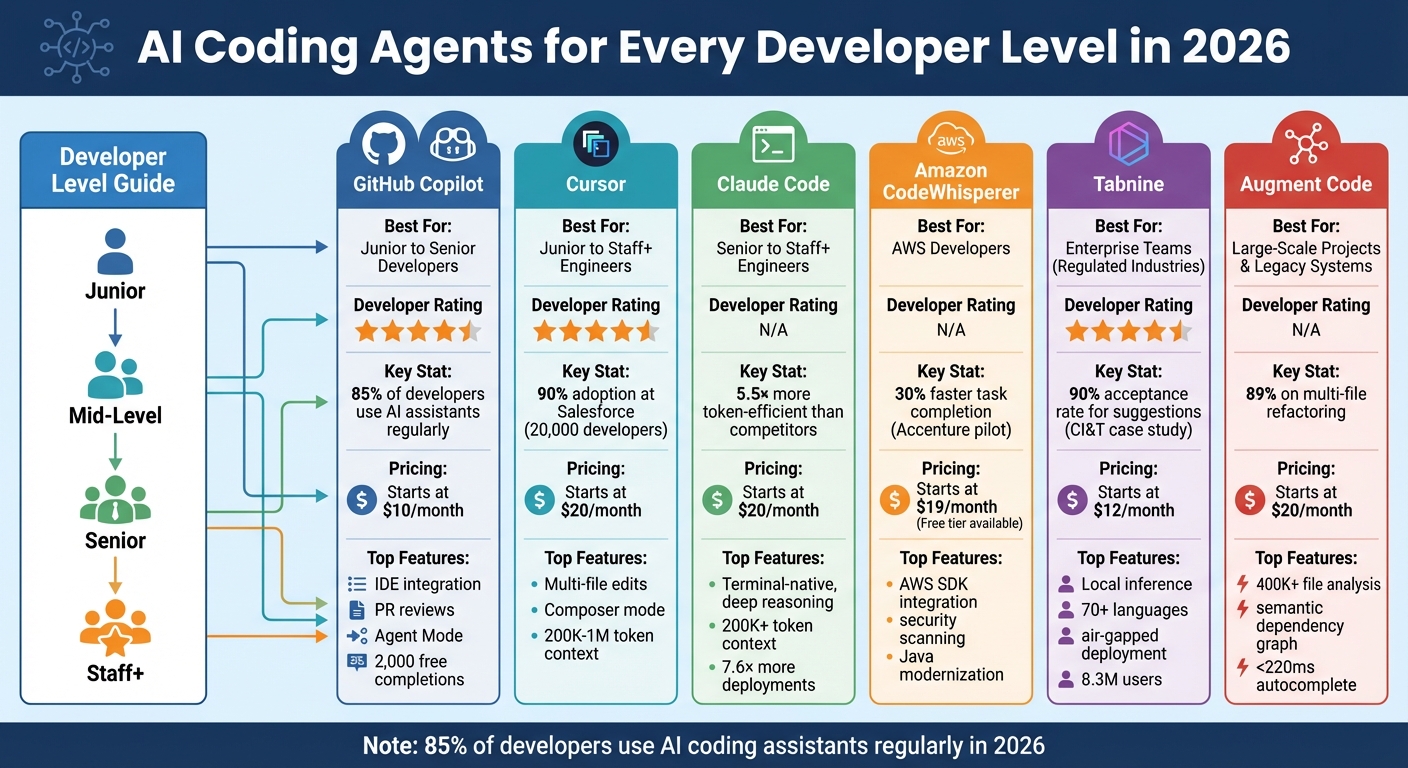
AI Coding Tools Comparison by Developer Level and Features 2026
I Tried Every AI Coding Agent... Here's My 2026 Setup
Explore AI Tools on Flaex.ai
Discover the best AI tools for your workflow, curated, reviewed, and ranked.
Browse Directory →1. GitHub Copilot
GitHub Copilot integrates directly with VS Code, JetBrains, and Xcode, making it a natural fit for your existing workflow. It boasts a 4.4/5 rating from developers, reflecting its popularity and usability.
Best Dev Level
Junior developers find Copilot particularly helpful as an entry point into AI-assisted coding. It offers 2,000 free completions per month, making it accessible for beginners. The "Explain" feature in Copilot Chat is a standout, simplifying complex or legacy code into plain language, which helps juniors build confidence and understanding.
For Staff+ engineers, Copilot serves as a reliable partner for routine or moderately complex tasks. In May 2025, Carvana adopted the GitHub Copilot coding agent to streamline their workflow. It automated translating specifications into production-ready code, clearing technical debt and handling repetitive tasks. This allowed the team to focus on more strategic, creative projects. Alex Devkar, Carvana's Senior Vice President of Engineering and Analytics, highlighted this shift:
"The GitHub Copilot coding agent fits into our existing workflow and converts specifications to production code in minutes. This increases our velocity and enables our team to channel their energy toward higher-level creative work." - Alex Devkar, Senior Vice President, Engineering and Analytics, Carvana
EY also utilized Copilot to establish "agent-driven teams", enabling developers to work more efficiently alongside automated agents.
The tool's flexibility shines through features like Custom Instructions and Copilot Memory, which adapt to repository-specific standards. Senior engineers can select from multiple models based on task needs, including OpenAI GPT-5.3-Codex, Anthropic Claude 4.6, Google Gemini 3.1 Pro, GPT-5.2 for deep reasoning, and Claude Haiku 4.5 for quick edits. This adaptability makes Copilot suitable for both beginners and seasoned professionals, aligning with diverse developer needs.
Key Features
GitHub Copilot's autonomous coding agent works behind the scenes to tackle bugs, implement features, and manage technical debt. It can even generate draft pull requests with auto-filled commit messages, saving time and effort. For backlog management, Staff+ engineers can assign tasks directly to the Copilot agent by selecting "Copilot" as the assignee in GitHub Issues.
Agent Mode enables multi-file edits and local test execution directly within IDEs like VS Code or JetBrains. The Model Context Protocol (MCP) connects Copilot to external data sources, pulling in relevant context when needed. Its vision capabilities allow it to process images and screenshots attached to GitHub issues, clarifying UI bugs or feature mockups. With the Next Edit Suggestions feature, Copilot predicts your next logical steps, streamlining the editing process. Security is also a priority, with built-in tools like CodeQL analysis, secret scanning, and dependency checks for all generated code.
Pricing
| Plan | Price | Best For | Key Features |
|---|---|---|---|
| Free | $0/month | Students/Juniors | 2,000 completions, 50 agent requests |
| Pro | $10/month | Professional Devs | Unlimited completions, 300 premium requests |
| Pro+ | $39/month | Staff+ / Power Users | 1,500 premium requests, access to Claude Opus 4.6 |
| Business | $19/user/month | Small/Mid Teams | IP indemnity, license management |
| Enterprise | $39/user/month | Large Organizations | Codebase indexing, custom models |
The Pro plan at $10/month is ideal for individual developers, offering unlimited inline suggestions and agent mode with GPT-5 mini. Students and open-source maintainers can apply for free access to the Pro plan through verification. For more demanding tasks, the Pro+ plan at $39/month provides five times the premium requests and access to Claude Opus 4.6 for advanced reasoning.
Limitations
While Copilot offers powerful features, it does have some restrictions. It supports only one repository at a time and limits pull requests to single tasks. It may not always comply with repository-specific rules, such as requiring signed commits. Developers using the Pro plan might find the 300 premium request cap limiting, especially if they rely on chat features for complex tasks. Additionally, while Agent Mode is effective, it sometimes falls short compared to competitors when handling intricate multi-file edits. For Free tier users, the 2,000-completion limit can be quickly exhausted, often within just a week or two of active coding.
2. Cursor

Cursor is a standalone AI-enhanced fork of VS Code, designed to provide integrated coding support. It has earned an impressive 4.7/5 rating from developers. By January 2026, over 90% of Salesforce's 20,000 developers were using Cursor, resulting in measurable improvements in cycle time, pull request velocity, and overall code quality. At Y Combinator, its adoption skyrocketed from single digits to over 80% in just one cycle. Diana Hu, General Partner at Y Combinator, described this shift:
"It was night and day from one batch to another, adoption went from single digits to over 80%. It just spread like wildfire, all the best builders were using Cursor." - Diana Hu, General Partner, Y Combinator
Cursor stands out as a productivity-boosting IDE that complements other AI coding tools.
Best Development Levels
Cursor is designed to cater to developers at all skill levels, from junior engineers to Staff+ professionals. Senior and Staff+ engineers benefit the most from its advanced features, such as multi-file refactoring and in-depth codebase analysis. Its Composer mode allows senior developers to outline architectural changes in plain language, while Cursor handles the edits, testing, and iterations across files. For full-stack developers, it simplifies coordinating changes across both frontend and backend systems.
Junior developers find Cursor invaluable as a pair programming tool. In Agent Mode, it can debug failing pipelines, explain complex code, and provide guidance. Freelancers also appreciate its intuitive interface and ease of use. Jensen Huang, President & CEO of NVIDIA, highlighted Cursor’s impact:
"My favorite enterprise AI service is Cursor. Every one of our engineers, some 40,000, are now assisted by AI and our productivity has gone up incredibly." - Jensen Huang, President & CEO, NVIDIA
Key Features
Cursor offers a range of features tailored to developers across various experience levels:
- Composer (Agent Mode): Developers can describe new features in plain language, and Cursor handles planning, file creation, and test execution.
- Predictive Tab Completions: Powered by Supermaven technology, it predicts edit locations and multi-line changes with precision.
- Granular Checkpoints: Allows developers to create snapshots of their project, making it easy to roll back to specific states during a session.
- Expanded Context Window: Supports between 200,000 and 1 million tokens, far surpassing the ~8,000 tokens typical of standard autocomplete tools.
- Multi-Model Support: Users can switch between models like Claude 3.5/4.5/4.6, GPT-4/5, and Gemini 3 Pro based on their needs.
- Integration Flexibility: Cursor works with GitHub for pull request reviews, Slack for collaboration, and even operates directly in the terminal.
- Recent Updates: 2026 introduced long-running agents in research preview, async subagents, and sandbox access controls for enhanced functionality.
Pricing
| Plan | Price | Best For | Key Features |
|---|---|---|---|
| Hobby | $0/month | Students/Beginners | 2,000 completions, limited agent tasks |
| Pro | $20/month | Professional Devs | Unlimited Tab completions, 500–1,000+ premium requests |
| Pro+ | $60/month | Power Users | 3× agent capacity, background multi-step agents |
| Ultra | $200/month | Extreme Power Users | 20× Pro credits, early access to features |
| Teams | $40/user/month | Small/Mid Teams | Admin controls, centralized billing |
For individual developers, the Pro plan at $20/month offers unlimited Tab completions and background agents, making it a great starting point. Power users handling larger-scale projects may prefer the Pro+ plan at $60/month, which triples agent capacity. The Ultra plan, priced at $200/month, includes $400 worth of API usage and priority access to new features.
Limitations
While Cursor is packed with features, it does have some constraints:
- It is exclusively a VS Code fork, meaning developers who prefer environments like JetBrains, Neovim, or Xcode cannot use it natively.
- Token efficiency is a concern; for example, Cursor required 181,000 tokens to complete a task that Claude Code managed with just 33,000 tokens, making it 5.5× less efficient in benchmarks by Builder.io.
- As an AI-native tool, it demands more memory and CPU compared to standard extensions.
- Cursor lacks a public SDK and built-in web search capabilities.
- Heavy use of Agent Mode can quickly exhaust credits on the Pro tier, often necessitating an upgrade to a higher plan.
Despite these limitations, Cursor's extensive feature set makes it a compelling choice for developers seeking to enhance their workflow.
3. Claude
Claude Code has quickly gained traction among power users in early 2026, carving out its niche as a terminal-native coding agent rather than an extension for IDEs. Unlike traditional autocomplete tools, Claude takes on tasks like planning, editing, testing, and iterating across entire codebases - all without constant user input. In independent tests, Claude was found to be 5.5 times more token-efficient than Cursor when tackling complex tasks, completing a benchmark with just 33,000 tokens compared to Cursor's 181,000.
Best Dev Level
Claude Code is tailored for professional developers, particularly senior and Staff+ engineers, who need tools capable of managing complex refactoring and codebase autonomy. For Staff+ engineers, it acts as an orchestration tool, turning high-level designs into fully functional production pipelines. Simon Last, Co-founder, highlighted how this shift changes workflows:
"Claude Code is moving our team up a level: we decide what needs to happen, and smooth the process so it can build and verify end-to-end. A big part of my job now is to keep as many instances of Claude Code busy as possible." - Simon Last, Co-founder
Mid-level developers benefit from its ability to streamline feature implementation and resolve bugs across multiple files, while also tracing issues back to their root causes. For junior engineers, Claude automates routine tasks like writing tests, fixing lint errors, resolving merge conflicts, and updating dependencies. Organizations using Claude Code report 7.6 times more frequent deployments, 14% weekly deployment growth, and an 80% reduction in incident investigation time.
These advantages stem from features designed to simplify and scale coding workflows.
Key Features
Claude operates directly from the terminal, using CLI tools to map and explain entire codebases while coordinating changes across multiple files. Its automated search feature maps project structures and dependencies without requiring manual context input. For example, it can seamlessly migrate APIs from REST to GraphQL across 30, 50, or even more files in a single operation.
A dedicated CLAUDE.md file in the project root allows customization of coding standards, architectural guidelines, and library preferences, ensuring the tool adheres to project-specific patterns. Developers can also set up advanced automation hooks with eight trigger types, such as PostToolUse, to automatically format code or run linting before commits. With support for 200,000 to over 1 million tokens of context, Claude can index and understand entire codebases - far exceeding the ~8,000 token limit of older tools.
Anton Biryukov, Staff Software Engineer, shared his team's experience:
"Claude Code has accelerated our team's efficiency... This process saves 1-2 days of routine (and often boring!) work per model." - Anton Biryukov, Staff Software Engineer
These advanced capabilities are paired with a pricing structure designed to meet varying project needs.
Pricing
| Plan | Price | Best For | Key Features |
|---|---|---|---|
| Pro | $20/month ($17/month annually) | Professional Developers | Access to Sonnet 4.6 and Opus 4.6 for short coding sprints |
| Max (5× usage) | $100/month | Power Users | 5× usage capacity for large codebases |
| Max (20× usage) | $200/month | Extreme Power Users | 20× usage capacity, early feature access |
| Team | $20/seat/month | Teams (5–150 members) | Self-serve seat management, centralized billing |
| API | Pay-as-you-go | Custom Integrations | Standard Claude API rates, unlimited developers, no per-seat fees |
The Pro plan at $20/month is ideal for professional developers working on smaller projects or short sprints. For more demanding workloads, the Max plans at $100 or $200/month provide higher usage limits, making them suitable for large-scale projects. Additionally, a Fast Mode option for Opus 4.6 is available at $30 or $150 per million tokens for consumption-based plans.
Limitations
Claude Code is not designed for inline "ghost text" completions as you type, unlike Cursor or GitHub Copilot. Instead, it focuses on task-based, autonomous workflows. Its command-line interface may take some time to get used to, especially for developers accustomed to visual IDEs, and it lacks visual diff previews in its terminal-native form, requiring an editor for change reviews.
High token usage can result in daily costs ranging from $5 to over $30. While it supports a 1 million token context window, simply adding more data doesn't always improve performance - developers need to structure context carefully with immutable rules to avoid issues. Additionally, Claude Code is exclusively tied to Anthropic's models, which limits flexibility compared to some open-source tools. A 2025 METR study even found that while AI tools sped up routine tasks, they slowed down complex open-source projects by 19%, emphasizing the need for careful review of multi-file changes. Choosing the right tool for your specific development needs remains crucial.
4. Amazon CodeWhisperer
Amazon CodeWhisperer, integrated with Amazon Q Developer since April 30, 2024, is built to handle AWS-specific tasks with precision. It’s trained on billions of lines of Amazon and open-source code, making it particularly effective for tasks like Boto3 calls, S3 policies, and CloudFormation templates.
Its focus on AWS-related workflows makes it a handy tool for developers at various skill levels.
Best Dev Level
Amazon CodeWhisperer is designed to cater to developers across the experience spectrum, from beginners to seasoned engineers. For junior developers, it provides real-time suggestions that are educational - type "upload file to S3", and it generates a complete API call with error handling. Mid-level engineers can use it to simplify complex infrastructure-as-code tasks, such as creating VPCs, CloudWatch rules, or Terraform state backends, all aligned with AWS standards.
For senior engineers and staff-level developers, the tool becomes a strategic ally for large-scale projects. The Pro tier offers advanced features like specialized agents for language migrations, enabling transformations of up to 4,000 lines of code per user per month. For example, it can help modernize Java applications from Java 8 to Java 17. It also allows customization by training on private repositories, ensuring adherence to internal naming conventions and API wrappers. A case study from National Australia Bank (NAB) showed their acceptance rate improved from 50% to 60% as they expanded from 30 to 450 engineers using customized models.
Key Features
Amazon Q Developer includes several standout features powered by Amazon CodeWhisperer:
- Built-in security scanning: Uses Amazon CodeGuru to detect vulnerabilities like hard-coded keys or overly broad IAM policies, offering one-click fixes.
- Open-source reference tracker: Flags suggestions that resemble public repositories and provides the repository URL and license type for compliance.
- @workspace indexing: Automatically understands project structures for better context.
- Expanded context window: Handles up to 200,000 tokens, surpassing GitHub Copilot's 128,000-token limit.
Accenture is rolling out Amazon Q to 50,000 developers, and early pilot data suggests tasks are completed about 30% faster with its help.
Pricing
| Plan | Price | Best For | Key Features |
|---|---|---|---|
| Free Tier | $0/month | Individual Developers | Unlimited code suggestions, 50 security scans/month, 1,000 lines of code transformation/month |
| Pro Tier | $19/user/month | Enterprise Teams | 1,000 agentic requests, 4,000 lines of code transformation, admin dashboards, IP indemnity |
The Free Tier is ideal for individual developers, offering unlimited inline suggestions and 50 security scans per month when using an AWS Builder ID. The Pro Tier, priced at $19 per user per month, is tailored for enterprise teams. It includes IP indemnity, which provides legal protection against copyright infringement claims - a crucial feature for businesses. Additional code transformations beyond the Pro limit are available at $0.003 per line.
Limitations
While Amazon CodeWhisperer shines in AWS environments, it’s less effective for general-purpose or multi-cloud projects compared to other AI coding tools. Its production testing revealed a 40% acceptance rate. Some independent reviewers rated it 2/5 for general-purpose coding, citing latency issues that can disrupt experienced developers’ workflows. It performs best in Python, Java, and JavaScript but struggles with niche languages and lacks the flexibility of multi-model platforms. Developers outside the AWS ecosystem may find its specialized training on AWS SDKs and infrastructure patterns limiting.
5. Tabnine
Tabnine emphasizes enterprise-level security and privacy while offering advanced code completion. With over 8.3 million users and 4.2 million active developers, it’s designed for organizations that demand complete control over their code and data. Supporting more than 70 programming languages and integrating with over 40 IDEs, Tabnine is adaptable to a wide range of tech environments.
One of its standout features, the Enterprise Context Engine, learns your organization’s coding standards and architecture to provide tailored suggestions. This customization aligns with a company’s specific workflows and legacy systems. For instance, CI&T, a global digital solutions provider, reported that their developers accepted 90% of Tabnine’s single-line suggestions, resulting in an 11% boost in productivity across projects.
Best Dev Level
Tabnine caters to developers at all levels. Junior developers and students benefit from tools like the "Explain Code" and "Onboarding" agents, which simplify understanding legacy codebases and learning new frameworks such as React and JavaScript. These features make it easier for less experienced developers to ramp up quickly.
For senior and Staff+ engineers, Tabnine offers tools like the Code Review Agent to enforce architectural standards and the Enterprise Context Engine to maintain consistency in complex, multi-language environments.
"Tabnine has helped us to ensure code consistency across our organization, resulting in faster and more efficient code reviews." - Amit Tal, VP Engineering at ReasonLabs
Tabnine also provides air-gapped and on-premises deployment options, making it a strong choice for enterprise teams in regulated industries like finance or healthcare, where data privacy is critical.
Key Features
Tabnine’s AI agents assist with tasks such as testing, code fixing, documentation, code review, and Jira integration. The Tabnine CLI extends these capabilities to the terminal, streamlining tasks like refactoring and handling pull requests. Unlike tools tied to a single model, Tabnine allows users to choose from multiple leading models - such as Claude 3.5 Sonnet, GPT-4o, Command R+, Codestral - or connect to private model endpoints.
The platform has earned a 4.7/5 rating across major IDE marketplaces and was ranked first in Gartner® Critical Capabilities for use cases like code generation, debugging, and explanation.
"Tabnine has become an absolute game changer for me... I'm easily 50% faster with coding as well as documenting my code." - Developer Michael Boeni
These features and flexibility are complemented by competitive pricing options.
Pricing
| Plan | Price | Best For | Key Features |
|---|---|---|---|
| Tabnine Code Assistant | $39/user/month (annual) | Individual developers and small teams | Chat and completions, Jira integration, SOC 2/GDPR compliance, IP indemnification |
| Tabnine Agentic Platform | $59/user/month (annual) | Enterprise teams | Everything in Code Assistant plus autonomous agents, Tabnine CLI, Enterprise Context Engine |
For users utilizing their own LLMs, unlimited usage is included. However, accessing Tabnine-provided LLMs may require additional payments for token consumption.
Limitations
While Tabnine’s conversational AI serves as a dependable assistant, its reasoning capabilities are less advanced compared to leading general-purpose LLMs. The initial indexing of repositories can be resource-intensive, potentially slowing local environments during setup. Additionally, air-gapped or on-premises deployments demand significant DevOps resources for setup. Although Tabnine excels in smart autocomplete (with acceptance rates of 30–50%), it demonstrates lower autonomy in handling complex, multi-file code generation tasks.
6. Augment Code
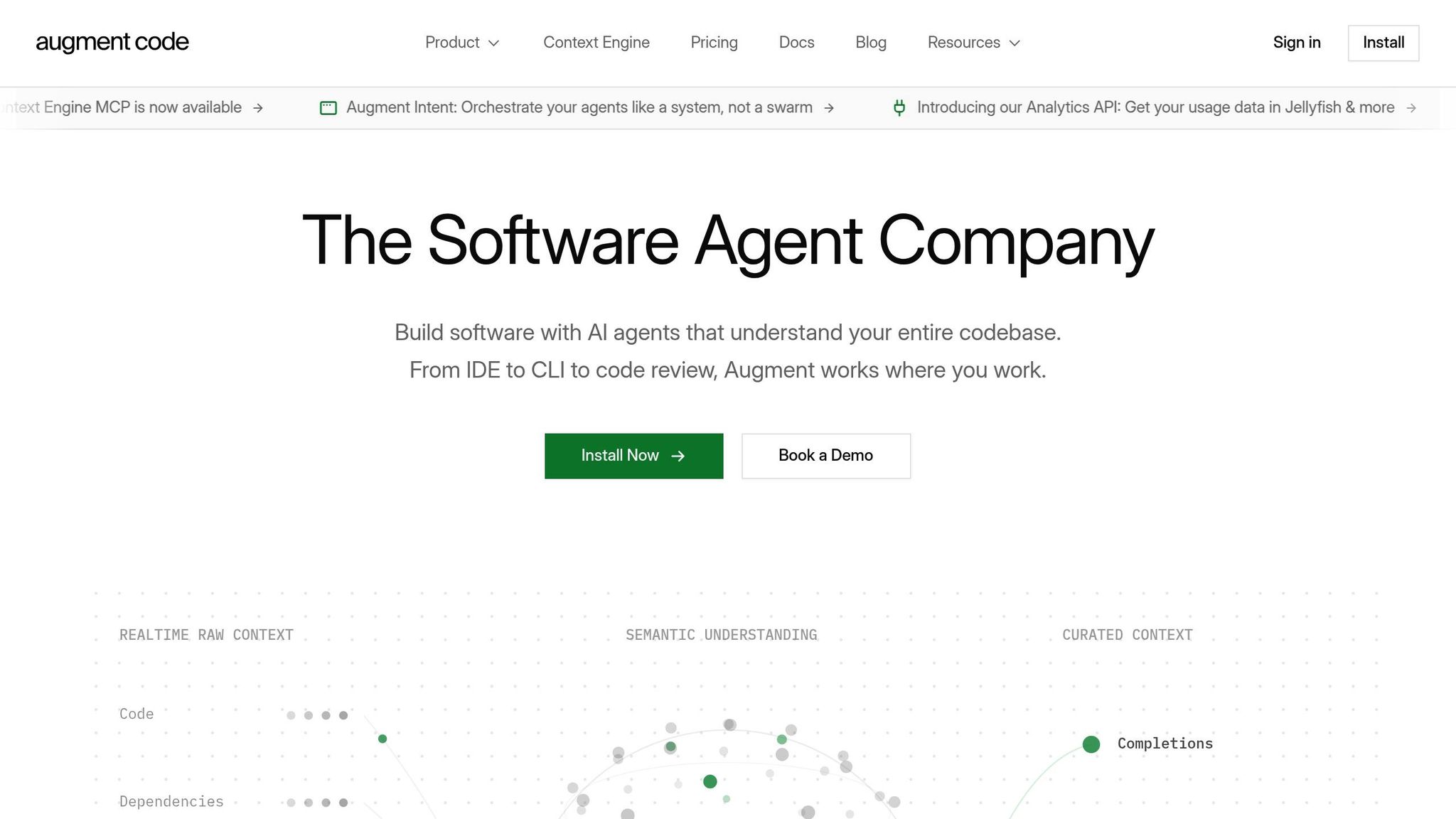
Augment Code takes code analysis to the next level, offering a deep dive into entire codebases, even those with over 400,000 files. It builds on earlier tools by creating a semantic dependency graph that captures how various parts of a codebase interact. This is a game-changer for tackling enterprise-level challenges like legacy system updates, debugging across multiple services, and understanding the ripple effects of architectural changes. For engineers managing distributed systems, this capability is invaluable.
Its performance speaks for itself: 70.6% accuracy on SWE-bench and 89% accuracy on multi-file refactoring tasks. These results surpass competitors limited to single-file analysis, enabling Augment Code to quickly identify and resolve issues like JWT validation mismatches across microservices.
Best Dev Level
Augment Code caters to developers at all levels. For Staff+ engineers and enterprise teams, it shines in managing sprawling, distributed systems. Its Context Engine is particularly adept at spotting inconsistencies - like when a checkout service uses different authentication logic than the main auth service.
For junior and mid-level developers, the PR review agent acts as a safeguard. It flags critical issues, such as SQL injections, N+1 query inefficiencies, and violations of architectural layers, before they make it to production. This blend of advanced analysis and practical support ensures smoother workflows for everyone involved.
Key Features
Augment Code stands out with its industry-first certifications, including ISO/IEC 42001 and SOC 2 Type II compliance, making it a trusted choice for regulated industries. Other standout features include:
- Fast indexing: Processes large monorepos in minutes, with incremental updates to keep everything up to date.
- Speedy autocomplete: Response times are consistently under 220ms.
Pricing
| Plan | Price | Credits | Best For |
|---|---|---|---|
| Indie | $20/month | 40,000 | Individual developers |
| Standard | $60/month | 130,000 | Small teams |
| Max | $200/month | 450,000 | High-demand teams |
| Enterprise | Custom | Bespoke | SSO/OIDC/SCIM, CMEK, ISO 42001 |
All plans include the Context Engine, unlimited completions, and SOC 2 Type II compliance.
Limitations
While Augment Code is packed with features, it does have a few drawbacks. Since it processes code in the cloud, security teams often need to approve its use - even with its enterprise-grade certifications. The initial indexing phase can be demanding, but using an .augmentignore file to exclude directories like node_modules/, .git/, and build folders can help streamline this process. Additionally, the shift to credit-based pricing has frustrated some developers due to cost unpredictability.
Strengths and Weaknesses
Here's a breakdown of the key benefits and drawbacks of each AI coding agent, based on their unique features and performance.
GitHub Copilot is a dependable choice for enterprise teams, especially with its seamless integration into the GitHub ecosystem. At just $10/month for individuals, it’s a cost-effective option. However, its focus on autocomplete makes it less effective for tackling complex, multi-file reasoning tasks.
Cursor has established itself as a go-to for AI-native IDEs. Its intuitive "flow" and Composer mode simplify multi-file edits, making it a favorite for routine coding tasks. That said, it can struggle with massive refactors, sometimes looping or failing, and its resource demands can slow down older machines.
Claude Code excels as a "coding brain", particularly for architectural changes and deep debugging. It handles tasks efficiently with fewer tokens compared to Cursor. But its terminal-first approach and lack of a native IDE GUI can be challenging for less-experienced developers.
Amazon CodeWhisperer is tailor-made for the AWS ecosystem, offering features like Java modernization and serverless optimization. While it’s a strong tool for cloud engineers, its utility is limited outside the AWS environment.
Tabnine prioritizes privacy, offering local inference and self-hosted models, which makes it ideal for industries like finance or defense. However, its capabilities lean more toward smart autocomplete rather than acting as a fully autonomous coding assistant.
Augment Code stands out for its fast context retention and quick shipping capabilities. Recent changes to a usage-based pricing model, however, have left some developers frustrated with its unpredictability.
"Cursor is the tool that 'just stays out of the way' while quietly making them faster." - Faros AI
Many developers find that combining tools works best - using Cursor for routine tasks and Claude Code for more complex debugging. This approach balances speed, depth, and cost, as no single tool excels across all areas. The table below highlights the strengths and trade-offs of each agent for easy comparison:
| AI Agent | Best Dev Level | Key Features | Pricing | Limitations |
|---|---|---|---|---|
| GitHub Copilot | Junior to Senior | GitHub integration, PR reviews, Agent Mode | $10/mo (Individual) | Weak at complex reasoning; opaque model use |
| Cursor | Junior to Senior | Repo-wide context, Composer mode, VS Code fork | $20/mo (Pro) | Struggles with large refactors; resource-heavy |
| Claude Code | Senior to Staff+ | Deep reasoning, terminal-native, subagent tasks | $20/mo (Pro) or API | No native GUI; costly per token |
| Amazon CodeWhisperer | AWS Cloud Devs | AWS SDK integration, Java modernization | $19/mo (Pro) | Limited outside AWS ecosystem |
| Tabnine | Enterprise/Security | Local inference, self-hosted, 80+ language support | $12/mo (Pro) | Less autonomous than Cursor or Claude |
| Augment Code | High-Growth Teams | Fast context retention, high-speed shipping | $20–$200/mo | Unpredictable credit-based pricing |
This comparison helps developers choose the best tool for their specific needs, ensuring they can tackle coding challenges effectively.
Conclusion
Choosing the right AI coding tool depends heavily on your experience level and specific needs. Here's a quick rundown to help you decide:
- Junior developers: GitHub Copilot, at $10/month, is a great starting point. Its inline suggestions help you learn coding patterns without overwhelming you, making it an excellent foundation for building your skills.
- Mid-level to senior developers: Cursor, priced at $20/month, offers a powerful Composer mode for seamless multi-file edits. With over 1 million developers using it as their primary IDE, it’s a trusted choice for more complex workflows.
- Staff engineers and architects: Claude Code shines in handling complex reasoning tasks. It boasts an 80.9% accuracy rate on SWE-bench Verified and delivers 5.5× better token efficiency than competitors, making it ideal for architectural decisions and large-scale refactoring. Many senior developers pair it with Cursor for a dual setup - Cursor for visual editing and Claude Code for deep debugging.
The role of developers is shifting from writing every line of code to reviewing and refining AI-generated solutions. These tools are no longer optional - they're becoming essential for modern development workflows.
Start with the tool that matches your current expertise, and as your projects grow in complexity, incorporate additional tools to enhance your workflow. The right AI coding assistant not only speeds up your work but also redefines your role, enabling you to focus on guiding and improving code rather than writing it line by line.
Featured on Flaex