
OpenClaw complete Secure Setup guideline 2026: Safe-by-default checklist and implementation

OpenClaw complete Secure Setup guideline 2026: Safe-by-default checklist and implementation
OpenClaw is a powerful open-source AI agent framework that connects Large Language Models (LLMs) like GPT and Claude to platforms like Telegram, WhatsApp, and Slack. However, its capabilities - like running system commands and managing sensitive data - make it a high-risk tool if not secured properly. 93.4% of OpenClaw instances were found vulnerable to exploitation in early 2026 due to weak security setups.
This guide provides a step-by-step checklist to secure your OpenClaw deployment, covering:
- Network Protection: Restrict public access, enforce authentication, and disable unnecessary features.
- Access Controls: Limit user permissions, redact sensitive logs, and adopt approval workflows for critical actions.
- Isolation & Sandboxing: Use Docker to isolate processes and restrict outbound connections.
- Credential Management: Store API keys securely using tools like HashiCorp Vault or AWS Secrets Manager.
- Incident Response: Stop your gateway, rotate credentials, and audit logs immediately if a breach occurs.
How to Setup OpenClaw Securely That Runs 24/7 - The SAFE way! (Clawdbot VPS Setup for Beginners)
What You Need Before Starting
Before diving into OpenClaw installation, it's essential to have the right tools and setup in place. Skipping this step can leave your deployment vulnerable, as shown by a January 2026 study that highlighted widespread issues caused by rushed setups. Getting everything ready beforehand helps ensure a secure and smooth installation.
System Requirements and Compatibility
To run OpenClaw effectively, you'll need Node.js 22.12.0 or later, as this version ensures compatibility in 2026. Supported platforms include Linux (with systemd; Debian 11+ or Ubuntu 20.04+ are recommended), macOS (via a dedicated app or CLI), and ARM-based devices like Raspberry Pi. For production environments, Docker is highly recommended to isolate processes securely.
It's best to use a dedicated machine or a virtual private server (VPS) instead of your primary workstation. For instance, you can get a Digital Ocean droplet starting at just $4/month, providing the isolation needed for secure deployment.
When building from source, pnpm should be your go-to package manager, though npm works fine for global installations. Also, never run the Gateway as a root user - create a dedicated non-root OS user to reduce security risks. Once these system requirements are met, you can focus on integrating the necessary tools.
Required Tools and Resources
For secure remote access, Tailscale is an excellent choice. It avoids exposing ports to the public internet by using identity-based authentication through Tailscale Serve. To prevent unauthorized data exfiltration, consider using Squid Proxy, which restricts the external domains your agent can contact. For handling TLS termination and external traffic, a reverse proxy like Nginx, Caddy, or Traefik is recommended.
If you're using a VPS, basic hardening tools like ufw (Uncomplicated Firewall) and fail2ban are essential. For managing sensitive credentials, rely on a secrets manager such as HashiCorp Vault, AWS Secrets Manager, or the 1Password CLI, ensuring API keys aren't stored in plaintext files. Keeping dependencies up to date is also critical, as outdated packages are often targeted by attackers. Research shows that 26% of agent skills contain vulnerabilities due to outdated dependencies.
Security Concepts You Should Know
To deploy OpenClaw securely, keep these key security principles in mind:
- Isolation: Use Docker or separate OS users to minimize the impact of potential breaches.
- Allowlisting: Limit interactions to specific user IDs or network domains, ensuring only approved entities can interact with your setup.
- Credential Encryption: Store API keys securely in encrypted vaults and inject them at runtime instead of leaving them in configuration files.
- Sandboxing: Restrict the agent's access to the filesystem and shell, confining it to a monitored workspace.
"There is no 'perfectly secure' setup. The goal is to be deliberate about who can talk to your bot, where the bot is allowed to act, and what the bot can touch." – OpenClaw Documentation
The importance of these principles became clear during the ClawHavoc incident in early 2026. This breach exposed 341 malicious skills on ClawHub, largely because users overlooked these fundamental security practices.
Security Setup Checklist: Implementation Steps
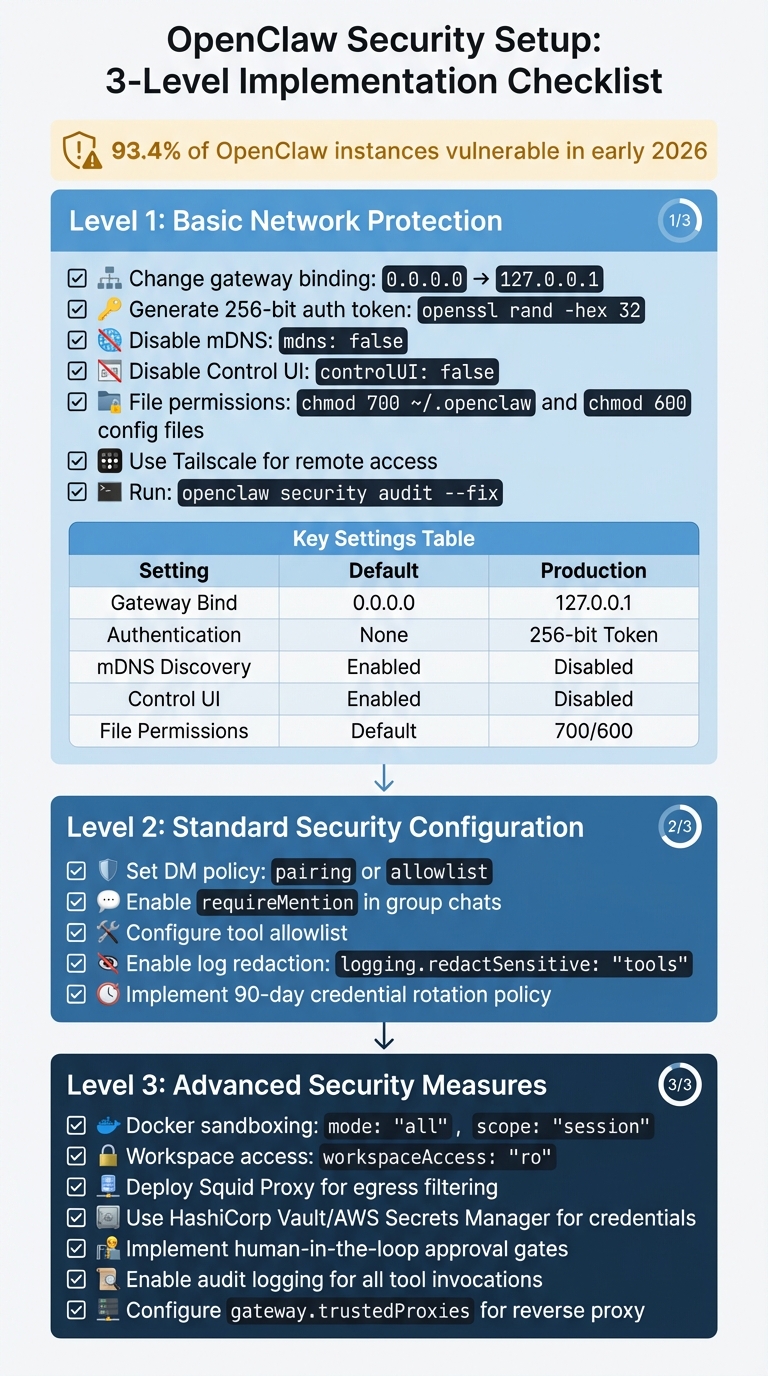
OpenClaw Security Setup: 3-Level Implementation Checklist
Follow these security measures step-by-step, starting with basic protections and gradually moving to advanced configurations. Each level builds upon the previous one, so it's essential to follow the order.
Level 1: Basic Network Protection
Begin by securing your network access. Change your gateway binding from 0.0.0.0 to 127.0.0.1 in your configuration file. To confirm this change, run the following command from a different machine:
curl -I http://[External-IP]:18789
The connection should be refused, indicating the binding change was successful.
Next, generate a 256-bit authentication token using:
openssl rand -hex 32
Add this token to your gateway configuration to ensure all requests include it, protecting against unauthorized access.
Disable mDNS discovery by setting:
mdns: false
This prevents operational broadcasts that could expose your system. Additionally, for production environments, disable the Control UI entirely with:
controlUI: false
This step is crucial, as exposed Control UI instances were responsible for leaking API keys in approximately 1,800 cases back in early 2026.
Tighten file permissions to secure sensitive files:
-
Set the OpenClaw directory permissions with
chmod 700 ~/.openclaw. -
Restrict configuration files (like
openclaw.json) tochmod 600.
For remote access, use Tailscale to create an encrypted private mesh network. Bind OpenClaw to your Tailscale IP (100.x.x.x) for added security.
Run openclaw security audit --fix to automatically address common vulnerabilities. For a deeper review, use openclaw security audit --deep, which checks over 50 security points.
Here’s a quick summary of key settings:
| Protection Layer | Default Setting | Recommended Production Setting |
|---|---|---|
| Gateway Bind | 0.0.0.0 (Public) |
127.0.0.1 (Loopback) |
| Authentication | Optional/None | Required (256-bit Token) |
| mDNS Discovery | Enabled (Full) | Disabled |
| Control UI | Enabled | Disabled |
| File Permissions | System Default | 700 (Dir) / 600 (File) |
Once your network is secure, move on to configuring access controls and permissions.
Level 2: Standard Security Configuration
After addressing basic network protections, refine user permissions and logging settings. Set your DM policy to either pairing or allowlist to block unauthorized users from interacting with your agent. In group chats, enable requireMention so the agent only responds when explicitly mentioned. These settings became default in version 2026.1.9 after researchers discovered 42,665 exposed instances, with 93.4% vulnerable to exploitation.
To further secure operations, configure a tool allowlist. This restricts which capabilities the agent can access, ensuring that even if a malicious skill is installed, it cannot execute unauthorized actions. For sensitive information, enable log redaction by setting:
logging.redactSensitive: "tools"
This prevents API keys and credentials from appearing in logs.
Finally, adopt a 90-day credential rotation policy for API keys and database passwords, ensuring they are regularly updated.
For production environments, proceed to advanced isolation and egress control measures.
Level 3: Advanced Security Measures
At this stage, focus on advanced isolation techniques and egress filtering for comprehensive security. Use Docker sandboxing with the following settings:
mode: "all"
scope: "session"
This creates a fresh, isolated container for each interaction, preventing the agent from accessing the host system. Additionally, configure workspace access as read-only with:
workspaceAccess: "ro"
or disable access entirely unless write operations are explicitly required.
For egress filtering, deploy Squid Proxy to restrict outbound connections. Allow access only to essential domains like api.anthropic.com or api.openai.com. Block internal network ranges (e.g., 10.x, 192.168.x) and cloud metadata endpoints (169.254.169.254) to prevent data leaks. This step is critical, as 7.1% of ClawHub skills were found to expose credentials through AI model context windows.
Move credentials out of plaintext files stored in ~/.openclaw/credentials/. Instead, use enterprise-grade secret managers like HashiCorp Vault, AWS Secrets Manager, or 1Password CLI, injecting keys at runtime.
For high-risk actions - like running shell commands, deleting files, or executing financial transactions - implement human-in-the-loop approval gates. Enable audit logging for all tool invocations and shell commands, and set up alerts for unusual activity, such as unauthorized egress attempts or abnormal API usage.
Lastly, if you’re using a reverse proxy like Nginx or Traefik, configure:
gateway.trustedProxies
This prevents authentication bypasses via spoofed X-Forwarded-For headers.
"CISOs must treat agents as production infrastructure." – VentureBeat CISO Guide, January 2026
Explore AI Tools on Flaex.ai
Discover the best AI tools for your workflow, curated, reviewed, and ranked.
Browse Directory →Security Audit Checklist
Once you've implemented your security measures, it's crucial to verify them thoroughly to ensure your deployment remains secure. OpenClaw provides built-in tools for scanning configurations, but manual checks are just as important to catch anything automated tools might overlook.
Running Automated Security Checks
OpenClaw's native openclaw security audit command is a powerful tool for identifying potential vulnerabilities, like exposed gateways, weak file permissions, or overly permissive allowlists. It's a good practice to run this command weekly in development environments and after making any configuration changes.
For a more in-depth scan, you can use the --deep flag. This enables live gateway probes, checks for symlink attacks, and validates plugin allowlists. It’s a proactive way to identify vulnerabilities before they can be exploited.
If the audit flags any issues, you can use openclaw security audit --fix to address them automatically. This command adjusts file permissions to 600, activates sensitive log redaction, and updates your group policy to allowlist mode. For domain-specific checks, run openclaw doctor.
Additionally, third-party tools like openclaw-security-scan provide extra validation, covering 12 specific checks, such as API key exposure and verifying your Node.js version. These tools can also integrate with CI/CD pipelines, like GitHub Actions or GitLab CI, to block builds if critical issues are detected.
"There is no 'perfectly secure' setup. The goal is to be deliberate about who can talk to your bot, where the bot is allowed to act, and what the bot can touch." – OpenClaw Documentation
After running automated scans, follow up with manual checks for a comprehensive review.
Manual Configuration Verification
Automated tools are helpful, but they can miss certain issues. Here are some manual steps to verify your configuration:
-
Check Network Binding: Run
netstat -tlnp | grep openclaw. If the output shows0.0.0.0, your gateway is exposed to the entire network. Update your settings to bind the gateway to127.0.0.1immediately. -
Verify File Permissions: Use
ls -la ~/.openclaw/to inspect permissions. Configuration files should have-rw-------(600), and directories should havedrwx------(700). If permissions are more permissive (e.g.,-rw-r--r--), correct them withchmod 600for files andchmod 700for directories. -
Inspect Skills Directory: Look for malicious or typosquatted skills in
~/.openclaw/skills/. Past attacks, such as ClawHavoc, introduced harmful skills likeclawhubbandauto-updater-agentto steal credentials. Delete any suspicious skills and rotate all API keys immediately. -
Verify Node.js Version: Run
node --versionto ensure you're using v22.12.0 or later, which addresses vulnerabilities like CVE-2025-59466 and CVE-2026-21636. - Test Authentication: Attempt to connect with an invalid token. Your gateway should reject the connection outright.
-
Check for mDNS Broadcasts: Use a network scanner to ensure
_openclaw-gw._tcpbroadcasts are disabled. If detected, setdiscovery.mdns.modetooff. -
Search for Auth Bypass Settings: Review your configuration for
dangerouslyDisableDeviceAuth. This setting should be either absent or set tofalse. Always use HTTPS or secure tunneling solutions like Tailscale.
Here’s a quick reference table for these checks:
| Check Item | How to Verify | Pass Criteria | Fix Action |
|---|---|---|---|
| Gateway Binding | `netstat -tlnp | grep 18789` | Shows 127.0.0.1:18789 |
| File Permissions | ls -la ~/.openclaw/ |
Files: 600, Directories: 700 | Use chmod 600 for files, chmod 700 for directories |
| Node.js Version | node --version |
v22.12.0 or higher | Update Node.js via nvm or package manager |
| Malicious Skills | ls ~/.openclaw/skills/ |
No suspicious/unknown skills | Delete suspicious skills; rotate API keys |
| mDNS Status | Check for _openclaw-gw._tcp broadcast |
No broadcast detected | Set discovery.mdns.mode to off |
| Auth Bypass | Search config for dangerouslyDisableDeviceAuth |
Absent or set to false |
Remove or correct the setting |
If any misconfigurations are found during these checks, it’s critical to rotate all credentials immediately. Earlier in 2026, researchers identified 42,665 exposed OpenClaw instances, with 93.4% being vulnerable due to default settings. Don’t let your deployment become part of that statistic.
Maintenance and Incident Response
Keeping OpenClaw secure is an ongoing process. With 41 security advisories published as of February 2026, regular maintenance and a solid incident response plan are critical to avoid breaches and ensure smooth operations.
Regular Security Tasks
Once your initial setup is secure, maintaining that security requires consistent effort. Routine tasks and quick responses to potential issues are crucial. For instance, using the --deep flag during scans enables live gateway probes, helping identify external vulnerabilities in real time.
Credential rotation is a key step - update all credentials, including gateway tokens and database passwords, every 30 to 90 days. Set up billing alerts and daily spending limits to catch unusual API usage before it becomes a problem.
Monthly reviews of session transcripts and gateway logs can reveal unexpected tool usage or anomalies. Retain logs for at least 90 days, or up to 365 days if compliance standards like SOC2 or HIPAA apply. Regularly pruning old data also reduces risk in the event of a breach.
Skills installed on your system should be checked monthly and before adding new ones. With 26% of agent skills containing vulnerabilities, it's important to verify the reputation of skill authors and scan for issues using openclaw security scan-skills. Also, ensure your Node.js runtime is updated to version 22.12.0 or higher to avoid known vulnerabilities like CVE-2026-21636.
Be alert to unusual activity, such as spikes in token usage, connections to unfamiliar domains, or tool actions outside business hours. These checks, combined with periodic audits, help maintain a secure and reliable deployment over time.
Incident Response Planning and Testing
Even with regular maintenance, incidents can happen. A clear response plan is essential for minimizing damage. If a security breach is suspected, stop the OpenClaw Gateway immediately. This step limits further exposure.
Rotate all credentials without delay. Update API keys for services like Anthropic and OpenAI, and revoke OAuth tokens for connected platforms such as Google, Slack, and Discord. Replace SSH keys and generate a new 256-bit gateway authentication token.
Audit logs are your best tool for understanding the scope of a breach. Look for unauthorized shell or filesystem tool calls in the audit.log file. Check for suspicious skills, as malicious campaigns like ClawHavoc have distributed harmful skills such as clawhubb and auto-updater-agent to steal credentials. Remove any questionable skills immediately.
"CISOs must treat agents as production infrastructure." – VentureBeat
In severe cases, rebuilding from a clean, hardened Docker image is often safer than trying to patch a compromised system. Regularly test your incident response plan by simulating potential issues, like an agent running a risky curl | bash command from an untrusted README. Document a "kill switch" procedure that team members can quickly execute during an active incident.
To further protect your system, implement human-in-the-loop (HITL) controls for high-risk actions, such as file deletions or shell commands. This adds an extra layer of security and can alert you to unauthorized activity. Disable mDNS broadcasts during containment by setting OPENCLAW_DISABLE_BONJOUR=1, and ensure sensitive data like API keys is redacted by configuring logging.redactSensitive to "tools".
Conclusion
Keeping OpenClaw secure demands constant attention. Recent scans and advisories highlight that most OpenClaw instances remain exposed, underscoring the need for a persistent focus on security. This isn't due to developer negligence but rather an underestimation of the ongoing effort required to maintain a secure environment.
Using the detailed checklist provided, the principles of defense in depth, least privilege, and identity-first configuration form a strong foundation for security. The concept of "identity first, model last" emphasizes prioritizing who can interact with your bot and defining its operational boundaries before relying on AI safeguards. Regularly running the command openclaw security audit --deep - ideally on a weekly basis - helps identify and address configuration drift before it escalates into a breach. Additionally, using Docker for isolation minimizes the impact of any potential compromises. This layered approach to security is only effective if it's paired with consistent upkeep and proactive incident management.
Security begins at setup but requires continuous effort. Routine tasks like rotating credentials, reviewing logs, and updating components (as detailed in the Maintenance section) are crucial. For example, upgrading Node.js to version 22.12.0 or newer addresses critical vulnerabilities such as CVE-2026-21636. Adding human-in-the-loop controls for high-risk actions further reduces the risk of unauthorized operations.
The space between functionality and security is where breaches often occur. By embedding these practices from the start and maintaining regular audits, you can protect your OpenClaw deployment from evolving threats. Stay vigilant, stay informed, and treat your OpenClaw setup with the same diligence as any critical production system.
Featured on Flaex