
Top Tools for Multi-API Workflow Orchestration

Top Tools for Multi-API Workflow Orchestration
Modern software relies on orchestrating multiple APIs to streamline workflows, improve efficiency, and enhance security. Tools for API orchestration range from code-heavy frameworks like Apache Airflow to low-code platforms like Workato and SnapLogic. Each tool offers unique strengths in integration, scalability, and cost structures, catering to different team expertise and project needs. Below is a quick overview of the key tools discussed:
- Apache Airflow: Open-source, Python-based, highly flexible but complex to set up and maintain.
- MuleSoft Anypoint Platform: Enterprise-grade iPaaS with reusable assets and robust API lifecycle management, requiring specialized training.
- Prefect: Python-native, dynamic workflows with hybrid deployment options, accessible for most developers.
- Workato: Low-code platform with pre-built connectors and AI tools, ideal for rapid deployment.
- SnapLogic: Visual interface with AI-assisted features, suited for both IT teams and business users.
- Apache Camel: Developer-focused, open-source integration framework with extensive connectivity options.
- Boomi: Unified platform combining integration, API management, and data governance, offering low-code tools.
- TIBCO Cloud Integration: Segmented tools for different user roles, supporting complex enterprise workflows.
- Azure Logic Apps: Serverless solution with extensive connectors and flexible deployment plans.
- AI Tools Directory (Flaex AI): A discovery hub for identifying and comparing tools for multi-API workflows.
Quick Comparison
| Tool | Integration Complexity | Scalability Type | Cost Structure | Required Skills | Implementation Time |
|---|---|---|---|---|---|
| Apache Airflow | High | Worker/K8s-based | Open-source (Free) | Python expertise | Months |
| MuleSoft Anypoint | High | Enterprise iPaaS | Enterprise Licensing | Specialized Training | Months |
| Prefect | Moderate | Hybrid/Cloud | Free/$100+ per month | Python Developers | Weeks |
| Workato | Low | AI-Powered iPaaS | Usage-based | Low-Code Users | Days/Weeks |
| SnapLogic | Low | Low-Code iPaaS | Usage-based | Citizen Integrators | Days/Weeks |
| Apache Camel | High | Code-driven | Open-source (Free) | Java Developers | Weeks/Months |
| Boomi | Low | Low-Code iPaaS | Usage-based | Low-Code Users | Days/Weeks |
| TIBCO Cloud | High | Enterprise iPaaS | Enterprise Licensing | Specialized Training | Months |
| Azure Logic Apps | Low | Serverless | Pay-as-you-go | Microsoft Cloud Teams | Weeks |
| AI Tools Directory | Low | Discovery/Recommendation | Freemium | Non-technical/Technical | Days (Research) |
Choosing the right tool depends on your team's expertise, project complexity, and budget. Open-source options like Apache Airflow and Apache Camel are cost-effective but require technical expertise. Low-code platforms like Workato, SnapLogic, and Boomi simplify workflows for non-technical users. Enterprise tools like MuleSoft and TIBCO are better for large-scale, complex integrations but come with higher costs and training requirements. Serverless solutions like Azure Logic Apps offer flexibility and scalability with minimal infrastructure management. Flaex AI's directory helps you identify the right tools for your needs.
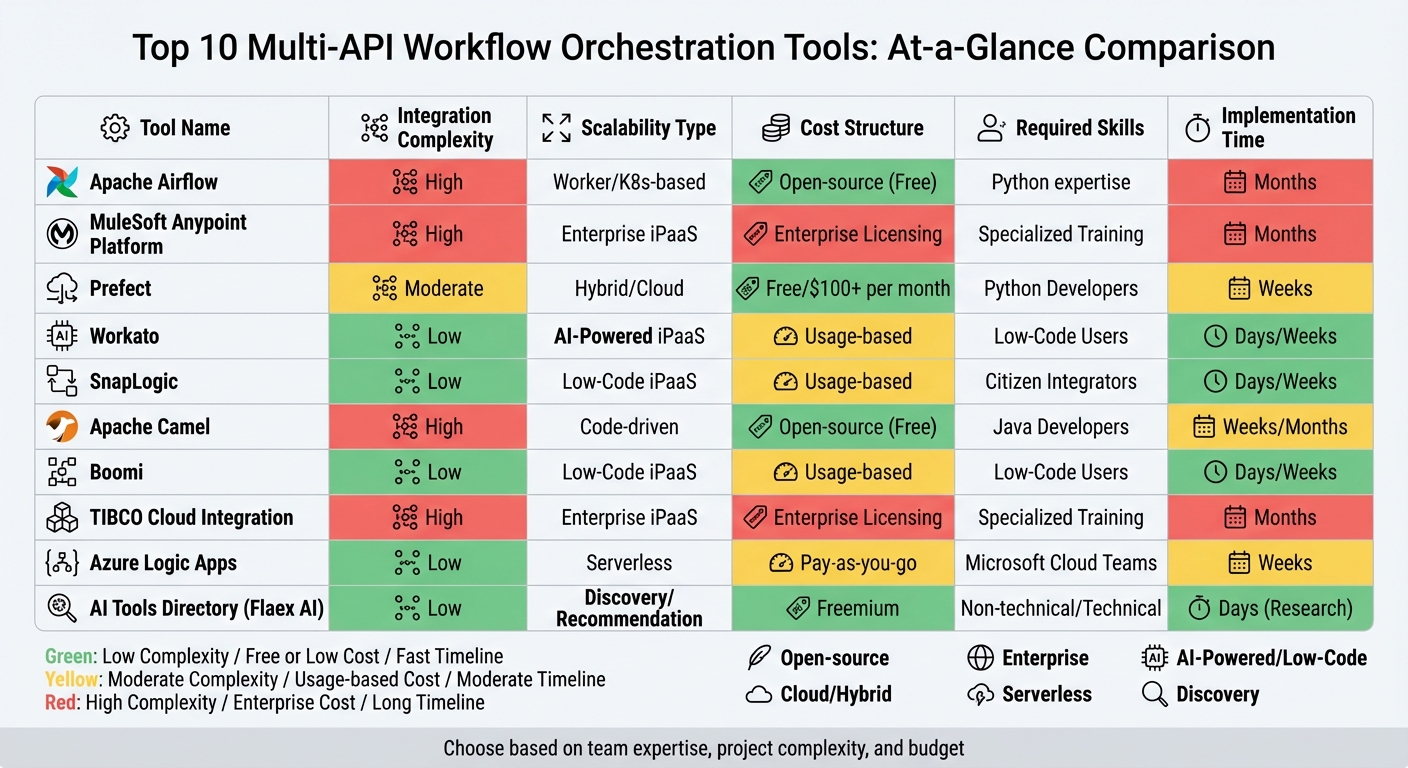
Multi-API Workflow Orchestration Tools Comparison: Features, Costs, and Implementation
7 Best AI Orchestration Tools in 2026 (Full Demo & Comparison)
Explore AI Tools on Flaex.ai
Discover the best AI tools for your workflow, curated, reviewed, and ranked.
Browse Directory →1. Apache Airflow
Apache Airflow has earned its place as one of the most established and widely-used open-source orchestration tools, with over 34,500 stars on GitHub. It enables users to define workflows as dynamic DAGs (Directed Acyclic Graphs) using Python, which makes it flexible enough to handle changing API endpoints and data structures. As the Apache Airflow documentation explains:
Airflow's extensible Python framework enables you to build workflows connecting with virtually any technology.
One of its key strengths is its extensive library of providers. These include pre-built operators and hooks for major cloud platforms like AWS, GCP, and Azure, as well as integrations with SaaS tools such as Salesforce, Zendesk, and Slack. You can also discover the best AI tools to integrate into these workflows via our directory. It also supports standard protocols like HTTP and FTP. This broad ecosystem often removes the need for developers to create custom API requests from scratch.
Scalability and Performance
Airflow is designed to scale from a single process to large distributed clusters, thanks to its flexible executor system. For example:
- CeleryExecutor: Handles distributed task queues, making it ideal for scaling across multiple machines.
- KubernetesExecutor: Runs tasks in on-demand Kubernetes pods, which dynamically scale based on workload.
Another noteworthy feature is the Triggerer component. It uses deferrable operators to handle tasks with long API response times. By releasing worker slots during these wait periods, the system optimizes resource usage and improves efficiency.
Development Team Skill Requirements
To deploy and maintain Airflow effectively, teams need strong Python expertise and solid platform engineering skills. Administrators are responsible for managing critical components like metadata databases, executors, schedulers, and worker health. This complexity is a common challenge. Hugo Lu, CEO of Orchestra, highlights this issue:
Airflow (OSS) struggles with complexity and set-up: complex and time-consuming to set up and maintain.
For organizations lacking a dedicated platform engineering team, managed services such as Astronomer or Google Cloud Composer can simplify the process by handling much of the infrastructure maintenance.
Cost and Licensing Model
Airflow is free to use under the Apache License 2.0. However, the actual cost of ownership can be significant due to the engineering hours required to manage and maintain self-hosted infrastructure. Managed services provide an alternative with usage-based pricing. For instance, Google Cloud Composer offers a small-scale setup for approximately $63 per month.
Next, let’s take a look at another powerful orchestration tool, the MuleSoft Anypoint Platform.
2. MuleSoft Anypoint Platform
MuleSoft Anypoint Platform blends API lifecycle management with integration capabilities into a single solution. Instead of focusing solely on orchestration, it uses an API-led connectivity method structured into three layers - System, Process, and Experience APIs. This modular design makes it simpler to reuse integration components across various workflows, saving time and effort.
Integration Complexity
The platform’s centralized approach is designed to handle complex multi-API workflows. It offers over 1,500 pre-built integrations for SaaS applications, on-premises systems, and even older mainframe technologies. MuleSoft’s data mapping language, DataWeave, processes data transformations up to six times faster than conventional tools. Chris Taylor, VP of Digital Accelerator at Airbus, highlighted its impact:
MuleSoft enables our developers to search, discover, amend, develop, and deploy APIs. Having reusable assets across the enterprise allows us to develop faster and cheaper, and at scale.
On average, organizations find that 45% of their API and integration assets become reusable within their enterprise, which significantly speeds up project timelines.
Scalability and Performance
MuleSoft processes 60 billion transactions monthly, ensuring reliable performance and uptime. It supports scalability through several deployment options: CloudHub (a managed PaaS with auto-scaling), Runtime Fabric (Kubernetes-based container orchestration), and on-premises setups. For instance, CloudHub can automatically allocate extra computing power during traffic surges, eliminating the need for manual adjustments.
In 2024, Jade Global implemented MuleSoft for a US-based Hi-Tech company, achieving over 120 global integrations and doubling their rollout speed. Mihir Dharurkar, Solution Architect at Jade Global, described the platform’s scalability:
MuleSoft's naturally scalable design allows businesses to easily grow their integration capabilities as their needs change.
The platform supports a range of replica sizes, from mule.nano (0.05 vCore, 1 GB memory) to mule.2xlarge.mem (2 vCore, 7 GB memory). For CloudHub 2.0 and Runtime Fabric, the maximum deployment size is capped at 350 MB.
Development Team Skill Requirements
To work effectively with MuleSoft, teams need to learn DataWeave and become proficient with tools like Anypoint Studio or Code Builder. While this dual approach caters to both business users and developers, smaller teams may find the specialized training requirements challenging, though they can compare top AI tools to find more accessible alternatives.
That said, organizations often report significant efficiency gains post-implementation, including a 70% reduction in ongoing API management efforts and a 60% cut in the time needed for API and integration delivery.
Cost and Licensing Model
MuleSoft operates on an annual subscription model, with pricing based on "Mule Flow" (integration scope) and "Mule Message" (usage volume). The platform offers tiered packages, starting with Integration Starter for essential features, Integration Advanced for hybrid deployments and high availability, and standalone API Management options.
Although its licensing costs are higher compared to some alternatives, the platform’s value is evident. Brad Ringer, Principal Solution Engineer at AT&T, shared:
MuleSoft saves each of our teams 30 minutes a day, which over the course of a year is more than 2 million work hours to focus on what they do best - helping our customers.
For those interested in exploring the platform, MuleSoft offers a 30-day free trial with no credit card required, providing teams the opportunity to test its features before making a commitment.
Next, we’ll examine another orchestration tool.
3. Prefect
Prefect transforms Python functions into production-ready workflows using decorators like @flow and @task. This approach eliminates the need for complicated DSLs or YAML configurations, making it easier to manage dynamic, multi-API workflows.
Integration Complexity
Prefect simplifies handling complex API interactions by allowing workflows to dynamically adapt based on incoming data or conditions. Unlike tools with rigid structures, Prefect uses Python’s native control flow (like if/else statements and loops) to manage tasks and branches. It also integrates seamlessly with major cloud platform categories like AWS, GCP, and Azure, while supporting custom blocks for API integrations.
In 2024, Snorkel AI used Prefect OSS to manage over 1,000 flows per hour, processing tens of thousands of tasks daily. By switching to Prefect, they achieved a 20x boost in throughput for network-heavy asynchronous tasks. Smit Shah, Director of Engineering at Snorkel AI, praised Prefect, saying:
We improved throughput by 20x with Prefect. It's our workhorse for asynchronous processing - a Swiss Army knife.
Scalability and Performance
Prefect 3.0, launched in 2024, significantly reduced runtime overhead - by as much as 90%. For high-volume API workloads, it offers specialized task runners like ThreadPoolTaskRunner for concurrent I/O tasks and options like DaskTaskRunner or RayTaskRunner for distributed execution across multiple machines.
Its hybrid architecture keeps code and data within your private environment, while Prefect handles orchestration metadata, scheduling, and state tracking. This setup avoids the need for inbound firewall exceptions. Additionally, Prefect’s durable execution feature ensures workflows resume from their last successful step after a failure, avoiding unnecessary API retries.
Endpoint, a digital title and settlement company, saw a 73.78% reduction in invoice costs after switching from Astronomer (Airflow) to Prefect. This shift allowed their Data Engineering and MLOps teams to triple their production output while cutting expenses. Sunny Pachunuri, Data Engineering and Platform Manager at Endpoint, noted:
Switching from Astronomer to Prefect resulted in a 73.78% reduction in invoice costs alone.
Development Team Skill Requirements
Prefect is designed to work with standard Python knowledge, making it accessible for most development teams. Its "Work Pools" feature separates workflow logic from infrastructure, enabling teams to easily switch between environments like Docker, Kubernetes, or serverless platforms without modifying their Python code. For best results, teams should manage task granularity carefully and ensure thread safety when using the default ThreadPoolTaskRunner.
Cost and Licensing Model
Prefect offers an open-source version under the Apache 2.0 license, allowing teams to self-host orchestration with full VPC control at no cost. For those seeking a managed solution, Prefect Cloud provides high-availability orchestration with a free tier for individuals and paid options for teams and enterprises. These paid tiers include advanced features like SSO, RBAC, and audit logs, with a 99.99% uptime guarantee. The open-source engine has earned strong community support, with over 21,600 stars on GitHub, making it a popular choice for teams looking to start without upfront expenses.
4. Workato
Workato takes a recipe-based orchestration approach, allowing users to create workflows that connect APIs, events, and business logic into reusable modules. Instead of rigid structures, the platform offers over 1,200 pre-built connectors for SaaS, on-premises, and cloud applications. For cases where native connectors aren’t available, Workato provides universal options for HTTP, OpenAPI, GraphQL, and SOAP. This flexibility makes it a strong tool for handling complex integrations.
Integration Complexity
Workato simplifies integration challenges through API Collections, which organize endpoints based on their function. For high-volume requests, API Proxy collections forward them directly to backends with minimal processing. Meanwhile, API Recipe collections map endpoints to custom Workato recipes, enabling multi-app orchestration and error handling. The platform also supports the Model Context Protocol (MCP), which packages enterprise APIs as reusable "skills" to standardize communication between AI agents and APIs. Developers can use Recipe Functions to break workflows into smaller, reusable parts, ensuring consistency across integrations.
Scalability and Performance
Workato’s native Scheduler app lets users automate workflows with standard (hourly, daily, weekly) or custom cron-based schedules. For handling large datasets, the platform supports batch and bulk triggers, with bulk triggers using CSV streaming to process unlimited data volumes. Its serverless, containerized runtime automatically scales while maintaining 99.9% uptime reliability. Development teams can also adjust recipe concurrency to handle multiple jobs simultaneously. For hybrid setups, on-premises agents can be grouped to distribute workloads evenly. These features ensure scalability while keeping operations efficient for developers.
Development Team Skill Requirements
Workato is a low-code platform, which means basic integrations require minimal programming. For advanced needs, it offers a Connector SDK and supports languages like Python, JavaScript, Ruby, and SQL for custom transformations or connectors. Additionally, AI Copilots assist users by generating pipelines and transformations using natural language, lowering the technical barrier for less experienced teams. This setup is ideal for managing the dynamic scheduling and multi-API pipelines that modern businesses demand. Teams should also note that synchronous recipe calls are included in the parent call cost, helping optimize budgets.
Cost and Licensing Model
As of February 2024, Workato operates on a usage-based pricing model, which includes a base platform fee and variable costs based on consumption. There are four editions available - Standard, Business, Enterprise, and Workato One - each offering more advanced features than the previous tier. Usage is calculated using a unified billing unit that covers API calls, MCP calls, and business actions, giving teams flexibility in resource allocation. To manage expenses, Workato provides real-time cost tracking through Workato Insights and AIRO, helping teams avoid unexpected charges. Additionally, API proxy calls are billed at a lower rate compared to managed API calls, offering a cost-efficient option for high-volume operations. This pricing structure supports scalable integration efforts without breaking the budget.
5. SnapLogic
SnapLogic stands out as a visually intuitive, low-code platform designed for quick and efficient multi-API integration. At its core are "Snaps", pre-built connectors that act as building blocks for seamless integrations. With more than 1,000 Snaps available, the platform supports popular AI and data tools like Salesforce, Workday, Snowflake, and Databricks, among others. Instead of relying on rigid coding, users can simply drag and drop Snaps into Pipelines to create integrations. For advanced use cases, SnapLogic offers SnapGPT, a generative AI assistant that enables integration building through natural language commands, while Iris AI provides automatic suggestions for connections and transformations. For teams needing more tailored guidance, an AI project advisor can help navigate these complex tool selections. This makes the platform approachable for both IT teams and business users, although more complex projects may still demand technical expertise.
Integration Complexity
SnapLogic boasts compatibility with over 1,800 applications, making it a strong choice for large-scale enterprise needs. However, it’s important for teams to verify that key applications in their stack support functions like CRUD operations, bulk processing, or CDC through SnapLogic. A case in point: Guild managed to cut customer onboarding time for engineers by 70% and replaced over 1,000 lines of code with a single configuration file.
Scalability and Performance
SnapLogic’s architecture is designed for scalability, using a cloud-based Control Plane combined with Snaplex for execution. The platform’s least-loaded algorithm ensures efficient horizontal scaling, accommodating both streaming and batch processes. Snaplex can function as Cloudplexes (managed by SnapLogic) or Groundplexes (self-managed, either on-premises or in private clouds). For enterprises with high-volume demands, SnapLogic offers High-Performance Nodes and Ultra-Pipelines, enabling near real-time processing at scale. Swati Oza, Director of IT Emerging Technology at Hewlett Packard Enterprise, highlighted the platform’s impact:
SnapLogic enabled rapid deployment across 1,800 applications while reducing support overhead and costs by over 25%.
This blend of scalability and simplicity enhances SnapLogic’s appeal for businesses.
Development Team Skill Requirements
SnapLogic’s visual interface and AI tools make it accessible to both IT professionals and less technical users. However, non-technical users might face challenges when dealing with highly customized logic. For simpler integrations, teams can rely on pre-built Snaps and templates, while more complex scenarios might require a deeper understanding of data mapping and error handling. The platform’s AI features, like Iris AI, help streamline repetitive tasks and recommend optimal configurations, easing the workload for development teams.
Cost and Licensing Model
SnapLogic’s pricing is structured around package-based bundles, avoiding variable consumption fees. Both Business and Enterprise packages include unlimited data movement, ensuring predictable costs regardless of usage volume. The Business package includes one Org (logical domain), while the Enterprise package offers three Orgs (one for production and two for sandboxes). Core Snaps are included in the base packages, while Premium Snaps are offered separately. For example, Tier One Premium Snaps for applications like Workday or NetSuite cost around $45,000, and Tier Two Premium Snaps are priced at approximately $15,000. According to a Total Economic Impact study, SnapLogic delivers a 181% ROI with a payback period of under six months, generating $3.3 million in benefits over three years. Nisha Clark, Former CIO at Abano Healthcare, shared her experience:
We've saved over $250,000 just by the simplicity of the implementation and the cost-effectiveness of the solution.
6. Apache Camel
Apache Camel is a standout tool for orchestrating dynamic multi-API workflows, offering a code-first, developer-focused approach. This open-source integration framework is built on Enterprise Integration Patterns (EIPs) and requires manual coding through Domain-Specific Languages (DSLs) like Java, XML, YAML, or Groovy. With over 300 components available, Camel can connect to nearly any API, database, messaging system (like Kafka or JMS), or cloud service (AWS, Azure). It also supports around 50 data formats, making it a solid choice for bridging diverse system protocols. As of February 19, 2026, the framework's community actively maintains Long-Term Support (LTS) versions, including the 4.18 release.
Integration Complexity
Camel shines with its flexibility and wide connectivity options, though this comes at the cost of a steeper learning curve. Teams need to align their workflows with EIPs, such as content-based routing, splitters, and aggregators. Camel can be used as a library within frameworks like Spring Boot or Quarkus or run as a standalone service, making it ideal for microservices architectures. It’s particularly effective for scenarios requiring custom logic or real-time, event-driven integrations, offering an edge over batch-oriented tools like Airflow. To ease adoption, newer subprojects like Camel Karavan and Camel JBang are introducing low-code visual designers and CLI-based tools for rapid prototyping.
Scalability and Performance
Apache Camel has adapted well to cloud-native environments, making it a strong choice for Kubernetes-based deployments. Tools like Camel K enable serverless-style integrations with rapid scaling, while Camel Quarkus provides fast startup times and a low memory footprint for containerized applications. The framework also incorporates advanced features like exchange pooling to reduce object allocation overhead and stream caching for handling large payloads efficiently. These optimizations make it capable of high-throughput orchestration across diverse APIs. Additionally, Camel supports load balancing and clustering through its EIPs, ensuring smooth management of real-time workflows without the complexity of traditional Enterprise Service Buses.
Development Team Skill Requirements
As a developer-driven framework, Apache Camel requires teams to have strong technical expertise. Proficiency in one of its supported DSLs - such as Java, XML, YAML, Groovy, Scala, or Kotlin - is essential, along with a solid grasp of Enterprise Integration Patterns. While Camel offers extensive flexibility for crafting custom workflows, it doesn’t provide the built-in API governance features common in enterprise iPaaS solutions. Pre-built components and templates can simplify basic integrations, but handling complex scenarios demands deep technical skills. Its moderate learning curve makes it more suitable for experienced development teams.
Cost and Licensing Model
One of Camel’s key advantages is its cost structure. As an open-source tool distributed under the Apache License v2.0, it’s completely free to use. Unlike enterprise iPaaS platforms, there are no fees for connectors, cores, or data volume, making it an attractive option for organizations aiming to avoid high commercial costs. The primary investment lies in the expertise required to design and maintain integration workflows, giving teams full control over their logic without incurring additional licensing expenses.
7. Boomi
Boomi provides a unified platform for managing multi-API workflows, combining iPaaS, API management, data governance, and AI agent orchestration into one cloud-native system [72, 76]. Recognized as a Leader in the Gartner® Magic Quadrant™ for iPaaS for 11 years running, the platform supports over 30,000 businesses worldwide. With more than 1,500 pre-built connectors and compatibility with over 300,000 unique endpoints [72, 76], Boomi is designed for organizations tackling complex API ecosystems.
Integration Complexity
Boomi's low-code visual interface simplifies the creation of multi-API workflows, making it easier for teams to build integrations without extensive coding knowledge. Its drag-and-drop environment is complemented by features like "Boomi Suggest", which uses machine learning to recommend data mappings based on over 200 million anonymized integration patterns. Additionally, "Agentstudio" enables AI agents to communicate via APIs, automating end-to-end business processes [76, 74]. The platform's "API Control Plane" centralizes the management of multiple API gateways, helping businesses avoid vendor lock-in and resolve gateway conflicts.
For example, PTC leveraged Boomi to update its legacy systems, achieving a 75% reduction in API development time while creating over 60 reusable APIs. This streamlined approach highlights how Boomi's tools can handle both complexity and scalability.
Scalability and Performance
Boomi is designed to process billions of API transactions, delivering global-scale critical transactions without overhead. It supports hybrid deployments, allowing runtimes to operate in the cloud, on-premises, or at the edge to meet stringent performance and latency needs. Intelligent routing mechanisms distribute requests based on service health and location, while granular rate limiting and throttling protect backend systems from overload [79, 75].
For instance, Origin Energy used Boomi to manage over 1,500 integrations, achieving an 80% reduction in integration time. Smartsheet also saw success, automating its order-to-cash process to handle a 2x increase in sales order volume while achieving 4x faster development speeds.
Development Team Skill Requirements
Boomi's low-code tools make it accessible to both business analysts and integration developers. However, advanced multi-API orchestration may require familiarity with REST/SOAP protocols, JSON/XML mapping, and occasionally Python for custom logic [80, 81]. This user-friendly design earned Boomi high marks for "Ease of Use" on G2. A Technology Director shared:
It is a great tool that can be used by anyone with a fair degree of technical knowledge as it allows for building data processes without needing to code.
AI-driven features like DesignGen and DataDetective further assist teams by speeding up setup and troubleshooting [80, 74].
Cost and Licensing Model
Boomi offers flexible pricing options, including annual subscriptions, monthly pay-as-you-go (PAYG) starting at $99/month, and consumption-based credits measured in Boomi Data Units (BDUs) [80, 82]. The PAYG model charges a flat $0.05 per Boomi Message, with no long-term commitment required. For multi-API orchestration, most organizations opt for the "Professional Plus" tier or higher, which includes API-enablement features. Enterprise-level tiers unlock advanced capabilities like clustered runtime for high availability and parallel processing.
Users report up to a 347% ROI, as Boomi consolidates integration and API management tasks into a single subscription, reducing operational overhead [73, 75].
8. TIBCO Cloud Integration

TIBCO Cloud Integration takes a tailored approach to API orchestration, segmenting its tools based on user roles. It offers "Connect" for no-code SaaS integration aimed at business analysts, "Integrate" for enterprise-level patterns using BusinessWorks, and "Develop" for event-driven applications powered by Flogo's Go engine. This structure ensures that teams can align the right tool with the complexity of their workflows, though selecting the ideal capability requires thoughtful evaluation. Let’s dive into the platform’s core operational features.
Integration Complexity
TIBCO manages complex multi-API workflows through two orchestration models: parallel orchestration, which splits a single request into simultaneous calls to various endpoints via Servemyapi before merging the responses, and sequential orchestration, which processes APIs in a specific order for tasks like authorization or fulfillment. Its API-first design streamlines the development process by enabling teams to create API contracts and mock applications upfront.
The platform’s complexity depends on the tool being used. For example, Connect offers a user-friendly graphical interface but limits flows to 250 blocks, making it ideal for business users. On the other hand, Integrate caters to more advanced use cases and typically requires formal training to take full advantage of its enterprise integration patterns. To ease the learning curve, the TIBCO Flogo Design Assistant allows users to build applications using natural language prompts.
Scalability and Performance
TIBCO’s Flogo engine, built with Golang, supports a wide range of deployment options, including edge, cloud, serverless, and on-premises setups. It’s designed for optimal performance, offering low memory usage, minimal latency, and fast startup times, making it suitable for high-throughput scenarios. While the platform delivers reliable scalability and stability, some users have remarked that its interface feels outdated compared to newer cloud-native tools.
Development Team Skill Requirements
TIBCO accommodates both non-technical users and seasoned developers. While its no-code and low-code tools are accessible to business analysts and citizen integrators, the platform’s more advanced features - like enterprise integration patterns - demand a higher level of expertise and formal training. Fortunately, TIBCO’s community of over 60,000 experts provides a wealth of support resources, helping teams navigate the platform’s intricacies.
Cost and Licensing Model
TIBCO offers a tiered subscription model to address varying deployment needs. The pricing structure includes:
- Basic Plan: $400/month, which includes 5 iPaaS app instances and community support.
- Premium Plan: $1,500/month, offering 15 app instances and standard support.
- Hybrid Plan: Custom pricing, providing 25 app instances per pack, enterprise API management for up to 1 million queries per month, and deployment flexibility across on-premises, private cloud, or edge environments.
Licensing is based on "Application Instances" for cloud deployments or "Processors" for on-premises setups. While the platform earns a 4.2/5 rating from 160 reviews, its licensing model has been criticized for its complexity compared to newer alternatives. Organizations should carefully monitor their instance usage, as costs scale with demand. Additionally, some specialized connectors in the TIBCO Marketplace require separate licensing, adding another layer of consideration.
This pricing approach ensures TIBCO can meet diverse deployment needs, making it a solid choice for organizations with varying levels of integration complexity. However, teams must weigh the platform’s capabilities against its learning curve and licensing intricacies.
9. Azure Logic Apps
Azure Logic Apps is a standout option for managing dynamic task scheduling in multi-API pipelines, complementing other orchestration tools. With Microsoft's serverless integration technology at its core, this platform handles over 205 billion actions monthly for more than 65,000 customers worldwide. It offers a dual approach: a drag-and-drop visual designer for simplicity and a code-first option in Visual Studio Code, supporting Python, .NET, PowerShell, and JavaScript. This flexibility allows teams to work in their preferred style without compromising on capabilities.
Integration Complexity
Azure Logic Apps makes multi-API workflows easier with its extensive library of over 1,400 prebuilt connectors, covering platforms like Salesforce, SAP, Microsoft 365, and IBM Mainframes. For more advanced workflows, it supports orchestration patterns like prompt chaining, AI agent routing, and parallel processing. Its built-in Data Mapper simplifies XML and JSON transformations, while native EDI operations facilitate B2B transactions using protocols like EDIFACT, X12, and AS2.
Users can choose between two resource types, each tailored to specific needs:
- Consumption Plan: Runs in a multitenant environment with pay-as-you-go pricing, making it ideal for simpler workflows.
- Standard Plan: Offers single-tenant hosting with dedicated resources, avoiding interference from other tenants and enabling enterprise-grade features like native VNet integration.
To streamline security, Microsoft recommends managed identities for authenticating Azure resource connections, eliminating the need for manual credential management. Developers can further enhance error resilience by renaming triggers and actions and grouping related actions into Scopes using Try-Catch-Finally blocks. These options allow teams to tailor workflows to their specific operational and security needs.
Scalability and Performance
As a serverless solution, Azure Logic Apps takes care of infrastructure, scaling, and performance automatically. The Standard plan introduces Stateless workflows, designed for high-throughput scenarios where state persistence isn't necessary. These workflows keep execution data in memory, avoiding the overhead of external storage.
For task scheduling, Recurrence triggers are perfect for fixed schedules, while Webhook triggers handle event-driven execution without incurring unnecessary polling costs. Complex pipelines benefit from the "Orchestrator-workers" pattern, where a central logic app delegates tasks dynamically to specialized workers or APIs. The Standard plan also supports deployment slots, enabling zero-downtime updates during workflow modifications. Microsoft emphasizes that the platform "handles scale, availability, and performance", backed by a team of over 34,000 engineers dedicated to security across Azure.
Development Team Skill Requirements
Azure Logic Apps caters to a wide range of skill levels. While the visual designer is accessible to citizen developers, more complex workflows - like multi-API orchestration - require familiarity with Azure API Management, JSON/XML schemas, and DevOps practices for automated deployments. The platform also supports "agentic workflows", enabling AI agents to perform autonomous actions or engage in conversational collaboration. Teams working on B2B integrations should understand protocols like AS2, X12, EDIFACT, and RosettaNet.
Cost and Licensing Model
Azure Logic Apps provides two pricing models:
- Consumption Plan: Charges per execution - $0.000025 per action after the first 4,000 free actions per subscription. Standard connectors cost $0.000125 per call, while Enterprise connectors are $0.001 per call.
- Standard Plan: Offers fixed monthly hosting, starting at approximately $175.16/month for WS1 (1 vCPU, 3.5 GB memory), $350.33/month for WS2, and $700.65/month for WS3.
| Plan Type | Best For | Pricing Model | Key Benefit |
|---|---|---|---|
| Consumption | Low-frequency, unpredictable workloads | Pay-per-execution | Only pay when workflows run |
| Standard | High-volume enterprise integrations | Fixed hosting plan | Predictable billing, better performance |
| Hybrid | On-premises or compliance-driven scenarios | vCPU usage on customer infrastructure | Local processing with centralized governance |
To maximize cost efficiency, prioritize built-in connectors, which are often free under the Standard plan or cheaper in the Consumption model. Stateless workflows in the Standard plan are ideal for high-volume tasks under five minutes, as they avoid external storage fees. Integration Accounts for B2B/EDI capabilities are billed hourly: Basic at $0.42/hour (2 trading partners, 500 maps/schemas), Standard at $1.37/hour (1,000 trading partners), and Premium at $1.37/hour with unlimited capacity. Organizations can use Azure Cost Management tools to monitor expenses, set budgets, and detect anomalies.
10. AI Tools Directory (Flaex AI)
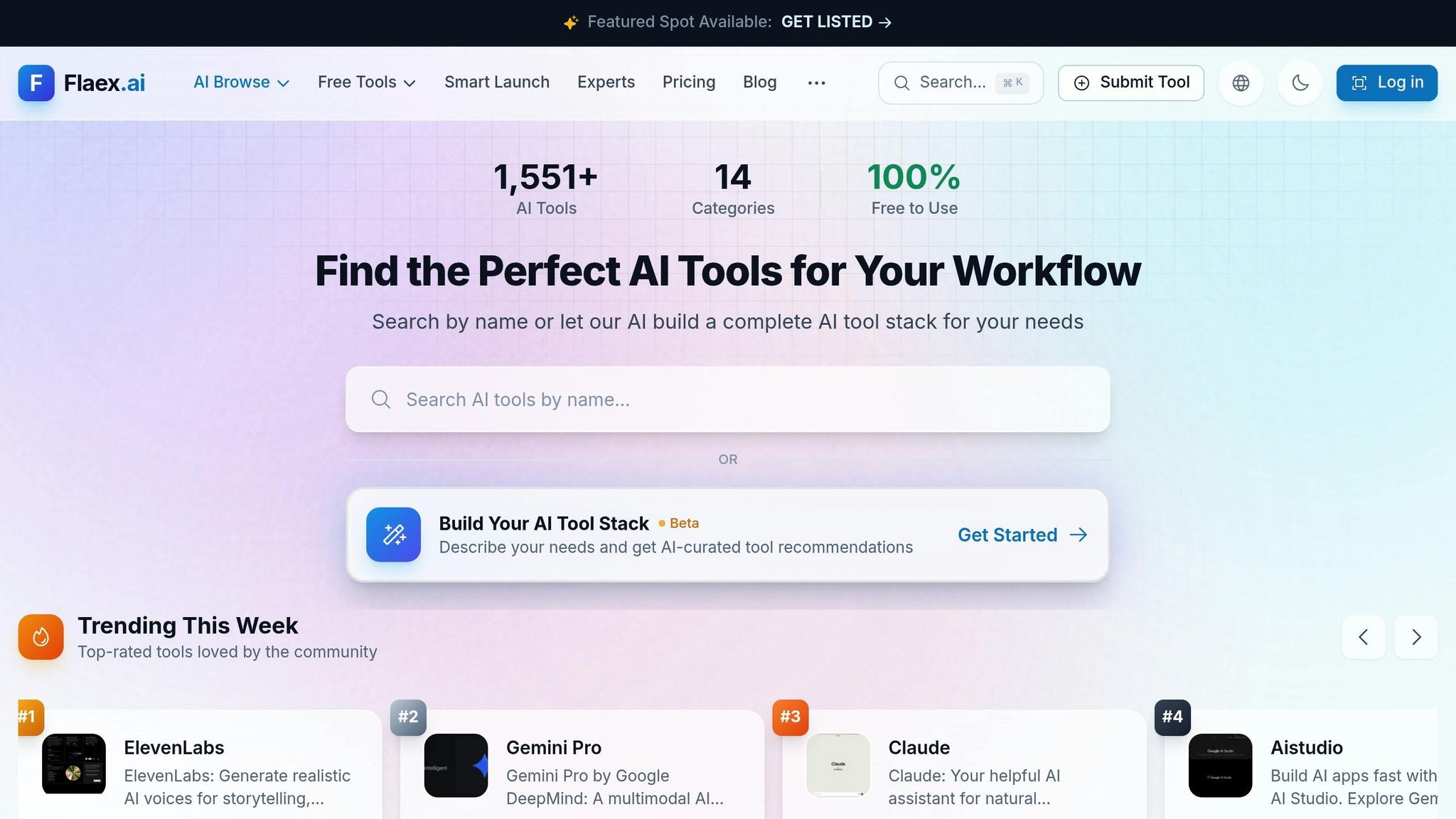
The AI Tools Directory by Flaex AI serves as a discovery hub for managing multi-API workflows. With a catalog of over 1,527 AI tools across categories like automation, development, audio, video, and image generation, it helps teams identify the best API combinations for their projects. Built-in AI Agents guide users by comparing tools, suggesting workflows, and aligning project goals with the right tech stack. This reduces the time spent on trial and error, empowering teams to make informed decisions when managing complex multi-API workflows.
Integration Complexity
Finding the right tools is made easier with advanced search features, trending tool highlights, and filters that sort by free options, top ratings, or newly added tools. Each tool listing includes detailed information about functionality, use cases, and user ratings. For teams tackling multi-API pipelines, the MCP Server segments provide integration guidance, covering factors like reliability, cost, security concerns, and data exposure risks. This ensures developers avoid common mistakes and build secure, efficient workflows. The platform’s design caters to both technical and non-technical users, making it approachable for a broad audience.
Development Team Skill Requirements
The platform bridges the gap between technical and non-technical users. Non-technical stakeholders benefit from AI-curated recommendations that simplify decision-making, while developers have access to technical specs and community feedback. AI Agents further streamline the process by translating business goals into actionable stack recommendations. This makes the directory a valuable tool for teams with varying levels of expertise. Weekly email updates keep users informed about new tools and integration trends, ensuring they stay ahead in the fast-evolving AI landscape.
Cost and Licensing Model
Operating on a freemium model, the directory offers free access to its extensive database of over 1,527 tools, along with basic search, filtering, and recommendation features. It aggregates tools with different licensing models, including freemium, subscription-based, usage-based, and open-source options, making it easy for users to experiment with free tiers or trials. Premium plans unlock advanced features, catering to individual developers, startups, and enterprise teams. By focusing on reducing research time and minimizing integration risks, the AI Tools Directory complements traditional orchestration tools, helping teams build a strong multi-API strategy without charging for execution workflows.
Comparison Table
Dynamic task scheduling in multi-API pipelines requires tools that strike a balance between efficiency and usability. Choosing the right orchestration tool means weighing factors like integration complexity, scalability, cost, and the technical expertise of your team. Below is a comparison of ten popular tools across these key areas to guide your decision-making process.
| Tool | Integration Complexity | Scalability Type | Cost Structure | Required Technical Skills | Implementation Timeline |
|---|---|---|---|---|---|
| Apache Airflow | High | Worker/K8s based | Open-source (Free) | Platform Engineers (Python) | Months (Setup + Tuning) |
| MuleSoft Anypoint Platform | High | Enterprise iPaaS | High Enterprise Licensing | Enterprise IT (Specialized Training) | Months (Requires Training) |
| Prefect | Moderate | Hybrid/Cloud | Free plan; Starter at $100/month | Python Developers | Weeks |
| Workato | Low | AI-Powered iPaaS | Endpoint-based (Scales with connections) | Business Users (Low-Code) | Days/Weeks |
| SnapLogic | Low | Low-code iPaaS | Usage-based (Scales with volume) | Citizen Integrators | Days/Weeks |
| Apache Camel | High | Code-driven | Open-source (Free) | Java Developers | Weeks/Months |
| Boomi | Low | Low-code iPaaS | Usage-based (Scales quickly) | Citizen Integrators | Days/Weeks |
| TIBCO Cloud Integration | High | Enterprise iPaaS | Enterprise Licensing | Enterprise IT (Specialized Training) | Months (Requires Training) |
| Azure Logic Apps | Low | Serverless | Pay-as-you-go | Microsoft-centric cloud teams | Weeks |
| AI Tools Directory (Flaex AI) | Low | Discovery/Recommendation | Freemium (Free access to 1,527+ tools) | Non-technical to Technical | Days (Research Phase) |
Tools like Workato, Boomi, and SnapLogic offer low-code environments with drag-and-drop interfaces, enabling rapid workflow creation for users with minimal technical expertise. On the other hand, developer-focused frameworks like Apache Airflow and Apache Camel call for robust coding skills and longer setup times. As Hugo Lu, CEO of Orchestra, aptly points out:
The hardest part of orchestration isn't writing workflows - it's operating them at scale.
Serverless solutions such as Azure Logic Apps minimize infrastructure management, allowing teams to concentrate on business challenges rather than ongoing maintenance. Meanwhile, enterprise iPaaS platforms like MuleSoft Anypoint Platform and TIBCO Cloud Integration handle intricate integrations with governance tools but require substantial training and long-term planning. Custom-built orchestration can take three to five times longer to develop, underscoring the critical nature of the build-versus-buy decision.
Cost structures play a significant role in determining the overall value of each tool. Open-source options like Apache Airflow and Apache Camel eliminate licensing fees but demand technical expertise for maintenance. Cloud-native platforms provide scalability for fluctuating workloads but require careful optimization to manage costs. The AI Tools Directory stands out with its freemium model, offering access to over 1,500 tools for experimentation before committing to a paid plan.
This comparison highlights the diverse approaches to API orchestration, helping you identify tools that align with your project's specific needs and resources.
Conclusion
When it comes to selecting the right multi-API workflow orchestration tool, the goal isn't to find the "best" platform, but rather the one that aligns with your team's expertise, infrastructure, and business objectives. As Hugo Lu, CEO of Orchestra, wisely states:
The best orchestration tool is the one that matches how your team builds pipelines, how you operate them, and how much platform work you're willing to own.
Start by evaluating your infrastructure. Do you need the flexibility of code-first tools like Apache Airflow, Prefect, or Apache Camel? Or would a low-code solution like Workato, SnapLogic, or Boomi better suit your needs? Consider whether your team can handle self-hosted solutions or if serverless platforms with automatic scaling are a better fit. With 78% of data teams grappling with orchestration complexity and 79% dealing with undocumented pipelines, tools offering strong observability and unified control should be a top priority.
Make scalability and security key considerations, especially as your workflows grow. The data orchestration market is projected to hit $4.3 billion by 2034, and with 95% of organizations expected to face API security challenges in 2024, these features are more important than ever. Be sure to test pricing models under realistic conditions - usage-based billing can get expensive as you scale, while open-source options often require dedicated engineering resources.
Before committing, run a small pilot program to test the tool's capabilities and ensure it integrates smoothly with your CI/CD workflows.
If you're still exploring your options, the AI Tools Directory offers free access to over 1,500 tools, making it easier to design your ideal tech stack without upfront financial commitments.
As the orchestration landscape evolves with AI-driven workflows and multi-cloud strategies, aim for a tool that not only addresses your current needs but also adapts to future challenges. Whether you need support for MCP-ready APIs, event-driven architectures, or advanced governance controls, staying proactive is crucial. Regularly reassess your orchestration stack to ensure it keeps pace with the ever-changing demands of your business.
Featured on Flaex