
Free vs Paid AI Tools: Which Should You Choose?

Free vs Paid AI Tools: Which Should You Choose?
When deciding between free and paid AI tools, it boils down to your needs and how much you value time and performance. Free tools are great for casual use or learning, offering about 70–80% of the functionality of paid versions. However, paid tools deliver faster performance, better quality, and fewer limitations, making them essential for professional or revenue-generating tasks.
Key Takeaways:
- Free AI Tools: Ideal for basic tasks like writing, brainstorming, or small coding projects. Expect slower speeds, limited usage, and lower-quality outputs (e.g., 720p images or more errors in text).
- Paid AI Tools: Best for heavy use or professional work. They provide faster response times, higher-quality outputs (e.g., 4K visuals), extended usage limits, and commercial rights.
- Cost: Subscriptions range from $10 to $200/month. Evaluate based on ROI - if a tool saves you hours and boosts productivity, it’s likely worth the expense.
- Hybrid Approach: 68% of users mix free tools for simple tasks with paid tools for complex or high-stakes projects.
Quick Comparison:
| Feature | Free Tools | Paid Tools |
|---|---|---|
| Usage Limits | Strict caps (e.g., 15 messages/session) | Higher quotas or unlimited |
| Speed | Slower response times | Faster, priority processing |
| Output Quality | Basic (e.g., 720p images) | Advanced (e.g., 4K visuals) |
| Privacy | Limited, data used for training | Enterprise-grade security |
| Commercial Use | Restricted | Full licensing |
| Support | Community forums | Priority or dedicated support |
Start with free versions to test functionality, then upgrade if you need advanced features or faster performance for professional work. Paid tools like ChatGPT Plus ($20/month) or Midjourney ($10/month) can save time and improve results, especially for demanding tasks.
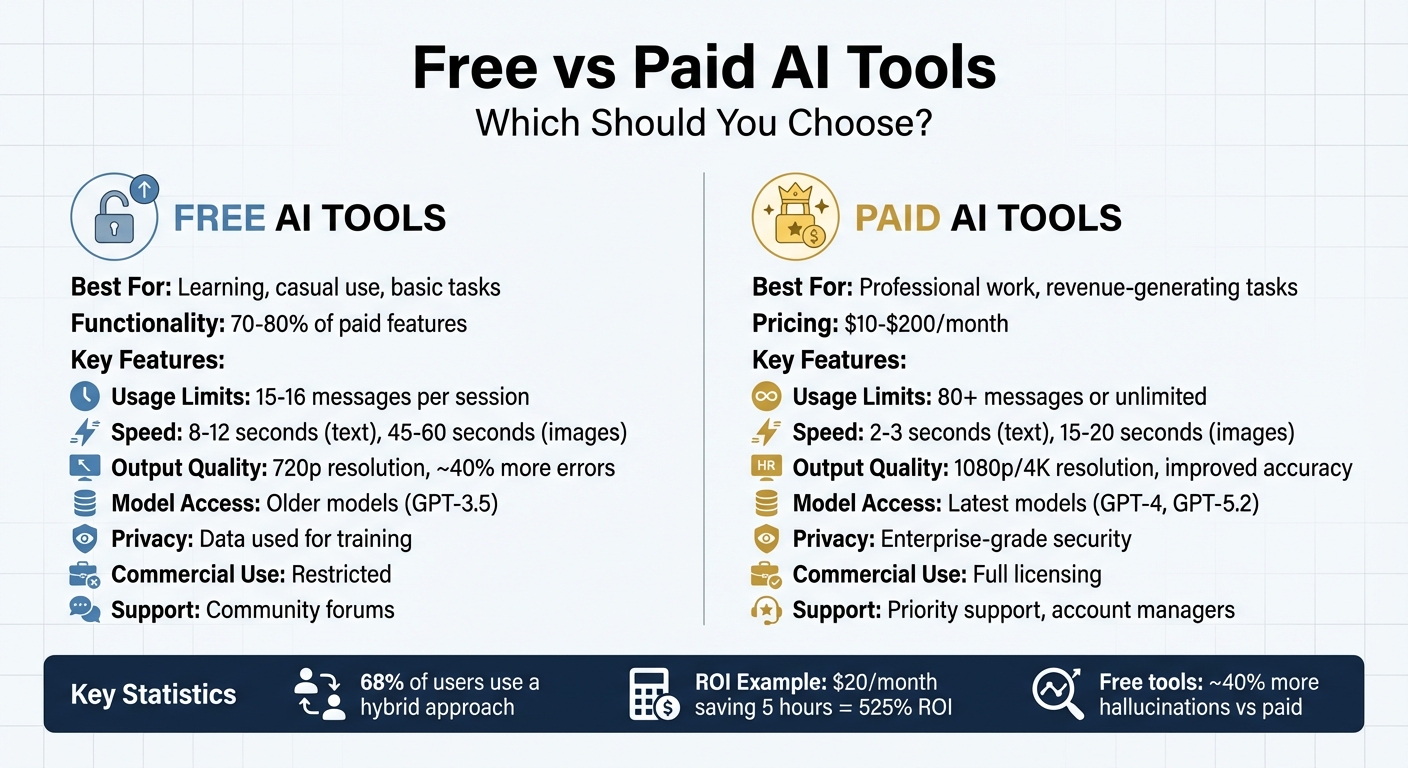
Free vs Paid AI Tools Comparison Chart
STOP Buying AI Tools: Which AI Subscription is Worth It?
Explore AI Tools on Flaex.ai
Discover the best AI tools for your workflow, curated, reviewed, and ranked.
Browse Directory →Main Differences Between Free and Paid AI Tools
Free and paid AI tools stand apart in terms of usage limits, output quality, and response speed. Free versions often rely on older-generation models, like GPT-3.5 instead of GPT-4, and come with strict usage caps. For example, ChatGPT's free tier allows only 15–16 messages every three hours, while the $20/month Plus plan raises this to 80 messages. Additionally, free tools can leave you waiting in a queue during peak times, resulting in slower response times.
Quality of output is another noticeable difference. Free AI tools tend to produce about 40% more hallucinations - confident but incorrect responses - compared to their paid counterparts. For video generation, free tools typically offer 720p resolution with watermarks, while paid versions deliver 1080p or even 4K quality without branding. These distinctions align with expert perspectives.
"The free version of ChatGPT 3.5 is a landline. The paid version is the newest smartphone."
– Jordan Wilson, Host, Everyday AI
Privacy and commercial use are also critical considerations. Free tools often use user inputs to improve their models and restrict commercial applications. On the other hand, paid versions provide enterprise-grade privacy and include full commercial licensing, making them more suitable for professional use.
Customer support further separates the two tiers. Free users typically rely on community forums or basic FAQs for help. Paid subscribers, however, enjoy benefits like priority support, dedicated account managers, and guaranteed service availability. For instance, when LA/VIE, a media buying group, switched from free analytical tools to Akkio's paid predictive AI models in 2024, they reported a 247% revenue increase and a 208% boost in Return on Ad Spend.
These differences are crucial to consider when choosing an AI tool that fits your needs and budget.
Comparison Table: Core Attributes
| Feature | Free AI Tools | Paid AI Tools |
|---|---|---|
| Usage Limits | 15–16 messages per session | 80+ messages per session; higher quotas |
| Model Access | Older models (e.g., GPT-3.5) | Latest models (e.g., GPT-4) |
| Response Speed | 8–12 seconds (text); 45–60 seconds (images) | 2–3 seconds (text); 15–20 seconds (images) |
| Output Quality | 720p resolution; ~40% more hallucinations | 1080p/4K resolution; improved accuracy |
| Data Privacy | Input data used for training | Enterprise-grade security; opt-out options |
| Commercial Rights | Limited to personal use | Full commercial licensing |
| Customer Support | Community forums; basic FAQs | Priority support; account managers |
| Integrations | Minimal or none | API access; professional integrations |
Free AI Tools Explained
Free AI tools provide a practical way to explore artificial intelligence for learning, personal projects, or occasional use. Many of these tools use scaled-down versions of advanced models, such as GPT-5 mini, to handle everyday tasks like writing emails, creating social media graphics, or offering basic coding help or using PromptFix to refine instructions.
These tools come with some trade-offs, but for many users, they’re more than sufficient. Free tiers often include smaller context windows (ranging from 2,000 to 32,000 tokens), slower processing speeds, and daily usage caps. For image generation, outputs may include watermarks, and peak usage times can lead to queues. Users looking for more flexibility might compare AI image generators like Playground AI to find the best free options. Additionally, free tools generally lack features like API access, custom instructions, or file uploads. Despite these limitations, they’re an excellent entry point for experimentation without financial risk.
Whether you’re exploring how AI works, brainstorming ideas for a hobby project, or testing a tool’s fit before committing to a subscription, free versions offer a low-pressure way to start.
"Free AI is a starting line, not a finish."
– Mboneni Stan Mulaudzi, Consultant
A good strategy is to spend at least two weeks using a free version to identify any shortcomings. This approach helps you avoid unnecessary subscriptions and ensures you only pay for features you truly need.
Below are some standout free AI tools that highlight the balance between benefits and limitations.
Examples of Free AI Tools
ChatGPT Free Tier: Running on GPT-5 mini as of February 2026, this version supports web browsing and basic data analysis. It’s perfect for general writing, quick research, and brainstorming. By early 2026, the free tier had around 100 million weekly active users.
Claude Free Tier: Offers access to Claude 3.5 or 4.5 Sonnet, allowing for 30–50 messages per day. It’s particularly effective for creative writing and handling complex instructions, with studies showing it has about 30% fewer hallucinations compared to GPT-4. Its "Artifacts" feature even lets users visualize code and UI elements directly in chat.
Google Gemini Free: Known for its massive 1 million token context window - about eight times larger than ChatGPT’s 128,000-token limit. This makes it ideal for processing lengthy documents. It integrates seamlessly with Google Workspace tools like Gmail and Docs, though it lacks some advanced reasoning features found in the Pro version.
DeepSeek: Offers unlimited free use of its V3 and R1 models without requiring a subscription. It’s great for tackling complex reasoning and mathematical problems, with API users reporting costs up to 50 times lower than comparable OpenAI models. Developers and students working on coding projects can benefit from these savings without compromising performance.
AI Tools Directory: A platform featuring over 1,527 free and freemium tools across categories like audio, video, image generation, automation, and development. Its filters make it easy to find tools with free tiers, high ratings, or trending status. Built-in AI agents can recommend workflows and compare options, helping users discover specialized tools such as Remove.bg for background removal or QuillBot for text rephrasing.
Paid AI Tools Explained
Paid AI tools offer a way to bypass the restrictions of free versions, giving users access to advanced features like GPT-5.2 Pro and Claude 4 Opus. With premium subscriptions, users enjoy perks such as no daily message caps, priority access during peak hours, and extended context windows (up to 128,000 tokens) to handle lengthy conversations seamlessly. Additionally, these plans often include enterprise-level security - think SOC 2 Type 2 compliance and SAML SSO - and full commercial rights, ensuring your data remains private and isn't used for training models. These upgrades explain the range of pricing options available.
Subscription costs typically range from $10 to $60 per month, with ultra-premium plans like ChatGPT Pro priced at $200 monthly. The value of these tools often lies in the time they save. For instance, if a tool saves you two hours of work each week, the investment might pay for itself. A practical way to evaluate this is the "Coffee Shop Test": if the tool costs less than your coffee budget while saving you hours of effort, it’s likely worth it. However, with 67% of users canceling premium plans within three months due to complicated features and poor onboarding, it’s smart to regularly review your subscriptions to ensure they’re meeting your needs.
For professionals tackling high-demand tasks - whether it's processing extensive codebases, generating multiple marketing assets, or conducting in-depth research - paid tools can eliminate the bottlenecks often found in free versions. The key is choosing a subscription tier that aligns with your workflow rather than assuming that a higher price automatically means better results. Below are examples of how paid tools cater to specific professional needs.
Examples of Paid AI Tools
-
ChatGPT Plus ($20/month):
Includes GPT-5.2, expanded usage limits, DALL-E for image generation, and custom GPT creation. It also offers Deep Research Mode for multi-step queries and limited video generation via Sora, making it a versatile choice for both writing and visual tasks. -
ChatGPT Pro ($200/month):
Tailored for power users, this plan provides unlimited GPT-5.2 Pro access, a 128,000-token context window, and priority processing. It also features expanded Sora capabilities and Agent Mode for handling highly complex queries. -
Claude Pro ($20/month):
Offers access to Claude 4 Opus with a 200,000-token context window (and a 1-million token beta option). It’s particularly effective for working with long documents, with users reporting 30% fewer hallucinations compared to GPT-4. -
Google Gemini Pro ($19.99/month):
Integrates seamlessly with Google Workspace tools like Gmail and Docs, featuring a 1-million-token context window. This multimodal tool handles text, images, and video inputs, making it ideal for managing large datasets. -
Midjourney (Starting at $10/month):
Known for high-quality image generation, it offers plans from Basic ($10) to Pro ($60). Paid tiers remove watermarks, allow commercial use, and include features like faster processing, upscaling, and style consistency controls. -
HeyGen (Starting at $29/month):
Focuses on AI-generated video avatars for marketing, training, and presentations. Features include professional voice cloning, custom avatars, and high-resolution exports suitable for commercial use. -
AI Tools Directory:
Lists over 1,527 tools with filters to help users find paid options by category, pricing, and ratings. It also includes AI agents that suggest workflows, such as pairing Surfer SEO ($89+/month) for content optimization with Jasper AI ($49+/month) for marketing copy.
Comparison Table: Paid Tool Pricing and Features
| Tool | Monthly Price | Key Features | Best For |
|---|---|---|---|
| ChatGPT Plus | $20 | GPT-5.2, DALL-E, Custom GPTs, Deep Research | General productivity, versatile tasks |
| ChatGPT Pro | $200 | Unlimited GPT-5.2 Pro, 128K context, Priority | Power users, high-volume work |
| Claude Pro | $20 | Claude 4 Opus, 200K context, 5× usage | Long documents, professional writing |
| Gemini Pro | $19.99 | 1M token context, Google integration | Research, large datasets |
| Midjourney Basic | $10 | Image generation, Commercial license | Designers, marketers |
| HeyGen | $29 | Video avatars, Voice cloning, HD exports | Video marketing, training content |
| GitHub Copilot Pro | $10 | Code completion, IDE integration | Developers, coding efficiency |
| Perplexity Pro | $20 | Real-time research, Citations | Researchers, fact-checking |
| Surfer SEO | $89+ | SERP analysis, Content optimization | SEO professionals |
| Jasper AI | $49+ | Marketing templates, Brand voice training | Marketing teams, copywriters |
This tiered system - from free versions that cover the basics to premium plans that remove nearly all limitations - shows how subscriptions can cater to a wide range of professional needs. Often, combining free tools for experimentation with one or two paid options for high-impact tasks strikes the perfect balance.
Free vs Paid Tools by Category
Free tools often deliver around 70–80% of their full potential, but they come with trade-offs that can impact professional workflows. Depending on the task, these limitations can make paid upgrades a necessity. Here’s a breakdown of how free and paid versions differ across chat, visual, and coding tools.
Chat and Writing Assistants
The gap between free and paid tools is most evident in chat and writing assistants due to usage limits and context restrictions. Free options like ChatGPT Free and Claude Free provide access to advanced models like GPT-5.2 and Claude 4 Sonnet, but they impose constraints such as message caps (10–60 messages every 5 hours) and a 16,000-token context window. Response times can also slow down during peak use hours[6,29].
Paid versions, such as ChatGPT Plus ($20/month) and Pro ($200/month), remove these bottlenecks. They allow for unlimited messages, extend the context window to 128,000 tokens, and offer custom GPTs tailored for specialized workflows. These features are particularly valuable for users handling complex tasks like analyzing entire codebases or conducting in-depth research. The enhanced capacity and advanced reasoning capabilities make paid tools indispensable for power users and professionals.
Image and Video Generation
For image and video tools, the key differences lie in resolution, output quality, and usage rights. Free tools like Ideogram.ai are great for quick prototypes or social media experiments, offering up to 100 images per day with strong text-rendering capabilities. However, these free versions often include watermarks, lower resolutions (around 720p), and restricted commercial usage rights.
On the other hand, paid tools like Midjourney (starting at $10/month) provide 4K resolution, refined artistic quality, and full commercial licenses. Similarly, HeyGen (starting at $29/month) enhances video generation with features like 1080p AI avatars, voice cloning, and high-resolution exports. These advanced options are critical for professional projects like corporate training or marketing campaigns. While free tools are fine for personal use, they lack the polish and flexibility required for professional-grade deliverables.
Data Analysis and Coding
In coding and data analysis, the main limitations of free tools are task complexity and dataset size. Free coding assistants like DeepSeek excel in handling small tasks and are great for students or open-source contributors[4,25]. GitHub Copilot’s free trial provides basic code completion, but its Pro version ($10/month) offers additional capabilities like unit test generation, error explanations, and integration across multiple IDEs.
For data analysis, free tools can handle smaller datasets and basic visualizations. However, professional tasks - such as predictive modeling or meeting SOC 2 compliance standards - require paid platforms. These tools offer larger token capacities (up to 128,000 tokens) and advanced visualization features[1,29]. For example, GitHub Copilot Pro users report completing tasks 55% faster, and companies like BBVA have saved an average of 2.8 hours per employee per week with ChatGPT Enterprise.
| Category | Free Tool Strengths | Paid Tool Advantages |
|---|---|---|
| Chat/Writing | Ideal for emails, brainstorming, and summaries | Unlimited messaging, larger context windows, custom GPTs, advanced reasoning |
| Image/Video | Great for prototyping and social media experiments | High resolution (4K), no watermarks, full commercial rights, voice cloning |
| Data/Coding | Perfect for small tasks and learning syntax | Expanded context windows, unit test generation, predictive modeling, SOC 2 compliance[8,29] |
When to Choose Free vs Paid AI Tools
The choice between free and paid AI tools often comes down to how much you rely on them in your daily work. A simple way to decide is by using this ROI formula:
Monthly Cost < (Hours Saved × Hourly Rate × 0.5).
For example, a $20/month ChatGPT Plus subscription that saves you 5 hours at an hourly rate of $25 delivers a 525% ROI. This kind of calculation can help you determine whether a paid tool is worth the investment for your specific needs.
If your work directly affects revenue - like creating client deliverables, marketing content, or production code - paid tools often become a necessity. They offer better reasoning capabilities, greater reliability, and, importantly, clear commercial usage rights and enterprise-level privacy protections. Free tools, on the other hand, often come with usage restrictions that might not meet professional requirements.
Many users find a hybrid approach works best. According to research, about 68% of AI users see optimal results by combining free and paid AI tools for general or experimental tasks for activities tied to measurable ROI. For example, you might use free tools for brainstorming or research, but switch to paid versions for client-facing work or projects requiring high-volume output. If you hit usage limits - like exceeding 20 tasks a month, each saving 15 minutes - it’s probably time to upgrade.
This balanced strategy ensures you make the most of both free and paid options without overspending.
Using AI Tools Directory for Selection
Sifting through 15,000 AI tools can feel overwhelming. The AI Tools Directory makes this easier by categorizing tools into clear groups like Chat and Writing Assistants, Image and Video Generation, Data Analysis, Coding, and Customer Support. This structure helps you zero in on the tools that fit your workflow without wasting time.
To refine your search, the directory offers powerful filtering options. You can sort tools by pricing, ratings, or features. For instance, if you're working with a limited budget, you can quickly find tools with strong free versions. Need enterprise-level security? Filter for tools with data classification approvals or compliance certifications. Each listing includes pros, cons, setup time, and even simulation trials, so you can test tools before making any commitments.
The filters also highlight ROI triggers - like tools that save over three hours per week - which can help you decide when a paid upgrade is worth it. For more technical evaluations, benchmarks such as model intelligence, speed, latency, and context window size are available. These details integrate seamlessly into your decision-making process, which is explored further in the next section.
To get started, use the search function to focus on tools that address your most time-consuming tasks. Experiment with free versions first to see which features might justify an upgrade. Features like "Expert Verified" badges and user-driven star ratings ensure you're prioritizing tools that deliver meaningful results.
Conclusion
Deciding between free and paid AI tools isn’t about finding a universal solution - it’s about choosing what fits your unique needs. Free tools are ideal for learning, handling occasional tasks, or managing personal projects where basic features and limited usage are enough. On the other hand, paid tools often shine in professional settings, offering advanced features, commercial licensing, and significant time savings that justify the cost. The key is to match the tool to your specific goals and budget.
Research shows that 68% of users find success with a hybrid approach, combining free and paid tools where appropriate. A simple guideline can help: if you use a tool daily, save at least three hours per week, and rely on it for income-generating work, upgrading to the paid version often delivers a strong return on investment (ROI).
"When managing key campaigns or content that defines your brand, it's worth paying for something that does it well." – Justin Wheeler, CEO, Funraise
To make an informed decision, calculate the value. For instance, a $20/month subscription that saves five hours weekly for someone earning $25/hour results in a 525% ROI. Keep an eye on how often you use the tool - if it’s less than five times per month, it might be better to switch back to a free version.
Start with free options to identify repetitive tasks and areas where upgrades could make a difference. The AI Tools Directory offers a helpful filtering system, letting you compare over 1,527 tools by pricing, features, and ROI potential. This makes it easier to build an AI toolkit that balances your budget with your workflow needs. By aligning your AI investments with your specific demands, you can maximize both cost-effectiveness and productivity.
Featured on Flaex