Back to Database
Xpression Camera
VERIFIED

Xpression Camera

0.0(0)

Xpression Camera lets you instantly transform into anyone or anything with a webcam, enhancing your video calls and streams.

Productivity & OpsFreemium

Boost this tool

Subscribe to listing upgrades or segmented pushes.

Log in to purchase

Overview

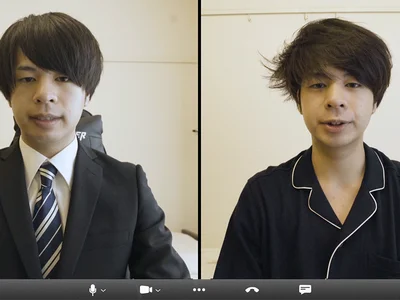
Xpression Camera is an AI-powered webcam software that transforms a user's appearance in real-time during video calls, live streams, and recordings. It allows users to embody different characters, avatars, or even objects, adding fun, anonymity, or professionalism to video interactions, making online communication more engaging and dynamic.

Key Features

  • Vast library of pre-designed avatars.
  • Ability to create custom avatars from images or videos.
  • Advanced facial tracking.
  • AI-driven image manipulation.
  • Seamless integration with popular video conferencing platforms like Zoom, Google Meet, and OBS Studio.
  • Background replacement and customization options.

Who It's For

Xpression Camera is ideal for:

  • Content creators looking to add unique visual elements to their streams and videos.
  • Educators who want to engage students in a more interactive way.
  • Business professionals who need to maintain privacy or create a more memorable presence during virtual meetings.
  • Anyone seeking to inject creativity and personality into their online communication.

Key Features

Real-time Avatar Transformation - Instantly change your appearance during video calls and streams.
Custom Avatar Creation - Upload images or videos to create personalized avatars.
Seamless Integration - Works with popular video conferencing platforms like Zoom, Google Meet, and OBS Studio.
Background Replacement - Change your background to create a professional or fun environment.
Facial Tracking - Ensures accurate and realistic avatar movements.
Vast Avatar Library - Choose from a wide range of pre-designed avatars.
Easy-to-Use Interface - Simple and intuitive design for effortless navigation.
Low Latency - Provides a smooth and responsive experience with minimal delay.
Customizable Settings - Adjust avatar size, position, and other parameters for optimal results.

Use Cases & Problems Solved

Use Cases

  • Use when you want to add a fun and engaging element to your live streams.
  • Perfect for teachers who want to create interactive and entertaining online lessons.
  • Ideal if you need to maintain privacy during video calls while still being visually present.
  • Use when creating marketing videos that require a unique and attention-grabbing visual.
  • Perfect for gamers who want to embody their favorite characters during gameplay streams.
  • Ideal if you need to present a professional yet creative image during virtual meetings.
  • Use when you want to create anonymized training or demo videos.

Problems Solved

  • Eliminates the need for expensive and complex video editing software for simple transformations.
  • Reduces the pressure of being on camera by allowing users to embody a different persona.
  • Solves the problem of boring and monotonous video calls by adding visual interest.
  • Eliminates the need for physical costumes or makeup for virtual events and performances.
  • Reduces privacy concerns in video calls by allowing for avatar-based representation.

Who It's For

Content creatorsLive streamersOnline educatorsVirtual event organizersRemote workersMarketing professionals

Fit Analysis

Best For

Best for content creators and remote workers who need to enhance their video presence and add a creative touch to their online interactions.

Not Ideal For

Not ideal for users requiring highly realistic or photorealistic avatar representations, as the focus is on creative and expressive transformations rather than perfect realism.

Metrics

Discovered12/29/2025
Reviews0
Saved By0 users

Related Tools