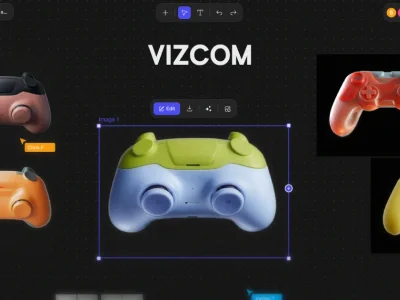
Vizcom AI transforms sketches into photorealistic renderings with speed and ease, empowering designers to explore infinite creative possibilities.
Boost this tool
Subscribe to listing upgrades or segmented pushes.
Vizcom AI is a revolutionary design tool that leverages artificial intelligence to transform simple sketches into stunning, realistic renderings. It provides a transformative workflow for concept drawing, enabling designers to quickly visualize and iterate on their ideas with remarkable speed and efficiency. By bridging the gap between imagination and photorealistic representation, Vizcom unlocks new realms of creative exploration.
Vizcom operates by allowing users to upload or draw sketches directly within the platform. The AI then intelligently interprets these sketches and applies chosen rendering styles, textures, and materials to generate impressive visuals. Key features include collaborative workspaces for team projects, a diverse library of rendering styles, familiar drawing tools for precise control, 3D model import capabilities, custom texture control using reference images, and comprehensive layer support for organized file management.
Vizcom is ideal for design and creative professionals, including industrial designers, architects, product designers, and concept artists. It's perfect for those seeking to accelerate their design process, explore a wider range of design options, and present their ideas with compelling photorealism. Designers choose Vizcom to save time, enhance collaboration, and push the boundaries of their creative vision.
Best for product designers and architects who need to quickly visualize design concepts with photorealistic quality and collaborate effectively with their teams.
Not ideal for animators or video game developers because it primarily focuses on static image rendering and concept visualization, not dynamic animations.
