Back to Database
Uizard
VERIFIED

Uizard

85
4.0(1)

Uizard: Design apps, websites, and UIs in minutes with this AI-powered UX/UI design tool. Generate designs from text & sketches!

ImageFreemium

Boost this tool

Subscribe to listing upgrades or segmented pushes.

Log in to purchase

Overview

Uizard is an AI-powered UX/UI design tool that dramatically speeds up the design process. It allows users to quickly create wireframes, mockups, and prototypes using innovative AI features. Uizard empowers both non-designers and professionals to bring their ideas to life faster and more efficiently. Its intuitive interface and AI-driven automation make UI/UX design accessible to everyone.

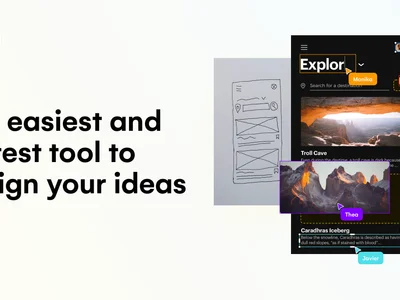
Uizard leverages AI in several key ways. Users can generate UI designs from simple text prompts, transforming descriptions into visual layouts. The tool also converts hand-drawn sketches into digital wireframes, bridging the gap between paper and screen. Furthermore, Uizard can transform screenshots into editable designs, allowing users to iterate on existing interfaces. Key features include a vast library of templates, real-time collaboration tools, and an AI Design Assistant with functionalities like scribble scans, screenshot transformations, and heatmap generation.

Uizard is ideal for startup founders, product managers, UX/UI designers, and anyone involved in the app or web development process. It's particularly valuable for those who need to rapidly prototype and iterate on design ideas, test concepts, or create professional-looking designs without extensive design experience. Teams benefit from its collaborative features, which streamline communication and ensure everyone is on the same page.

Key Features

AI-powered design generation - Create UI designs from text prompts, saving time and effort.
Sketch-to-design conversion - Turn hand-drawn sketches into digital wireframes instantly.
Screenshot transformation - Convert screenshots into editable UI designs for easy modification.
Design templates library - Access a vast collection of pre-made templates for various UI needs.
Real-time collaboration - Collaborate with team members on designs simultaneously for efficient teamwork.
AI Design Assistant - Automate design tasks with features like scribble scans and heatmap generation.
Drag-and-drop interface - Easily customize designs with an intuitive drag-and-drop interface.
UI component library - Access a comprehensive library of UI components for quick design creation.

Use Cases & Problems Solved

Use Cases

  • Use when you need to quickly prototype a new app idea and get user feedback.
  • Perfect for creating wireframes from hand-drawn sketches to visualize your initial concepts.
  • Ideal if you need to generate UI designs from text descriptions without starting from scratch.
  • Use when you want to transform existing screenshots into editable UI designs for redesign or adaptation.
  • Perfect for collaborating with a team on UI/UX design projects in real-time.
  • Ideal if you need access to a wide range of pre-made design templates and UI components.
  • Use when you want to leverage AI to automate repetitive design tasks and accelerate the design process.

Problems Solved

  • Eliminates the need for extensive design skills to create professional-looking UIs.
  • Reduces the time and effort required to prototype and iterate on design ideas.
  • Simplifies the process of converting sketches and screenshots into editable designs.
  • Overcomes the challenge of starting from a blank canvas by providing AI-generated designs and templates.
  • Facilitates seamless collaboration and communication among design teams.

Who It's For

Startup foundersProduct managersUX/UI designersWeb developersMobile app developersNon-designers who need to create UIs

Fit Analysis

Best For

Best for product managers and startup founders who need to rapidly prototype and validate their UI/UX design ideas without extensive design expertise.

Not Ideal For

Not ideal for large enterprises that require highly customized, pixel-perfect designs and have dedicated, experienced UI/UX teams already utilizing advanced design software.

Metrics

Discovered12/26/2025
Reviews1
Saved By0 users

Related Tools