Back to Database
OSS Insight
VERIFIED

OSS Insight

0.0(0)

OSS Insight: Unlock open source project insights with data-driven analytics and trends. Analyze repositories, contributors, and more!

Productivity & OpsFreemium

Boost this tool

Subscribe to listing upgrades or segmented pushes.

Log in to purchase

Overview

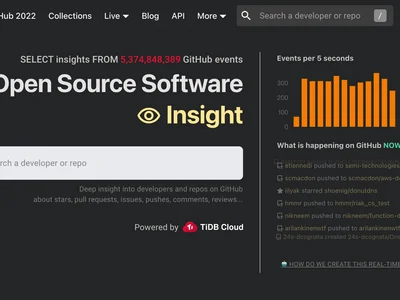
OSS Insight is a powerful platform for analyzing open-source software (OSS) projects. It provides comprehensive data and visualizations to understand project health, community activity, and development trends. Gain valuable insights into repository performance, contributor engagement, and code evolution, empowering you to make data-driven decisions regarding OSS involvement.

OSS Insight works by collecting and processing vast amounts of data from various open-source repositories. It then presents this data in user-friendly dashboards and reports, offering a variety of features like repository comparison, contributor analysis, event timeline visualization, and trend identification. Users can filter and customize the data to focus on specific projects, time periods, or metrics of interest. The platform provides interactive charts and tables to facilitate exploration and understanding.

OSS Insight is perfect for open-source developers, researchers, investors, and anyone interested in understanding the dynamics of the open-source ecosystem. Developers can use it to identify successful projects to contribute to, researchers can analyze OSS trends, and investors can assess the potential of open-source ventures. Choose OSS Insight for its comprehensive data, powerful analytics, and user-friendly interface, enabling you to make informed decisions in the world of open source.

Key Features

Repository analytics - Analyze project health, code quality, and development activity.
Contributor analysis - Identify key contributors and their impact on the project.
Event timeline - Visualize the history of events in a repository, such as commits and issues.
Trend identification - Discover emerging trends and patterns in the open-source ecosystem.
Repository comparison - Compare multiple repositories side-by-side to identify strengths and weaknesses.
Data visualization - Explore data through interactive charts and tables.
Customizable dashboards - Create personalized dashboards to track key metrics.
API access - Integrate OSS Insight data into your own applications and workflows.

Use Cases & Problems Solved

Use Cases

  • Use when researching potential open-source projects to contribute to.
  • Use when performing competitive analysis on open-source alternatives.
  • Use when tracking the growth and activity of your own open-source project.
  • Use when identifying key contributors and influencers within the open-source community.
  • Use when making data-driven decisions about technology adoption or investment in open-source solutions.
  • Perfect for monitoring the health and sustainability of open-source projects.
  • Ideal if you need to visualize open-source trends and patterns over time.

Problems Solved

  • Eliminates the need for manual data collection and analysis of open-source projects.
  • Reduces the time and effort required to understand the health and activity of open-source communities.
  • Provides a centralized platform for accessing comprehensive data on open-source repositories.
  • Overcomes the challenge of identifying relevant and impactful open-source projects.
  • Solves the problem of tracking contributor engagement and identifying key influencers.

Who It's For

Open-source developersSoftware architectsTechnology researchersVenture capitalists investing in open-sourceProduct managers evaluating open-source toolsData scientists analyzing software trends

Fit Analysis

Best For

Best for open-source developers and researchers who need to understand project dynamics and trends based on comprehensive data analysis.

Not Ideal For

Not ideal for users who need real-time monitoring of code changes or require deep code-level analysis.

Metrics

Discovered12/29/2025
Reviews0
Saved By0 users

Related Tools