Back to Database
Openwebanalytics
VERIFIED

Openwebanalytics

0.0(0)

Open Web Analytics: Gain complete control over your website analytics with this free, open-source platform for tracking and analyzing user behavior.

Data & DatabasesFreemium

Boost this tool

Subscribe to listing upgrades or segmented pushes.

Log in to purchase

Overview

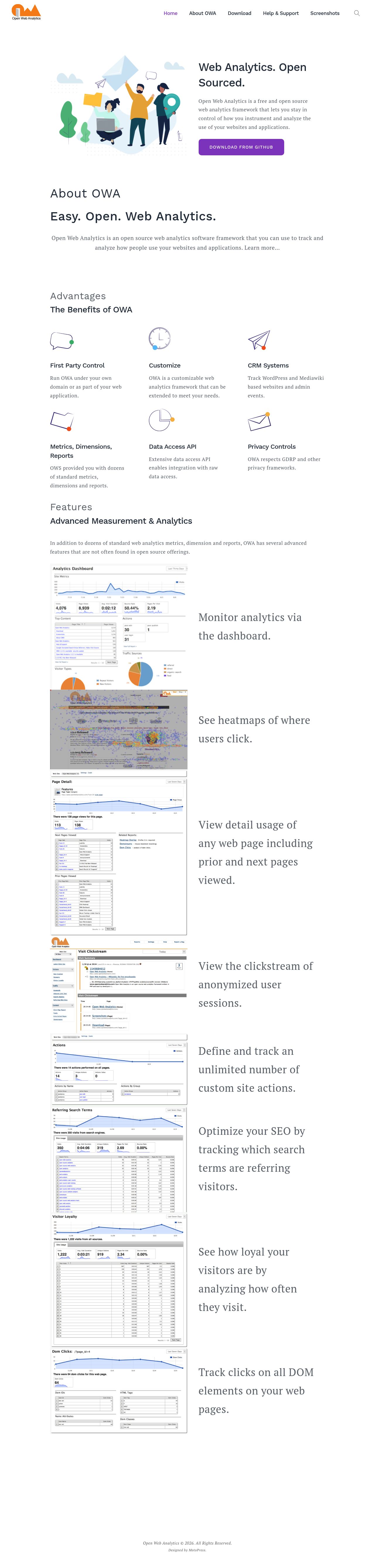
Open Web Analytics (OWA) is a free and open-source web analytics framework. It provides tools to track and analyze how users interact with websites and applications. Unlike hosted solutions, OWA gives users complete control over their data and how it's processed, emphasizing privacy and compliance.

Key Features

  • Standard web analytics metrics and reports
  • Heatmaps
  • Clickstream analysis
  • Custom action tracking
  • Search term optimization
  • Data access API for integration with other systems
  • Customizable to meet specific needs
  • Privacy controls to respect GDPR and other privacy frameworks

Who It's For

OWA is ideal for developers, website owners, and organizations seeking a privacy-focused and customizable web analytics solution. It's a fit for those who want to avoid vendor lock-in, maintain complete control over their data, and tailor their analytics to unique requirements, especially users of WordPress and Mediawiki based websites.

Key Features

Heatmaps - visualize user clicks and engagement on your web pages.
Clickstream analysis - understand user navigation paths through your website.
Custom action tracking - define and track specific user actions relevant to your business goals.
Search term tracking - identify the search terms that drive traffic to your website.
Data access API - integrate OWA data with other systems and applications.
Customizable framework - extend OWA to meet your unique analytics needs.
Privacy controls - comply with GDPR and other privacy regulations.
Standard metrics & reports - Access dozens of built-in reports for key website performance indicators.
Dashboard - monitor analytics via a customizable dashboard.
DOM element click tracking - Track clicks on specific elements on your pages.

Use Cases & Problems Solved

Use Cases

  • Use when you need detailed insights into user behavior on your website but want to avoid third-party tracking.
  • Perfect for organizations that require strict data privacy and compliance with regulations like GDPR.
  • Ideal if you need to customize your web analytics to track specific events or metrics unique to your business.
  • Use when you want to integrate web analytics data with your own CRM or other business intelligence systems.
  • Use when you need heatmaps and clickstream analysis to understand user interaction patterns.
  • Perfect for optimizing SEO by tracking referring search terms.
  • Ideal if you need to track WordPress and Mediawiki based websites and admin events.

Problems Solved

  • Eliminates reliance on third-party analytics providers, giving you full control over your data.
  • Solves privacy concerns by allowing you to host and manage your own analytics data.
  • Reduces vendor lock-in with its open-source nature.
  • Eliminates the limitations of standardized analytics platforms by allowing for custom metrics and tracking.
  • Avoids hefty subscription fees associated with proprietary analytics solutions.

Who It's For

DevelopersWebsite ownersOrganizations with strict privacy requirementsData analystsMarketing teamsBusinesses using WordPress and Mediawiki

Fit Analysis

Best For

Best for developers and organizations that need a customizable, privacy-focused, and open-source web analytics solution.

Not Ideal For

Not ideal for users who prefer a fully managed, out-of-the-box analytics solution with minimal setup and configuration.

Metrics

Discovered1/16/2026
Reviews0
Saved By0 users

Related Tools