Back to Database
Image To Video AI.run
VERIFIED

Image To Video AI.run

0.0(0)

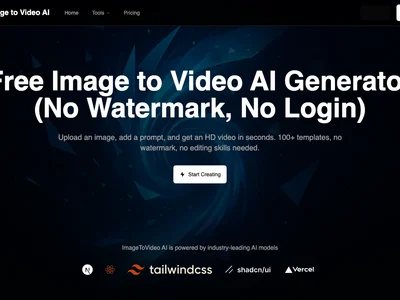
Turn images into engaging videos effortlessly with Image To Video AI.run! Create stunning visuals in seconds, no video editing skills needed.

Productivity & OpsFreemium

Boost this tool

Subscribe to listing upgrades or segmented pushes.

Log in to purchase

Overview

Image To Video AI.run is a powerful tool that converts static images into dynamic videos, saving you time and resources while producing high-quality content. It uses advanced artificial intelligence to animate images, add transitions, and even incorporate music, resulting in visually appealing videos perfect for various platforms. Whether you're a marketer, educator, or social media enthusiast, this tool simplifies video creation, making it accessible to everyone.

The platform works by allowing users to upload one or more images. The AI then analyzes the images and automatically generates a video sequence. Users can customize the video with different styles, transitions, music, and text overlays. Key features include automated video generation, customizable templates, music library integration, text overlay options, and various export formats. The intuitive interface makes it easy for anyone to create professional-looking videos without prior video editing experience.

Image To Video AI.run is ideal for content creators, social media managers, educators, and small business owners who need to produce engaging video content quickly and efficiently. It's the perfect solution for anyone looking to boost their online presence, create captivating presentations, or share visual stories without the complexity and cost of traditional video editing software.

Key Features

AI-powered video generation - automatically creates videos from images.
Customizable templates - quickly create videos with pre-designed layouts.
Music library integration - add background music to enhance your videos.
Text overlay options - add captions and titles to convey your message.
Various export formats - download videos in different resolutions and formats.
User-friendly interface - easy to use, even for beginners.
Automated transitions - creates smooth transitions between images.
Social media sharing - easily share videos directly to social media platforms.

Use Cases & Problems Solved

Use Cases

  • Use when you need to create promotional videos from product photos for social media.
  • Perfect for educators who want to transform static lecture slides into engaging video lessons.
  • Ideal if you need to quickly generate video content for your blog or website.
  • Use when creating marketing materials that require dynamic visuals to capture audience attention.
  • Perfect for social media managers looking to increase engagement with eye-catching video posts.
  • Ideal if you need to create animated explainer videos from diagrams or illustrations.
  • Use when you want to transform a collection of travel photos into a memorable video montage.

Problems Solved

  • Eliminates the need for expensive video editing software and skills.
  • Saves significant time and effort in video creation.
  • Overcomes creative blocks by providing AI-powered video suggestions.
  • Reduces the cost of outsourcing video production.
  • Simplifies the process of creating engaging video content for social media.

Who It's For

Social media managersContent creatorsMarketing teamsEducatorsSmall business ownersBloggers

Fit Analysis

Best For

Best for content creators who need to quickly and easily create engaging video content from images without requiring advanced video editing skills.

Not Ideal For

Not ideal for professional video editors who require advanced control and customization options for complex video projects.

Metrics

Discovered12/28/2025
Reviews0
Saved By0 users

Related Tools