Back to Database
AI Image Combiner
VERIFIED

AI Image Combiner

0.0(0)

Combine images seamlessly with AI Image Combiner! Create stunning visuals effortlessly and enhance your projects with unique compositions.

Productivity & OpsFreemium

Boost this tool

Subscribe to listing upgrades or segmented pushes.

Log in to purchase

Overview

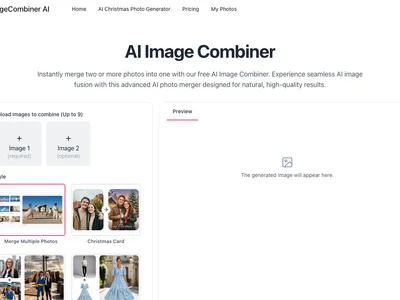
AI Image Combiner is an AI-powered tool that allows users to effortlessly merge multiple images into a single, cohesive visual. The primary benefit is significant time savings and creative flexibility, enabling users to generate unique and engaging content without requiring advanced photo editing skills or software. It simplifies the process of creating collages, before-and-after comparisons, and other composite images.

The tool typically works by allowing users to upload their desired images and select a combination method or layout. AI algorithms then analyze the images and intelligently blend them together, optimizing for visual harmony and aesthetic appeal. Key features often include adjustable blending modes, customizable layouts, background removal or replacement, and resolution enhancement to ensure high-quality output. Some tools may also offer style transfer options to apply a consistent visual style across all combined images.

AI Image Combiner is perfect for social media managers, marketers, educators, and anyone who needs to create visually appealing content quickly and easily. It's an excellent choice for those who lack extensive photo editing experience but still desire professional-looking results. It is especially valuable for businesses that need to create product showcases, marketing materials, or social media posts with unique visual combinations, saving them time and resources compared to hiring professional designers.

Key Features

AI-powered image blending - creates seamless and natural-looking combinations.
Customizable layouts - offers various pre-designed layouts for different purposes.
Adjustable blending modes - provides control over how images are merged.
Background removal/replacement - allows for easy background manipulation.
Resolution enhancement - ensures high-quality output for various platforms.
Style transfer - applies a consistent visual style across all combined images.
Text overlay - adds text to the combined image for captions or annotations.
Watermark addition - protects your creations with custom watermarks.
Batch processing - combine multiple sets of images at once for efficiency.
API access - Integrate the functionality into existing applications.

Use Cases & Problems Solved

Use Cases

  • Use when you need to create engaging social media content by combining product images with lifestyle shots.
  • Perfect for generating eye-catching marketing materials with before-and-after comparisons.
  • Ideal if you need to create unique visual content for presentations or educational materials.
  • Use when you want to quickly combine multiple product photos into a single banner for your online store.
  • Perfect for creating personalized greeting cards or invitations by merging photos with custom backgrounds.
  • Ideal if you need to generate website hero images by blending multiple stock photos seamlessly.
  • Use when creating mood boards or visual concepts for design projects.

Problems Solved

  • Eliminates the need for expensive and complex photo editing software.
  • Reduces the time and effort required to create visually appealing composite images.
  • Overcomes the limitations of basic image editing tools.
  • Solves the problem of creating consistent visual styles across multiple images.
  • Eliminates the need to hire professional designers for simple image combination tasks.

Who It's For

Social media managersMarketing teamsSmall business ownersContent creatorsEducatorsE-commerce store owners

Fit Analysis

Best For

Best for marketers and content creators who need to quickly and easily create visually engaging composite images for social media, marketing campaigns, or website content.

Not Ideal For

Not ideal for professional photographers or graphic designers requiring highly precise control over every aspect of the image editing process.

Metrics

Discovered12/28/2025
Reviews0
Saved By0 users

Related Tools