Back to Database
ai-cli
VERIFIED

ai-cli

0.0(0)

Access powerful AI models directly from your terminal with ai-cli. Boost productivity and get instant answers without leaving the command line.

Dev ToolsFreemium

Boost this tool

Subscribe to listing upgrades or segmented pushes.

Log in to purchase

Overview

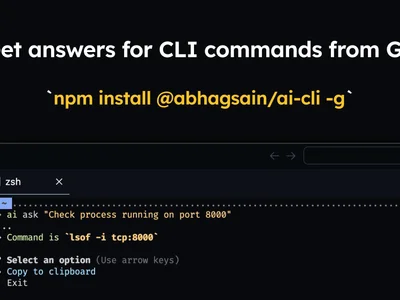
ai-cli is a command-line interface that provides access to AI models directly from the terminal. It enables users to generate text, translate languages, summarize documents, and perform other AI-powered tasks without needing a web browser or dedicated application. This streamlines workflows by integrating AI functionality into existing development environments.

Key Features

  • Supports multiple AI models.
  • Allows customizable prompts.
  • Tracks command history.
  • Saves and reuses frequently used commands.

How It Works

ai-cli sends commands and prompts to a configured AI model (such as those from OpenAI) via their API. Users configure API keys and model settings within ai-cli. The tool processes the API response and displays the result in the terminal.

Who It's For

ai-cli is suited for developers, data scientists, system administrators, and anyone who frequently uses the command line and needs quick access to AI. It's useful for automating tasks, generating code snippets, and analyzing data without interrupting existing workflows.

Key Features

Command-line interface - access AI models directly from your terminal.
Multiple AI model support - configure and switch between different AI providers like OpenAI.
Customizable prompts - tailor AI responses to your specific needs.
History tracking - easily access and reuse previous commands.
API key management - securely store and manage your API keys.
Code generation - quickly generate code snippets in various programming languages.
Text summarization - condense long documents into concise summaries.
Translation services - translate text between multiple languages directly from the command line.

Use Cases & Problems Solved

Use Cases

  • Use when you need to quickly generate code snippets or scripts from the command line.
  • Perfect for translating text between languages without leaving your terminal.
  • Ideal if you need to summarize long documents or articles directly from the command line.
  • Use when you want to debug code or understand error messages with AI assistance.
  • Perfect for generating creative content, such as poems or stories, directly from the terminal.
  • Ideal if you need to automate repetitive tasks using AI-powered scripting.
  • Use when you want to quickly explore different AI models and experiment with prompts.

Problems Solved

  • Eliminates the need to switch between multiple applications for AI-related tasks.
  • Reduces the time spent on repetitive tasks by automating them with AI.
  • Simplifies access to AI models for users who prefer working with the command line.
  • Removes friction in incorporating AI into existing workflows.
  • Reduces context switching and improves focus when working with AI in development environments

Who It's For

Software developersData scientistsSystem administratorsDevOps engineersResearchersTechnical writers

Fit Analysis

Best For

Best for developers and system administrators who need to quickly access and utilize AI models directly from their terminal to automate tasks and boost productivity.

Not Ideal For

Not ideal for users who prefer a graphical user interface or require complex AI workflows that are better suited for dedicated AI platforms because it is a command-line based tool.

Metrics

Discovered12/29/2025
Reviews0
Saved By0 users

Related Tools