
How to Build AI Tools in 2026: Step by Step
Flaex AI
Most tutorials on how to build AI tools hand you the same recipe: pick a frontier model, wire up an API key, tweak the system prompt until three examples look good, and ship. That advice works for a weekend demo, and it fails almost every time a team puts real users, private data, or money behind the interface.
Adoption is already moving fast enough that sloppy builds hit production quickly. In the 2025 Stack Overflow Developer Survey, 84% of respondents said they were using or planning to use AI tools in their development process, and a companion 2025 Stack Overflow Developer Survey breakdown reported that 36% of respondents had learned to use AI-enabled tools for their job or career advancement during the previous year. Almost anyone can spin up a working prototype in an afternoon now.
Shipping something dependable requires flipping the usual order. Because model inference has gotten cheap, the expensive part of building an AI product is no longer token spend. The main cost sits in workflow design, evaluation, and security gates between iterations, because one bad tool call or leaked record wipes out months of saved labor.
The Build Roadmap From Scope to Monitoring
A prototype proves a model can answer a prompt; a production tool proves a workflow stays inside strict boundaries when inputs turn messy. The NIST AI Risk Management Framework, released on January 26, 2023, treats trustworthy AI as a lifecycle property covering validity, reliability, safety, security, privacy, and accountability across both model outputs and the full application workflow, including tool selection, permissions, escalation, and human override.
The visual below maps the six stages from initial scoping to production monitoring.
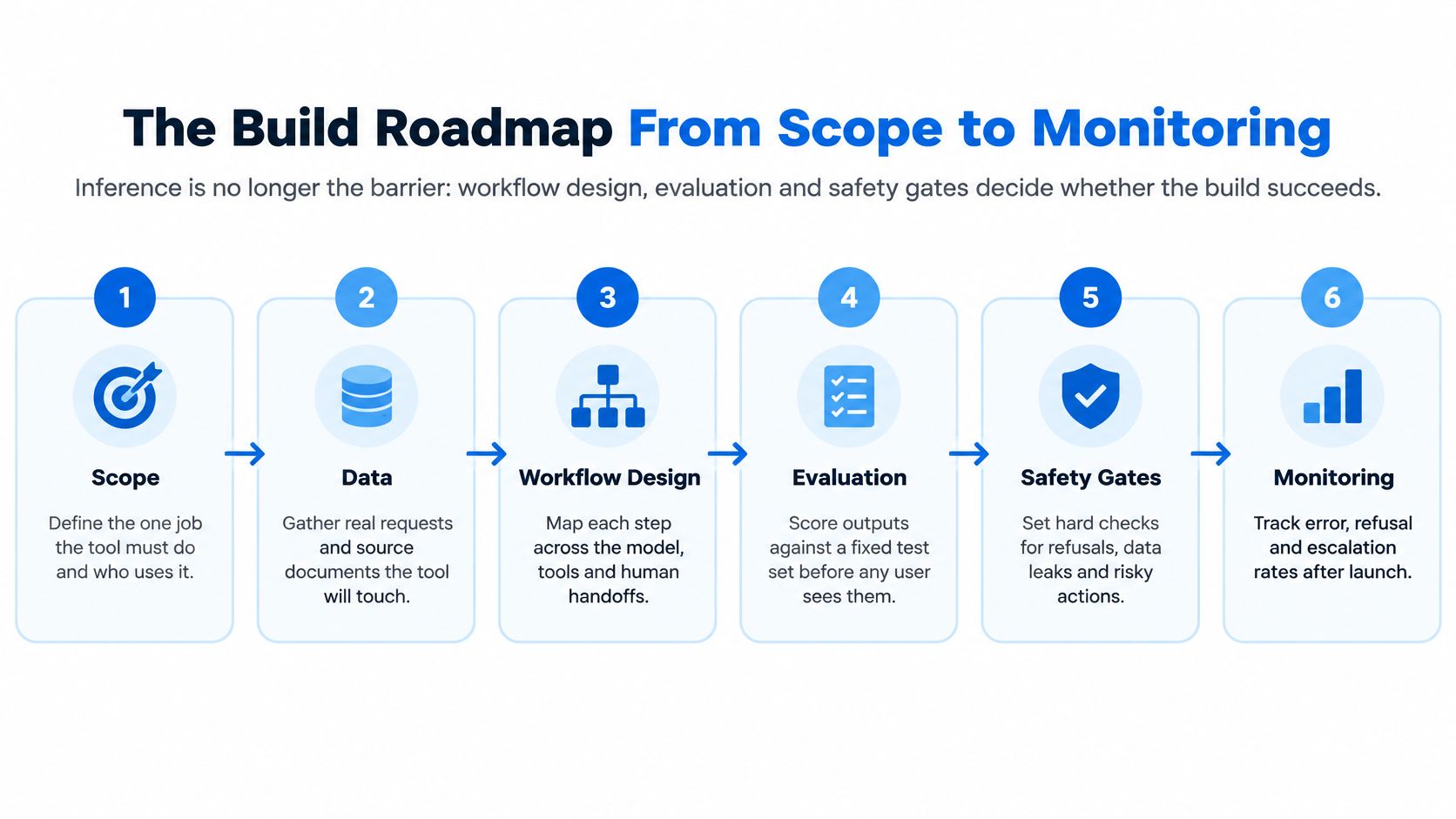
Every phase should end with a concrete artifact and an exit question that blocks the team from moving forward on gut feeling alone.
| Phase | Key artifact | Exit question |
|---|---|---|
| 1. Scope | One-page scope note with users, allowed actions, quality threshold, and unacceptable failures | Who uses it, what may it do, and what counts as a failure? |
| 2. Model and infrastructure | Benchmark sheet comparing 2 to 4 models on the real task with cost per successful task | Which model meets the quality bar at sustainable unit economics? |
| 3. AI stack assembly | Stack diagram covering GPT or assistant, retrieval, agents, MCP servers, and permissions | Does every component have a defined role and least-privilege access? |
| 4. Cost and procurement | Cost ceiling, vendor terms, and compliance inventory | Do unit costs, contracts, and obligations hold at full rollout? |
| 5. Prototype and test | Versioned evaluation set plus pass, refusal, tool-call, and injection results | Does it clear every gate on adversarial and edge inputs? |
| 6. Deploy and monitor | Canary release plan, dashboards, rollback procedure, and escalation rules | Can we detect drift and revert within the agreed window? |
Walking a Support Assistant Through Six Phases
Say a 40-person SaaS company builds an internal knowledge and support assistant to help account managers answer billing and setup questions faster. Following the roadmap turns a vague chatbot request into six verifiable artifacts instead of a pile of untested prompts:
- Phase 1 deliverable: A one-page scope note naming support reps as the only users, allowing read-only lookups and draft replies, and forbidding unauthorized refunds.
- Phase 2 deliverable: A model routing rule backed by real ticket tests, sending routine lookups to a fast small model and pushing complex policy questions to a stronger model.
- Phase 3 deliverable: A lean stack combining a GPT for drafting, a retrieval index over help-center docs, and one MCP server exposing read-only ticket lookup.
- Phase 4 deliverable: A monthly cost ceiling paired with vendor data terms and a compliance check before any production traffic arrives.
- Phase 5 deliverable: A versioned 150-case evaluation set covering normal questions, missing data, and prompt-injection attempts.
- Phase 6 deliverable: A canary release starting at 10 percent of internal traffic, wired to error dashboards and a documented rollback trigger.
Teams stumble in predictable places depending on company size. Startups usually under-scope Phase 1 and skip Phase 5, shipping straight from a flashy prototype into customer frustration. Larger enterprises get stuck in Phase 4 because security review and procurement lead times stretch past the engineering sprint; practical AI rollout advice from Vight highlights how planning operational governance early keeps managed service and IT rollouts from stalling mid-flight.
How to Set the Scope and Pick the Model
Before writing a single prompt, lock down a one-page scope note and have a non-engineering stakeholder, such as the Head of Support or Operations Lead, sign it. Name the exact user group, the single job the tool performs, the actions it is allowed to take, the minimum quality threshold, and the unacceptable failure modes. If the support lead can't agree on what counts as an unacceptable failure on paper, your engineering team has no way to test for it later.
Scope rule: If you can't describe what the tool is forbidden to do in three bullet points, the project isn't ready for an API key.
Once scope is signed, model choice stops being a guessing game because inference pricing no longer forces you to commit to one compromise. According to Stanford's 2025 AI Index, querying a model at GPT-3.5-level performance on the MMLU benchmark (64.8% accuracy) dropped from roughly $20 per million tokens in November 2022 to $0.07 per million tokens by October 2024, a reduction of more than 280 times in about 18 months. Hardware costs also declined about 30% annually while energy efficiency improved roughly 40% per year.
Cheap inference changes how you shortlist models. Instead of picking the highest-ranked model on a public leaderboard, review a shortlist of top AI models and test two to four candidates directly against your own requests.
Running a Real-Request Model Benchmark
Pull 20 to 50 anonymized examples from real support logs before choosing an architecture. Score each candidate model on five numbers: task success, factuality, refusal accuracy, latency, and cost per successful task. For the 40-person SaaS support assistant, a hypothetical 40-ticket benchmark sheet looks like this:
| Model | Task success (%) | Cost per successful task | Latency | Refusal accuracy (%) | Route |
|---|---|---|---|---|---|
| Small model A | 86 | $0.004 | 0.9s | 91 | Simple classification and retrieval queries |
| Small model B | 84 | $0.005 | 1.1s | 89 | Fallback for A on rate limits |
| Mid model C | 93 | $0.018 | 2.2s | 95 | Ambiguous support questions |
| Large model D | 97 | $0.060 | 4.1s | 98 | Escalated compliance and legal questions |
With those numbers in front of you, routing becomes simple math. Say 800 out of every 1,000 support conversations are routine retrieval questions handled by Small model A ($3.20), 150 are ambiguous troubleshooting threads routed to Mid model C ($2.70), and 50 are escalated compliance questions sent to Large model D ($3.00). That two-to-three-tier mix brings inference to roughly $8.90 per 1,000 conversations, while preserving a fallback model whenever rate limits spike.
Locking Down Core Infrastructure
Model calls only work when the surrounding plumbing is equally deliberate. Decide early on five infrastructure pieces:
- Hosted API versus self-hosted weights: Start with hosted APIs unless data residency or strict regulatory contracts require private VPC hosting, because GPU operations drain small engineering teams fast.
- Retrieval layer: Pair a standard relational database with a vector index like pgvector or Qdrant, and store source document IDs alongside every chunk so answers carry citations.
- Secrets management: Keep API keys and service tokens inside AWS Secrets Manager, GCP Secret Manager, or HashiCorp Vault, never in environment files checked into version control.
- Structured logging: Capture prompts, retrieved chunk IDs, latency, token counts, and tool-call payloads in one searchable store.
- Data residency: Confirm where logs and embeddings sit geographically, and verify zero-data-retention flags with your model provider before uploading customer tickets.
How to Assemble GPTs, Agents and MCP Servers
It's common to reach for an autonomous agent too early, adding unpredictable loops to jobs that only needed a prompt template and a search index. Match each building block to the exact amount of autonomy the workflow needs:
- GPT or assistant: Use a single model call with structured instructions when the steps are fixed, such as drafting a support reply from three retrieved help-center articles.
- Agent: Introduce an agent only when the system must inspect context, decide which step comes next, and call external tools conditionally, such as checking ticket status before deciding whether to escalate to billing.
- MCP server: Add a Model Context Protocol server when an agent needs a standardized, permissioned interface to internal APIs or databases rather than brittle, hand-rolled function wrappers.
If you're building that connection layer from scratch, follow a dedicated guide on how to build an MCP server so authentication and schema boundaries stay separate from prompt logic. Teams short on research time often use Flaex.ai to map those pieces together: our Build Your AI Stack tool generates a personalized stack recommendation, the AI Agent Full Stack section lays out the 5 pillars of the AI agent stack, and the AI Comparison Tool lets engineers weigh agent frameworks and connectors side by side instead of trialing every vendor blindly.
Permission Boundaries in the Support Assistant Stack
For our 40-person SaaS support assistant, the cleanest stack uses four discrete pieces. A retrieval layer pulls help-center docs, a GPT drafts the response, a lightweight triage agent decides whether ticket history is required, and one MCP server exposes a read-only ticket lookup.
Here is what the worked tool-call contract for that MCP server looks like in practice:
- Input schema: Require strict fields (
ticket_idmatching an alphanumeric regex andrequester_emailvalidated against the active user session) so the model can't query arbitrary customer accounts. - Validated JSON output: Return a fixed object containing
status,plan_tier,last_updated, andowner_queue, validated by deterministic application code before passing back to the model. - Scoped credentials: Issue a service token restricted to
tickets:readonly; the token has zero write privileges at the API layer. - Defined fallback: If the MCP server times out after 3 seconds or returns no match, return a structured
"record_unavailable"flag that forces the assistant to tell the rep to check Zendesk manually rather than guessing.
Never grant an agent write access just to save an extra click. Keep read tools autonomous, and put human approval in front of every refund, account edit, or outbound action with financial or legal weight.
When a workflow eventually needs to send external messages or handle inbound customer threads, route that traffic through a dedicated boundary like an email API for AI agents rather than handing an agent direct access to a company mailbox. For any write action you do permit later, attach an idempotency key so a network retry never issues a duplicate refund.
Before moving a component into testing, run a four-point check: least-privilege credentials issued, prompts version-controlled in Git, explicit timeout fallback implemented, and full request-to-tool traces logged.
How to Control Cost and Buy the Right Pieces
Token bills rarely kill an AI project. Failure costs do. One hallucinated discount, leaked enterprise ticket, or broken integration burns far more engineering time and customer trust than a month of API calls, which is why cost per successful task is the only unit metric that matters.
Break your monthly forecast into five clear lines before requesting budget:
- Model inference: Calculate token spend across your routing mix, then cut repeated prompt overhead with prompt caching for long system instructions and batching for offline jobs like nightly ticket tagging.
- Retrieval and storage: Account for embedding generation, vector index hosting, and document re-indexing whenever help-center content changes.
- Monitoring and evaluation: Budget for trace storage, automated LLM-as-a-judge runs, and regression suites executed on every pull request.
- Security and human review: Include staff hours for weekly sample audits, red-teaming, and human approval queues on sensitive actions.
- Vendor subscriptions: Tally third-party orchestrators, observability platforms, and MCP connector licenses alongside per-seat overhead.
As Stanford's 2025 AI Index highlights, increasingly capable small models let teams route routine requests to inexpensive models and reserve heavier ones for hard edge cases. In our support assistant scenario, routing routine classification and retrieval queries to a small model at roughly $0.004 per task while reserving a stronger model for ambiguous compliance questions at roughly $0.06 per task keeps variable spend predictable as ticket volume scales. For a deeper breakdown of engineering, infrastructure, and maintenance expenses, review this guide on how much it costs to build an AI agent.
Evaluating Vendors Without Falling for Benchmarks
Public leaderboard scores don't predict how a model, agent framework, or connector behaves on your proprietary tickets and permission rules. When comparing third-party components, Flaex.ai lists more than 2,500 AI tools, ranks top performers on the Top 100 AI Tools page, and supports side-by-side checks in our AI Comparison Tool so procurement and engineering teams can filter options fast before testing.
Put every shortlisted vendor through a six-column procurement check before signing an annual agreement:
| Reliability evidence | Security posture | Interoperability | Pricing model | Data terms | Exit path |
|---|---|---|---|---|---|
| Documented uptime SLAs and task-level eval results on real workloads | SOC 2 report, RBAC, audit logs, and scoped API tokens | Open standards such as MCP, REST, and exportable logs | Predictable per-token or per-seat tiers with hard spend caps | Zero training on customer data and clear retention windows | Full export of prompts, traces, and embeddings within 30 days |
Run every new tool inside a capped paid pilot, say $300 and four weeks, with a written pass condition signed before day one. If the tool misses the target accuracy or latency bar at week four, cancel cleanly instead of letting an open subscription linger.
Fold your European Union AI Act inventory into vendor questionnaires right here as well. Whether your team provides a general-purpose model, integrates one downstream, or runs a high-risk workflow determines what technical documentation, traceability logs, and risk disclosures you must demand from suppliers before the contract closes.
How to Test Before You Trust It
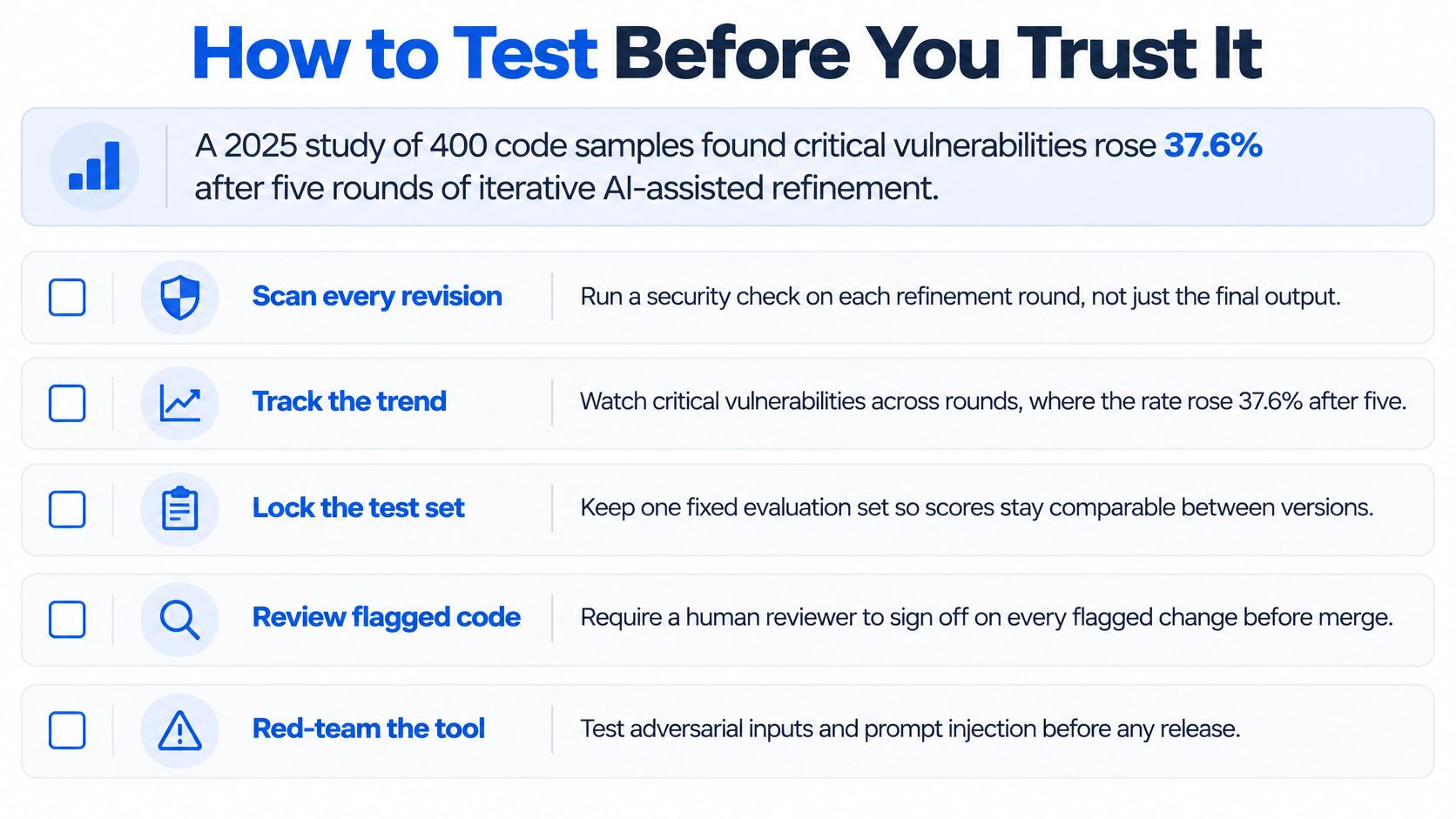
"Keep prompting until it works" isn't a testing methodology. It makes software less secure because each accepted revision can hide a new failure. In a 2025 controlled study of 400 code samples, critical vulnerabilities rose by 37.6% after only five rounds of iterative AI-assisted refinement. That matters because cheap inference changes the actual budget. The tokens are cheap, but weak checks move the cost into review time, incident response, and rework after launch.
Larger models don't fix security gaps either. In a UK AI Security Institute competition spanning 22 frontier agents and 1.8 million prompt-injection attempts, researchers recorded more than 60,000 successful policy violations, including unauthorized data access and illicit financial actions. Resilience had limited correlation with model size, capability, or inference-time compute. Treat that as a design constraint. Agent security comes from scoped permissions, deterministic controls, and evaluation gates, not from choosing a bigger model and hoping it behaves.
The security checklist below summarizes the revision discipline required to stop quality erosion between iterations.
Building an Isolated Evaluation Set
Follow NIST TEVV guidance and treat testing, evaluation, verification, and validation as a continuous lifecycle rather than a one-time check before launch. Keep evaluation data isolated from prompt-tuning examples so engineers don't overfit prompts to the test suite. A demo set that doubles as a grading set gives false confidence, especially when teams iterate quickly.
For the support assistant, pull 100 to 200 real requests from historical support tickets and sales calls. Label every case with three fields: expected answer, expected refusal when policy forbids answering, and expected tool call. Cover normal requests, edge cases, ambiguous wording, multilingual inputs, and adversarial probes. Version the dataset in Git, then split it into a development slice for daily iteration and a held-out release slice that runs only right before deployment. Keep the held-out slice boring and strict. Its job is to reveal whether the last round of prompt tuning improved the system or merely memorized the obvious cases.
Five Security and Quality Gates Before Launch
Run your prototype through five repeatable gates using LLM observability and eval tools before any real user sees it.
- Separate quality gates: Score correctness, authorization, retrieval quality, groundedness, latency, and cost per task individually so high answer fluency never hides a broken permission check.
- Adversarial prompt-injection testing: Follow the OWASP prompt-injection guidance and treat prompt injection as an application security problem, not a prompt-wording problem. Feed hostile instructions hidden inside retrieved help articles or customer tickets and verify the system ignores them.
- Deterministic output validation: Never let a model trigger a sensitive action directly. Say you build an AI tool that drafts purchase orders: let the model output a structured JSON proposal, then use deterministic application code to validate supplier IDs, price limits, and approval status before any order is submitted.
- Human review checkpoints: Require explicit human approval for filesystem edits, database writes, shell commands, or financial actions.
- Reproducible regression reruns: Log exact model snapshots, prompt hashes, and tool schemas, and rerun the entire suite automatically after every model upgrade, retrieval tweak, or MCP schema edit.
A practical rule: no gate means no promotion. A fluent assistant with weak authorization is a demo, not a tool ready for trusted work.
How to Deploy and Monitor in Production
Launching to 100% of users on day one turns a minor prompt regression into a company-wide incident. Treat deployment as a controlled expansion backed by live telemetry, as outlined in the rollout timeline below.
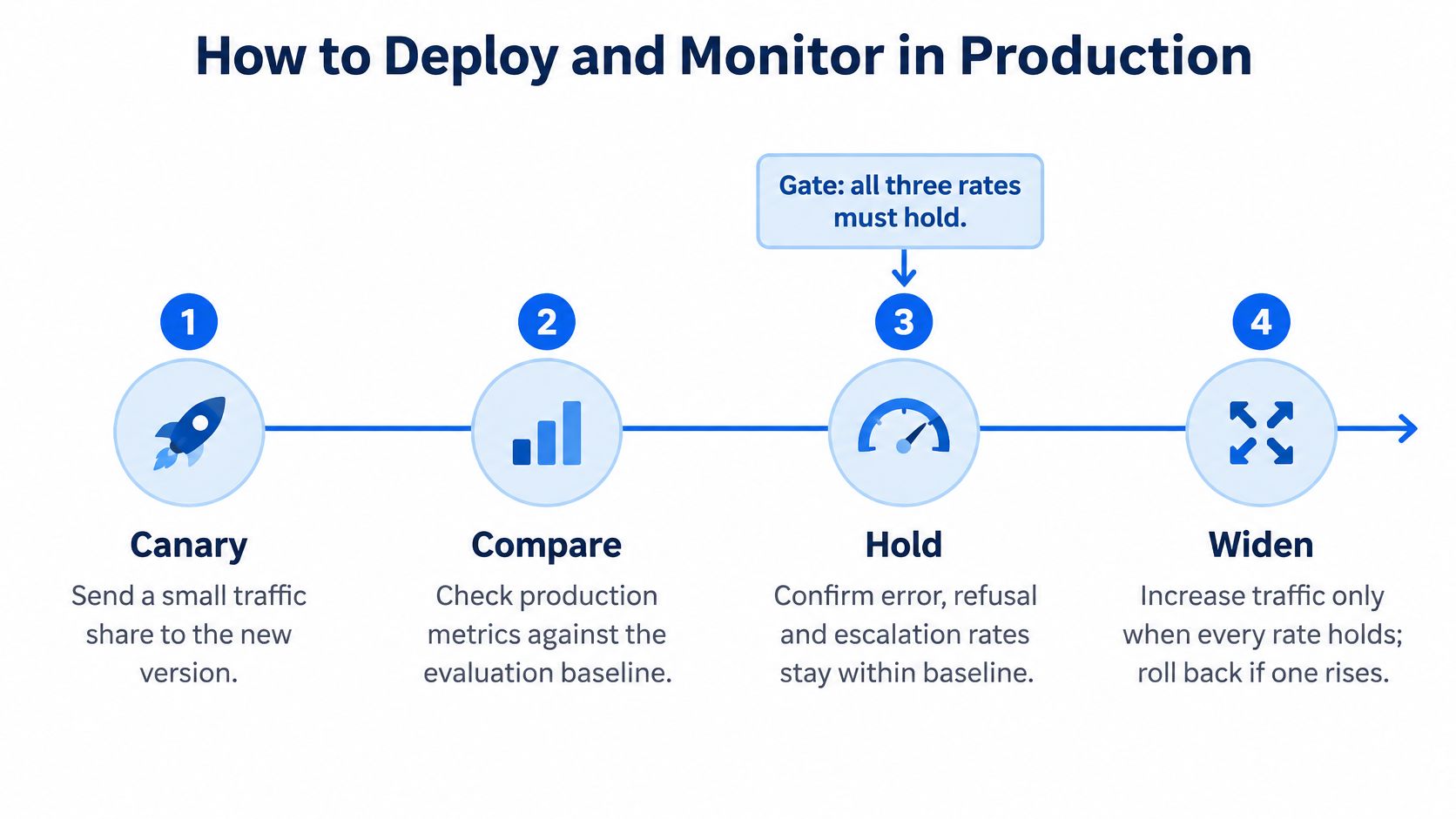
Start with a canary release routing a small slice of traffic to the new build. Compare production metrics directly against your pre-launch evaluation baseline, and widen traffic only when error, refusal, and escalation rates stay inside tolerance.
Ongoing production checks align directly with NIST AI RMF Measure 2.4, which calls for continuous monitoring of system functionality and behavior across validity, reliability, bias, privacy, security, incidents, and emergent impacts. Track six signals on your live dashboard: task success on sampled requests, unsupported claims, incorrect tool actions, p95 latency, cost per completed task, and drift in incoming topic mix.
Weekly Review Ritual and Incident Response
For the 40-person SaaS support assistant, establish a fixed Friday ritual. Sample 50 production conversations every week, tag hallucinations, bad refusals, and lookup errors, and push recurring patterns straight into the next sprint's evaluation set and fix queue. Set a hard rollback threshold in advance, such as a 3 percent error rate on sampled tickets, that automatically pauses the rollout or forces mandatory human review until patched.
Pair monitoring with three practiced incident controls:
- Instant kill switch: A feature flag that disables agent tool calls and drops users back to standard search within seconds.
- Fast credential rotation: Automated token revocation for every MCP server and model API key in case a prompt leaks sensitive context.
- Immutable log audit: Tamper-evident traces linking every tool call back to the exact user session, prompt version, and retrieved document.
The walkthrough below demonstrates how teams structure production observability and controlled rollouts in practice.
Mapping EU AI Act Deadlines Into Deployment
Compliance belongs inside the release gate, not in an email sent two weeks after launch. According to the European Commission's EU AI Act framework, the Act entered into force on 1 August 2024. Rules prohibiting specific AI practices and requiring AI literacy began applying on 2 February 2025, governance rules and obligations for general-purpose AI models began applying on 2 August 2025, and the broader Act becomes applicable on 2 August 2026 (with limited exceptions).
High-risk AI systems, such as automated hiring or credit-screening workflows, face strict requirements including risk assessment and mitigation, activity logging for traceability, and human oversight. Before turning on your canary, inventory whether your organization provides a general-purpose model, integrates one downstream, or operates a high-risk use case, confirm whether the 2 August 2026 obligations apply, and assign a named compliance owner to sign off on the canary plan.
Your First Week and the Launch Checklist
Reading architecture guides won't ship a dependable product. Producing versioned artifacts in week one will. The checklist graphic below lays out the five core deliverables to finish before writing production UI code.
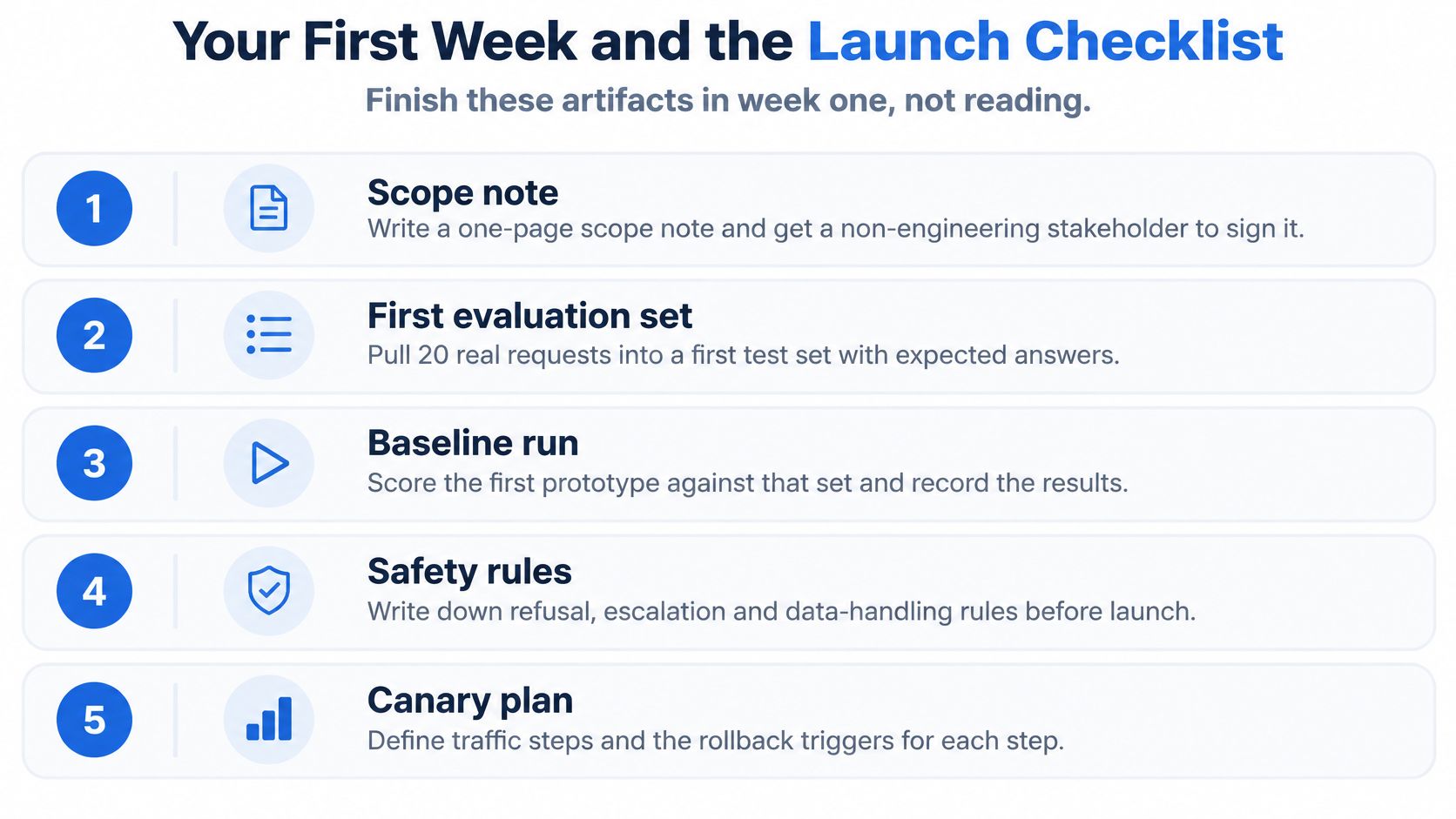
Follow this six-step sequence during your first five working days:
- Sign the scope note: Write your one-page scope document on Monday morning and get a non-engineering stakeholder's sign-off before opening your IDE.
- Build a starter test set: Pull 20 real requests into a spreadsheet or JSON file with expected answers and expected refusals.
- Run the initial benchmark: Score two or three candidate models on those 20 cases and log cost per successful task in your benchmark sheet.
- Draw the stack and scopes: Sketch the model, retrieval, and MCP server boundaries, labeling read-only tokens and human approval gates.
- Break the prototype early: Run one end-to-end test through your security gates, including at least one prompt-injection payload hidden inside retrieved text.
- Wire rollout controls: Configure your canary traffic split, your rollback threshold, and live monitoring dashboards before a single real user touches the tool.
One-Screen Pre-Launch Verification
Before flipping traffic from staging to canary, confirm every item on this launch gate, or run your stack through an interactive AI launch checklist:
- Versioned evaluation set: Development and held-out slices committed to Git with reproducible test scripts.
- Six gates cleared: Correctness, authorization, retrieval quality, groundedness, latency, and cost per task all inside target.
- Injection tests recorded: Adversarial test runs logged with verified deterministic validation on structured outputs.
- Least-privilege tokens issued: Read-only scopes enforced at the API layer and write actions guarded by human approval.
- Rollback and kill switch tested: Team has rehearsed reverting traffic and rotating keys in staging.
- Dashboards and ownership live: Telemetry active, compliance owner named, and monthly cost ceiling configured with spend alerts.
Small teams win by shrinking scope until the evaluation suite fits inside one week. Large teams win by starting legal and procurement review on day one.
If you're a startup, strip features down to one narrow workflow, run a single reliable model with a manual human escalation path, and expand only after production metrics prove stable. If you're an enterprise team, kick off vendor security questionnaires and legal classification in week one, and run your benchmark sheet against internal data before agreeing to any vendor pilot. To speed up pre-launch checks without buying another suite, Flaex.ai offers free tools including Security Analyzer, AI Agent Checklist, Pseudocode Generator, and AI Text Detector.
Pick one repetitive workflow today, write the one-page scope note, and pull your first 20 real requests before writing a single line of prompt code.
Ready to turn your architecture plan into a vetted, production-ready stack? Explore curated directories of GPTs, AI agents, and MCP servers, run side-by-side vendor checks with our AI Comparison Tool, and verify your rollout with free builder utilities at Flaex.ai.
Featured on Flaex